
Query to group on Day with sum total on a field & filter on Time but NOT group on the time

bignose2

Registered User.
Local time
Today, 19:16
Joined
May 2, 2010
Messages
251
Hi,

I am trying to sum total the two values as below but Grouped per day ONLY, 1 total for the 7th, the 8th etc. etc.
However I need the TmHour to filter the results just between those times
This causes it to no longer be grouped by day but per time hour also.
I just can't work this out, any ideas?
Thanks I/A
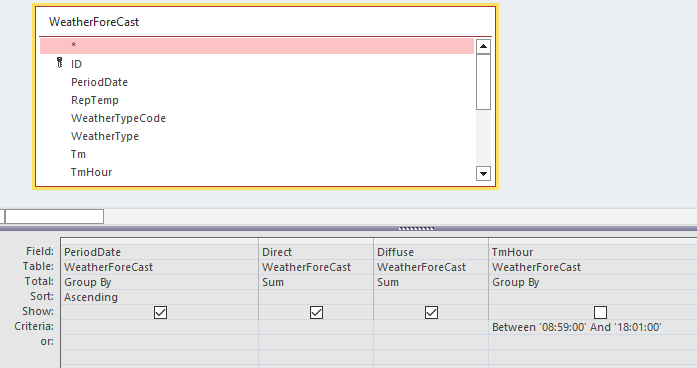

1688823563171.png


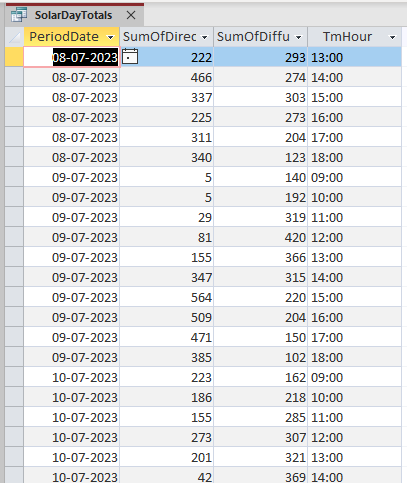
table below is with the TmHour ticked to show the format (not as above) for the example.
Unticked it still shows the several results per day.
1688823673494.png
 

Attachments

  • 1688823611174.png
    1688823611174.png
    22.8 KB · Views: 200
Replace the "PeriodDate" column with a calculated field and GroupBY that field. Perhaps something like PDate: Format([PeriodDate], "dd/mm/yyyy")
 
Hi,

Thank you for your prompt reply

Not helped & can't see why it might?

1688826961386.png


1688826915348.png
 
In light of Pat's advice, which I'm sure will be good advice, Use PDate: DateValue([PeriodDate])
 
In Column "TmHour" the Total row should be set to Where rather than GroupBy. That may be all that is required.
 
Last edited:
Hi,
Very many thanks
"In Column "TmHour" the Total row should be set to Where rather than GroupBy. That may be all that is required."
WORKED
I thought I had tried that & actually most of the other sum functions, just to get a dumb value to avoid the GroupBy but I guess not.
Put it back to the original table value, no format or even datevalue & seems to work fine although will keep eye out for the frequent anomaly with uk & us dates dates getting bent out of shape with day & month reversal.
thanks again.
 
Glad you have it working now. Good luck with your project.
 

Users who are viewing this thread

Back
Top Bottom