
Solved Simple VBA code to change form of a subform programmatically ..

sjs94704

Member
Local time
Today, 05:22
Joined
May 7, 2013
Messages
41
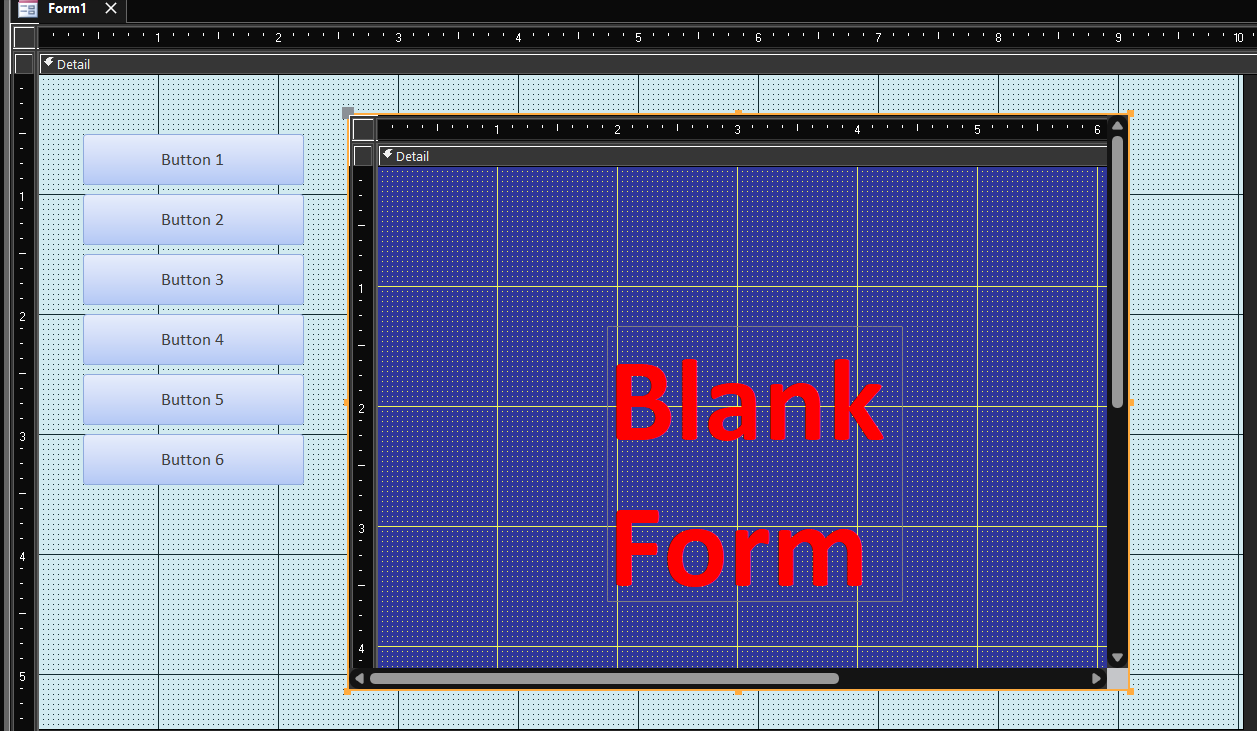
Here is a picture of my form. As you can see there are several buttons on in.
Let's say that that there are forms frmForm1, frmForm2, frmForm3, frmForm4, etc
that can correspond with each button.

Let's say that the subform itself is just called SfrmSubform

The goal is as each button is pushed that each corresponding form.
When all is done, the subform border will be transparent so that as the buttons are push all that people will see is what is on the form itself!

So, I am looking for the VBA code that would go behind the buttons to change the forms
Blank Form.png
 
Code:
Private Sub Button1_Click()
    Me.SfrmSubform.SourceObject = "fNameOfFormToLoad"
End Sub
 
Markk's code is the answer, but I suggest the navigation control. It does that and more, without code.
 
When changing forms, you should also ensure that open processes in this form are checked and securely completed.
This applies to forms in which more happens than just being looked at.
 
Private Sub Button1_Click()
Me.SfrmSubform.SourceObject = "fNameOfFormToLoad"
End Sub
While I respect Edgar's answer suggesting the Navigations forms, I am interested in doing this programmatically. I also caught what ebs17 says about doing any and all checks to be sure that everything on the form your on is completed before moving to another form.
 
Code:
Private Sub Button1_Click()
    Me.SfrmSubform.SourceObject = "fNameOfFormToLoad"
End Sub
OK, so probably not to anyone's surprise that this works. BUT, now I want to take this to the next level. What I mean is, I want to make a routine out of it that could possibly end up including other things that will ALWAYS happen at the same time!
 
I want to make a routine out of it that could possibly end up including other things that will ALWAYS happen at the same time!
If you can show me something that ALWAYS happens, I will love you FOREVER.
 
The challenge is low and not worth big words.
Code:
Private Sub Button1_Click()
    Me.SfrmSubform.SourceObject = "fNameOfFormToLoad"
    ProcedureForMore
End Sub
Of course, you can't do it at the same time, but only one after the other.
 
I don't use the built in Navigation form because it is not flexible. It works the way it works. If you are OK with that, then use it. Otherwise, making your own form really isn't a big deal. I would probably use a subform to produce the button list rather than hard coding it. That way you can have some control over which buttons appear for individual users based on their security settings. The file that populates the button list includes the name of the subform to load so your click event code is generic and won't need to change. If you add a new form and then add it to the button table, it automatically becomes available and no code change is necessary.
Pat, do you have an example of that? I'm just trying to envision how exactly the button list looks like as a subform. I started using buttons with emoji's and images in them and don't think that would work in a subform.
 
Thanks, Pat. that does give me some idea's to explore and see if they will work or not. What I'm thinking is to store the Unicode hex values for the captions in additional columns depending on UTF-8 or UTF-16 codes are needed. So even if the image part doesn't work, I could still get some Unicode symbols in there.
 
Thanks Pat, I will definitely develop something around this whole idea. I was getting ready to do an accordion style menu system links or buttons on the left side and you got me thinking about the possibility of making adding more future buttons in a manor that makes the whole process a lot easier (flexible). I did some preliminary tests using some simple unicode symbols and they display in the table just fine so they should easily display in the button menu. So that's what I was hoping for.

I just added two more columns to your tblButtons to hold the decimal value of the unicode values (DecVal_1 and DecVal_2). Then using a query to combine them together with the text of the button creates a nice looking button. I will need to do a lot more testing to see what's possible and what's not, but so far it has potential.
 
Hi @Mike Krailo
I actually added one to my switchboards sample. I haven't updated it yet. Maybe later today. If you don't see it, PM me.

Buttons are not all that flexible so these simulations are just textbox's. I couldn't find a way to change the button caption on a continuous form, but I didn't work very hard on it. I just used a textbox.

Here's the form. The buttons form is bound to a table with three columns. The Button text, the name of the form to open, and a code for the button color. This is of course very limited because it is dependent on conditional formatting. Since this is a sample in another application which has its own switchboard, there is the arrow with the special close button so you can go back to the application menu. In real use that wouldn't be there. The exit button exits the application. If you want pictures, you can add them to the table and use "two" buttons side by side. One with a picture and the other with text.
View attachment 109572
This is design view. I made the list subform only long enough to hold the 6 options. You will need to make it longer if you don't want to fix the options. You'll just have empty space at the bottom. Make the subform the same color as the background of the main form so it isn't jarring. Also, you can probably make this work like the actual switchboard (which I didn't do). This version is just a flat list. If I have time, I'll make it an actual switchboard so it can handle sub menus. You can probably even make the subform shrink and grow based on the number of items returned by it's recordSource query.
View attachment 109575

This is really cool! I will be interested to see if it will be possible for regular buttons to work with your idea.
 
I can't wait to see it.

I explained why I didn't use regular buttons. If you can figure out how to "bind" the button caption, that would be great. But unless you can do that, you can't use the table to fill the captions. I like the look of real buttons better although I can probably fiddle with the text boxes to get them to look more like buttons but it wasn't worth the time. I tried for a while to use text boxes over or behind buttons but I was having trouble with getting them to display and work so again, this was proof of concept and I have no intention of using this form any time in the future so I didn't pursue the fight with buttons. I just used textboxes.

If you get the caption property of the buttons to work, please post your solution. I spent only about an hour building the sample. Then I spent another half hour trying to get the caption to work or use a textbox over/under the button and nothing worked the way I wanted so I stopped and switched to the plain textbox which worked immediately and with a single line of code. I still feel like some combination of the bound textbox over a control to display the name will probably work but the first button always went blank and I couldn't figure out why so good luck and don't forget to tell us the solution if you find one.
Sorry, maybe I just misread what you said.
 
The comment was subtle and I didn't expand on it. I don't know for certain that buttons won't work. It is just not obvious how to make them work and I didn't have the time to spend on the task. Give it a shot.
OK, well I do remember from a previous experience that the security issue was quite cumbersome, but in that case we were opening and closing entire forms and the list if IF statements that we ended up having to cover all the various roles got very long! We probably could have done a much better job by breaking redundant things up into smaller routines, but it is what it is!
 
I didn't know we were talking about security. I thought we were just talking about a way to format a switchboard/menu as a navigation pane but use a subform to control the buttons rather than hard coding them.

For your own sanity, security settings should NEVER be hard coded. Always tablize them. If you need an example of a simple way to do that, look at the switchboard with securities sample database. Some of the switchboards are the same as in the unsecured version but not all.

Thanks, Pat. I appreciate the referral. I have book marked the security database thread and will take a closer look.
 
Thanks Pat, I will definitely develop something around this whole idea. I was getting ready to do an accordion style menu system links or buttons on the left side and you got me thinking about the possibility of making adding more future buttons in a manor that makes the whole process a lot easier (flexible). I did some preliminary tests using some simple unicode symbols and they display in the table just fine so they should easily display in the button menu. So that's what I was hoping for.

I just added two more columns to your tblButtons to hold the decimal value of the unicode values (DecVal_1 and DecVal_2). Then using a query to combine them together with the text of the button creates a nice looking button. I will need to do a lot more testing to see what's possible and what's not, but so far it has potential.
Sounds like a clever approach to enhance the visual appeal of the buttons.
 
It looks like the solution to binding captions to buttons from tables into continuous forms has been solved using the paint event for the detail section of the continuous form. This idea was from another thread about manipulating the visibility of a command button in a continuous form which is not possible. But each buttons caption can be different according to a table or a field in the continuous form by using that On Paint event. Didn't think it was possible until today.

Code:
Private Sub Detail_Paint()
   Me.Option1.Caption = Me.ItemText
End Sub


1705445355174.png
 
I'll give you what I have which isn't much. I'm really just toying around with the idea after having learned this technique. There is currently a bug that causes all the buttons to turn into "Exit Application" buttons (continuous navigation form). Not sure why yet. I see that the paint event is firing four times the moment I hover over one of the buttons which was not expected. When the bug doesn't trigger, it seems to work. So there should be a path forward with this.
 

Attachments

I'll give you what I have which isn't much. I'm really just toying around with the idea after having learned this technique. There is currently a bug that causes all the buttons to turn into "Exit Application" buttons (continuous navigation form). Not sure why yet. I see that the paint event is firing four times the moment I hover over one of the buttons which was not expected. When the bug doesn't trigger, it seems to work. So there should be a path forward with this.
Thank you for sharing. Though I may not have any direct use for the file, I truly appreciate everyone's desire to help. Who knows I might this in the future.
 
Last edited:

Users who are viewing this thread

Back
Top Bottom