eggwater
life as a rehearsal
- Local time
- Today, 13:18
- Joined
- Aug 14, 2003
- Messages
- 69
Okay fellas and lasses please help me out if you can.
I had this code below on the before update event of my form and it works like a dream - creating different flags for different levels of data... howver I want to add a new event that pprompts the user to dsave the record if the make any alterations. (skip through the code to the end.)
..... so I added this code at the start before the With me part...
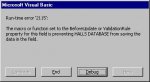
it appears to run alright until I choose yes to save. then I get a runtime error that says runtime error '2115' - it basically says that the code that I added is preventing the record being saved
why might this be?!
I had this code below on the before update event of my form and it works like a dream - creating different flags for different levels of data... howver I want to add a new event that pprompts the user to dsave the record if the make any alterations. (skip through the code to the end.)
Code:
Private Sub Form_BeforeUpdate(Cancel As Integer) 'Important for the entire EXPORT function

    With Me


            If .NewRecord Then
            If IsNull(Room_Number) Or IsNull(AllocatedHall) Or IsNull(Duration) Or IsNull(RType) Then
                .date_stamp = Now()
                .Export_ctrl = "4" 'this code creates a status four based on the above criteria
            Else
            If Not IsNull(Room_Number) And Not IsNull(AllocatedHall) And Not IsNull(Duration) And Not IsNull(RType) Then
            .Export_ctrl = "1" 'this code creates a status 1 based on the above criteria
            .date_stamp = Now()
            End If
            End If
            Else
            If .Export_ctrl = "4" And Not IsNull(Room_Number) And Not IsNull(AllocatedHall) And Not IsNull(Duration) And Not IsNull(RType) Then
            .date_stamp = Now()
            .Export_ctrl = "1" 'this code creates a status 1 based on the above criteria and if a stus 4 already

            Else
            If .Export_ctrl = "3" Then
                .date_stamp = Now()
                .Export_ctrl = "2" 'this code creates a status 2 if amended data is already status 3 ie. exported
            End If
            End If
            End If


    End With
End Sub
..... so I added this code at the start before the With me part...
Code:
Dim Msg, Style, Title, Response, MyString
MsgBox "Do you wish to save the changes . ", vbOKOnly, ""
Style = vbYesNo + vbExclamation + vbDefaultButton1
Title = "Save changes?"
Response = MsgBox(Msg, Style, Title)
If Response = vbYes Then
DoCmd.RunCommand acCmdSaveRecord

Else:
Me.Undo
End If
it appears to run alright until I choose yes to save. then I get a runtime error that says runtime error '2115' - it basically says that the code that I added is preventing the record being saved
why might this be?!
Last edited: