Subform List to Update Main Form (No Updates)

ozsupra

Registered User.
Local time
Tomorrow, 06:17
Joined
Apr 16, 2014
Messages
16
I have a table which contains products.
A product can be "ordered" "delivered" or "dispatched".
I have three queries that filter on those states.

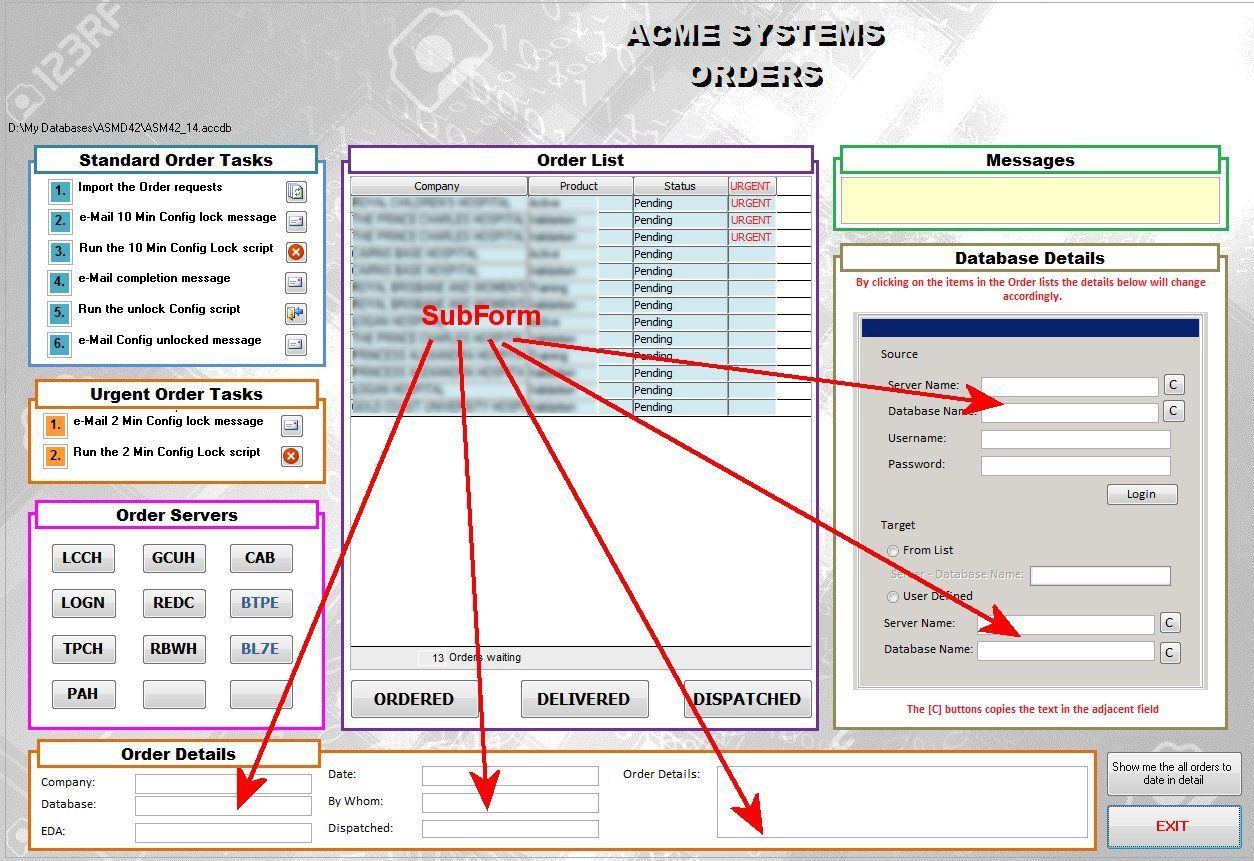
I have a main form that shows all the additional information associated with that product and three sub forms based on each of the queries. Buttons control which subform is displayed. So far, so good.

Now when I click on on a product on the subform I would like the main form to show all the product information. Try as I might I haven't been able to trigger this off just clicking on the subform entry.

Any help would be appreciated.
A
 
Assuming your SubForms are relevant to the MainForm, why would the MainForm not already be displaying the correct product information.
 
Subform is a list view of all filtered products.
Yes the Mainform shows the "first" products details, I would just like to then click on another entry in the list/subform and see the details for another product in the list and so on.
A.
 
ozsupra,

Further to RuralGuy's question, could you show readers a screen capture of your relationships window?

It seems you would have a Customer, who could make 1 or more Orders, and each Order could be for 1 or many Products.
From a Product perspective,
the Product could be (part of a purchase) Ordered from a Supplier ,
, could be part of an Order which has been dispatched or
,could be part of an Order that has been delivered or
, could possibly be in inventory.

A few more details about your "business" would be helpful to add some context to your set up.

Good luck with your project.
 
See Attached
If I click on a list item on the subform I expect to see the items on the main form (arrows) change.
Thanks.

Example_zpsraauap41.jpg
 
It almost seems like the Order list should be the MainForm then the LinkMaster/ChildFields would do what you want with no code.
 
Except there is a considerable amount of other functionality that wouldn't work that way. Any suggestions?
A.
 
Do you have a clear set of requirements?
Do you have a data model?
With a data model based on clear, complete requirements and some test data, you can test validate your model (database blueprint). It sounds like this sort of approach was bypassed.
I agree with RG that your parent/child forms set up seems backwards. Usually the Form/subform resolves/satisfies tables that in a 1 to many relationship.

If I click on a list item on the subform I expect to see the items on the main form (arrows) change.
Hmmm.. that isn't typical. The subform is usually
dependent on the main form.

We really don't know your business, so can not offer more focused responses/advice.
 

Users who are viewing this thread

Back
Top Bottom