Switchboard - Odd Request

Tieval

Still Clueless
Local time
Today, 02:12
Joined
Jun 26, 2015
Messages
474
Is it possible to make the standard switchboard multi-column?

This may sound a strange question but I find using a switchboard as an entry page for a database for too space-taking.

As the switchboard takes the full width of the form, is it possible to split it into two columns to reduce how far down the page it goes (this would buy me space below it) or alternatively is it possible to reduce the width of it to free up space down the side of it (presumably by using it as a sub-form)?
 
No.
The standard switchboard has many limitations and most developers makes their own to suit their own needs.

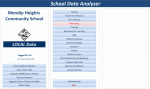
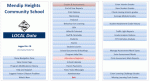
For example the screenshots attached show a main 'form' with 3 columns
The main (centre) column has up to 20 options. The right column also has 20 options which change according the centre option chosen
The left column has a further 6 options giving a theoretical total of 6+ (20*20) = 406.
In the app shown, there are actually about 260 choices
It sounds likely you need nothing as complex as that!
 

Attachments

  • MainMenu.gif
    MainMenu.gif
    40.8 KB · Views: 135
  • MainMenuGrades.gif
    MainMenuGrades.gif
    51.5 KB · Views: 123
  • MainMenuStaffTimetable.gif
    MainMenuStaffTimetable.gif
    49.2 KB · Views: 137
Have you looked at Navigation forms? Instead of buttons you have a choice of horizontal tabs, vertical or both.
 

Attachments

  • Nav.JPG
    Nav.JPG
    56.6 KB · Views: 138
@AB
I agree that navigation forms can look really good.
However, in my experience, the built in navigation forms are difficult to work with if you want to modify them in any significant way.
Similar to split forms in that respect.

Do you have a more positive experience with them?
 
I'm with Colin about the inbuilt navigation forms. Highly confusing if you don't understand they are loading and unloading subforms. But they do look pretty.

I like Tony, actually like the old inbuilt switchboard and the simplicity of how it works.
I've modified it for to add more buttons, and a few extra options, but would probably also add columns and an access level constituent to make it properly useful.

Colin's hand rolled example is also something I've used on many an occasion. I think it depends on what you need and the level of complexity.
 
@AB
I agree that navigation forms can look really good.
However, in my experience, the built in navigation forms are difficult to work with if you want to modify them in any significant way.
Similar to split forms in that respect.

Do you have a more positive experience with them?
Yes, each tab represents an open form. Unlike a button. Once the control is formatted to your preference you simply drop forms / subforms onto the tabs. You can have 11-12 open forms horizontally within one control. This makes opening forms instant without any memory issues.

The only downside is the setup of the control itself, also the amount of space needed horizontally / vertically makes it a poor choice for smaller screens like laptops.

This would be best suited for individuals who need to jump between related forms for data inputting.
 
Hi AB
Sorry if I wasn't clear.

I know what they are and how they work
However I've found them extremely unsatisfactory in cases where I've made any significant modifications to the basic design.
For example using nested subforms or tabbed subforms on a navigation form
Plus, I find referencing controls can be to put it mildly unintuitive.
As a result I NEVER use the MS navigation form

By contrast, I use 'standard' tabbed forms on a regular basis and find them extremely useful e.g. where I want to
jump between related forms for data inputting

I have similar issues with MS split forms - fine as long as you don't want to modify them! Total PITA if you do so (so I NEVER use them either)
That was the original reason for the emulated split form 'project' last year.
 
Yeah I hear ya, its not for everyone. It's kinda like a down and dirty shortcut, similar to the original switchboard that everybody hated. Although I do see the original switchboard still making an appearance every now and then.
 
Just out of interest, where exactly is it hidden these days?
 
Thanks
It really was hidden ....Couldn't find it in 2010 though

It looks just the same as I remember from the 'good old days' of 2005 or so.
I remember making them several pages deep and finding ways somehow of getting more than 8 items on a page. No idea how I did that now
Ahhh ... progress!
 
Thanks for all the comments and advice, pretty much what I thought, just hoping for one of those hallelujah moments when somebody said 'just do this', I did suspect it wouldn't happen though. :cool:
 

Users who are viewing this thread

Back
Top Bottom