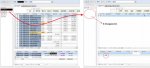
Question Totals in a datasheet

munhun

New member
Local time
Today, 14:11
Joined
Nov 23, 2018
Messages
8
Hello.
Help me.

Click the "Home" tab -> Record -> Total to get the sum in the datasheet.

I want to implement this menu button with vba.
What is VBA code?

ex) docmd.RunCommand ????

I would appreciate your reply by e-mail.
jeongmunhun
@ gmail . com

Thank you.
 
Last edited:
Try.

CommandBars.ExecuteMso "RecordsTotals"
 
CommandBars.ExecuteMso "RecordsTotals" ... Good code.

But....
One more question.

Do you know if "RecordsTotals" is displayed or not?
I want to show when a record is present and not when it is not.

It is causing problems when there are no records.

view
 

Attachments

  • 1.jpg
    1.jpg
    104.2 KB · Views: 177
Last edited:
In my experience, the display of Totals in datasheets can be a bit flaky especially when filtering.

If I use a datasheet I usually put the total expression as the ControlSource of a textbox in the header or footer. The header or footer won't display but it can be referred to from other objects.

Put the datasheet in a subform and refer to it from a control on the main form.

This technique works in all version of Access.
 
Even if it's not a good idea...

When there is no record "SourceObject = ''"

form_name.SourceObject = ""

Thank you...
 

Users who are viewing this thread

Back
Top Bottom