
lone_rider15
Registered User.
- Local time
- Today, 16:01
- Joined
- Nov 6, 2016
- Messages
- 32
Hello!
I hope everyone is doing great.
I have an unbound form shown below. I have added a subroutine to the form's on load event to fill up the controls from an ADO record set. Once the necessary changes are made, the record is updated by the "Complete" button click.
Trying to achieve: "Complete" button click will update the current record and fill up the form controls with another record using the same record set.
What I achieved: "Complete" button click updates the current record.
Problem: "Complete" button click does not fill up the form controls with another record after updating the current record.
How can I achieve that?
NB: I can get only 1 record at a time since there is a timestamp (StartTime) when the record is loaded. When the "Complete" button is clicked there will be another timestamp (EndTime).
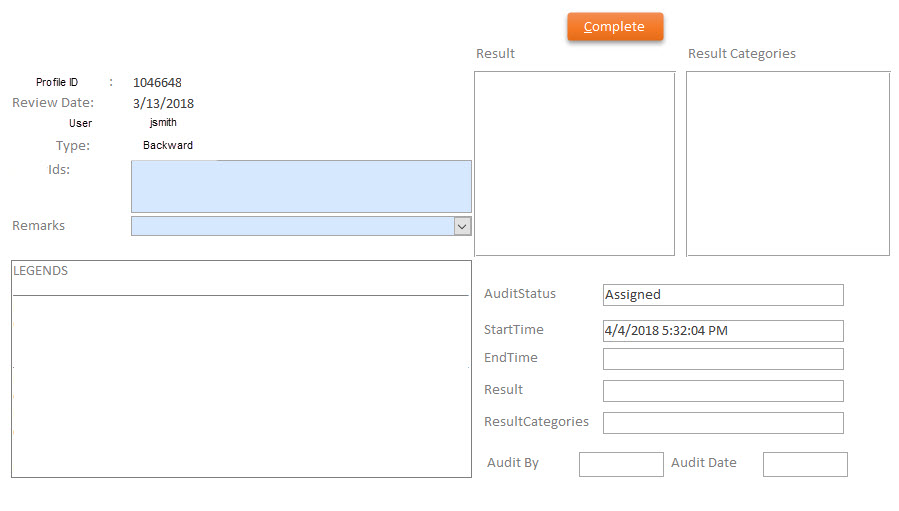
My form's codes are below:
ModifyqryQcInquiryAssign Sub works fine. No problem in there.
I hope everyone is doing great.
I have an unbound form shown below. I have added a subroutine to the form's on load event to fill up the controls from an ADO record set. Once the necessary changes are made, the record is updated by the "Complete" button click.
Trying to achieve: "Complete" button click will update the current record and fill up the form controls with another record using the same record set.
What I achieved: "Complete" button click updates the current record.
Problem: "Complete" button click does not fill up the form controls with another record after updating the current record.
How can I achieve that?
NB: I can get only 1 record at a time since there is a timestamp (StartTime) when the record is loaded. When the "Complete" button is clicked there will be another timestamp (EndTime).
My form's codes are below:
Code:
Private Sub Form_Load()
    Call AssignReview
End Sub
Code:
Public Sub AssignReview()
    Dim ADOConn As New ADODB.Connection
    Dim ADORec As New ADODB.Recordset
    On Error Resume Next
    ADOConn.ConnectionString = "Driver={SQL Server};Server=SHARE;Database=SebpoRdcDatabase;Trusted_connection=Yes;"
    ADOConn.Open
    Do While ADOConn.State <> 1
        DoEvents
        If ADOConn.State = 0 Then Exit Sub
    Loop
    Set ADORec.ActiveConnection = ADOConn
    ADORec.LockType = adLockOptimistic

    ADORec.Source = "SELECT * FROM tblMarsRDCInquiries " & _
                    "WHERE (tblInquiries.AuditStatus='Assigned') " & _
                     "AND (tblInquiries.AssignedTo= '" & Forms(frmLogin)!txtUserId & "') "
    ADORec.Open
    If Not ADORec.EOF Then
        ADORec.MoveFirst
        GetData
    Else
        DoCmd.SetWarnings False
        Call ModifyqryQcInquiryAssign
        DoCmd.SetWarnings True
        ADORec.Open
        ADORec.MoveFirst
        GetData
     End If
End Sub
ModifyqryQcInquiryAssign Sub works fine. No problem in there.
Code:
Private Sub cmdComplete_Click()
On Error GoTo cmdComplete_Click_Err

    On Error Resume Next
    If IsNull(Me!fraResult) Or Me!fraResult <> 1 And IsNull(Me!fraResultCategories) Or Me!fraResult <> 1 And IsNull(Me!txtEntityIds) Then
            MsgBox "There must have a result to complete the review."
            Exit Sub
        Else
            Me!txtAuditStatus.Value = "Complete"
            Me!txtEndTime.Value = Now()
            PostData
            ADORec.Update
            Call ClearAll(Me)
            DoEvents
            Call AssignReview
    End If

    If (MacroError <> 0) Then
        Beep
        MsgBox MacroError.Description, vbOKOnly, ""
    End If

cmdComplete_Click_Exit:
    Exit Sub

cmdComplete_Click_Err:
    MsgBox Error$
    Resume cmdComplete_Click_Exit

End Sub
Code:
Private Sub GetData()
        Me.txtInquiryMatchId = ADORec("InquiryMatchID")
        Me.txtReviewDate = ADORec("ReviewDate")
        Me.txtAnalyst = ADORec("Analyst")
        Me.txtSearchType = ADORec("SearchType")
        Me.txtEntityIds = ADORec("EntityIds")
        Me.cboRemarks = ADORec("Remarks")
        Me.txtResult = ADORec("Result")
        Me.txtResultCategories = ADORec("ResultCategories")
        Me.txtAuditStatus = ADORec("AuditStatus")
        Me.txtStartTime = ADORec("StartTime")
        Me.txtEndTime = ADORec("EndTime")
        Me.txtAuditBy.Value = ADORec("AuditBy")
        Me.txtAuditDate = ADORec("AuditDate")
End Sub
Code:
Private Sub PostData()
        ADORec("InquiryMatchID") = Me.txtInquiryMatchId
        ADORec("ReviewDate") = Me.txtReviewDate
        ADORec("Analyst") = Me.txtAnalyst
        ADORec("SearchType") = Me.txtSearchType
        ADORec("EntityIds") = Me.txtEntityIds
        ADORec("Remarks") = Me.cboRemarks
        ADORec("Result") = Me.txtResult
        ADORec("ResultCategories") = Me.txtResultCategories
        ADORec("AuditStatus") = Me.txtAuditStatus
        ADORec("StartTime") = Me.txtStartTime
        ADORec("EndTime") = Me.txtEndTime
        ADORec("AuditBy") = Me.txtAuditBy.Value
        ADORec("AuditDate") = Me.txtAuditDate
End Sub

