Use variable from a "FormModule" in a "StandardModule"

Leen

Registered User.
Local time
Today, 21:38
Joined
Mar 15, 2007
Messages
56
Hi,

I created a form called "MAIN". In a textbox called "SECONDLC", a user needs to insert a word. The aim is that I can use his/her inserted word in my standard code (by using After Update event).

So in my code under "Microsoft Office Access Class Objects" under "Form_MAIN", I put the code:

Code:
Public Secondlanguage As String

Code:
Public Sub SECONDLC_AfterUpdate()

Secondlanguage = SECONDLC.Value
AddSecondLC

End Sub

Then, in my (standard) "Modules" I want to use the value "Secondlanguage", in a sub procedure called AddSecondLC:

Code:
sub AddSecondLC

If Secondlanguage = "Dutch" Then ...

End sub

However, when entering a word, it seems that the variable "Secondlanguage" is not having the value entered when using that variable in the standardcode.

Is there a special link between the variables in a "Form_module" or those in a "standard_module"? Or what am I doing wrong??

Thanks for any help!
 
Did you create this yourself:

Public Sub SECONDLC_AfterUpdate()

Because Access doesn't like it when you try to create your own events. I've found that you need to let Access manage the events and you can utilize them.
 
Wel, in my form, I put an event on the textbox called "SECONDLC". Then it automattically creates in the module "Form_Main":

Private Sub SECONDLC_AfterUpdate()
End sub

IN which afterwoods I added the variable "secondlanguage" and the procedure "AddSecondLC" .

So what exactly do you mean by "I've found that you need to let Access manage the events and you can utilize them". How could I solve this prolem? Any idea?

Thanks,
Leen
 
I was suspect of that since you had listed it as Public and Access creates form and control events as Private.

This part needs to be in the General Declarations of a STANDARD module and not a form module:
Code:
Public Secondlanguage As String

or else it isn't able to be reached by the sub in the standard module because if it is declared as public in a form module it is only available to events within that form.
 
Hi,

I changed the location of public sub declaration to my standard module, but still he doesn't find the values inserted in the form via the form-module?

Any idea what could be the mistake? When I use an "addwatch" when running the code, in my standardcode, when coming on the value Secondlanguage, this variable is always "out of context".

Thanks for any hints!
 
Is there any possibility of getting your database posted so we can take a look? I'm about all out of suggestions. If you do post, please go to Tools > Database Tools > Compact and Repair and do a compact and then use WinZip (or similar) to zip it. It has to be 393KB or less after zipping to be able to post here.
 
Why not declare you Public varaible in the standard module instead of the forms class module.
 
I'll try to put it tomorrow morning here.. if you have still time then..
Because I've got to go very quick now.

Thanks!
 
My guess is that you don't need code in a standard module.
Whatever you are trying to do with...
Code:
If SecondLanguage = "Dutch" Then...
...it seems more likely that this routine should exist on the Form_Main.
Code:
Public Sub SECONDLC_AfterUpdate()
  If Me.SECONDLC = "Dutch" Then
    ...
  End If
End Sub
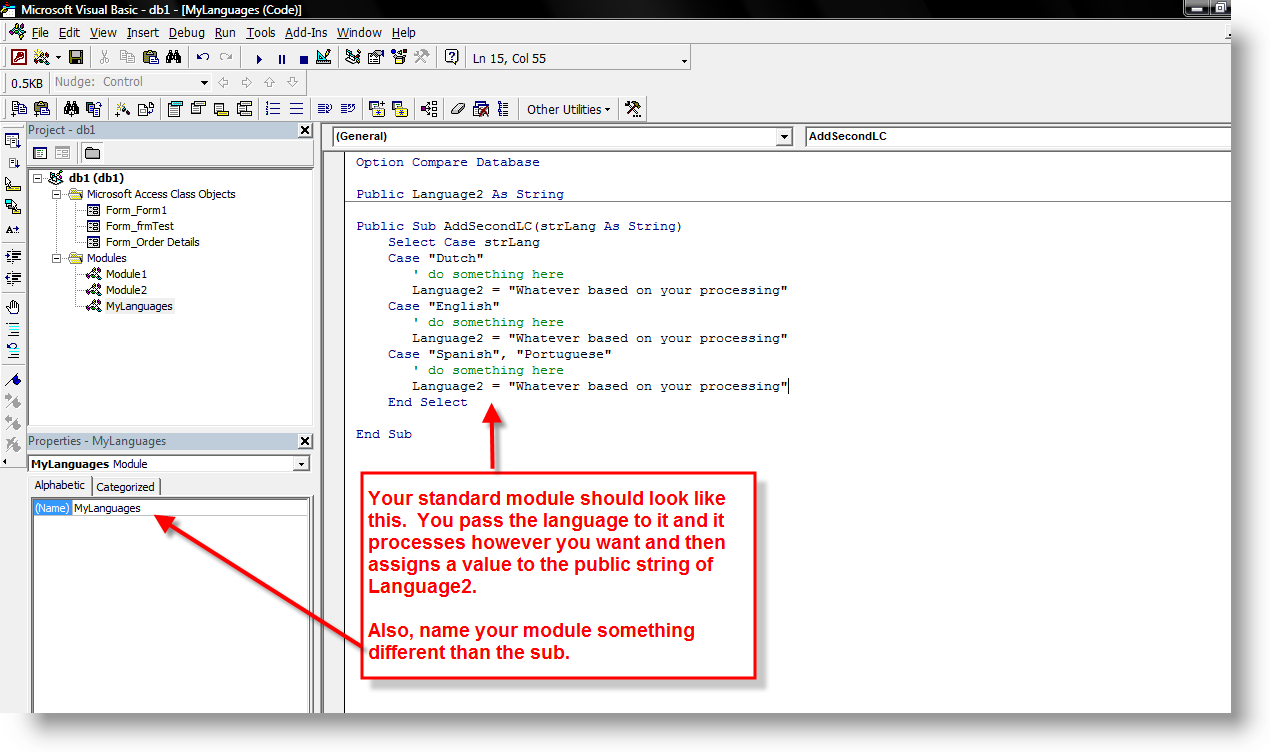
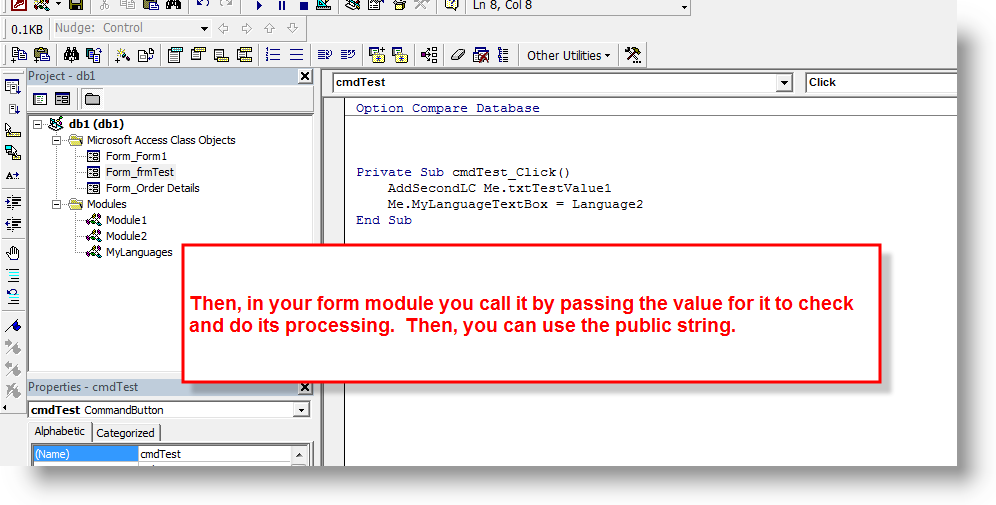
If the routine must exist in a Standard module so that other objects can use it, the best way to communicate data to that routine is pass in a parameter...
Code:
Sub AddSecondLC(Language2 as string)
  If Language2 = "Dutch" Then
    ...
  End If
End sub
 
I don't really understand. You wrote:

"If the routine must exist in a Standard module so that other objects can use it, the best way to communicate data to that routine is pass in a parameter..."

Code:
Sub AddSecondLC(Language2 as string)
  If Language2 = "Dutch" Then
    ...
  End If
End sub

In my case, I really need to pass the parameters to my standard module. So the above code, where exactly do I put it? In
It did the following but it doesn't work:

Code in form module:

Code:
Public Sub SECONDLC_AfterUpdate()
 language2 = SECONDLC.value 
End Sub

Code in standard module:

Code:
Public language2 as string

Code:
Sub AddSecondLC(Language2 as string)
  If Language2 = "Dutch" Then
    ...
  End If
End sub

Any idea what I'm doing wrong?

Thanks!
Leen
 
lang01.png


lang02.png
 
Waw, what a help!! I ow you ;)!

I'll give it a try asap!
Thanks!!!!
 
It works!! I'm getting to understand how Access is working already a big step better!!! Thanks for your very clear explanation!
 
Hi,

actually, I want to try now something very similar, but it doesn't work anymore..

I have a form with several options, some of them can be vinked, some not. BUT, if one is vinked, it should be imported. However, for some reasons he can't save the values of the parameters and the tables aren't imported.

I attached the database with
-the form + form module
-the standard module

If you have any time, can you please have a look. I tried to do it exactly the way you told me but for example the "Me"-characteristic did not work.

Thank you already very much on forehand!!
 

Attachments

Users who are viewing this thread

Back
Top Bottom