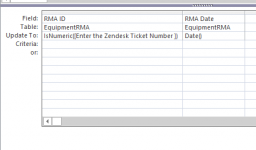
Is it possible to validate only numbers are entered when using a User Propmt Query?
I've tried the attached and it still allows letters or nothing at all and because my SQL Table DataType is 'Int" it just leaves the filed blank without erroring.
To specify the data type for parameters in a query:
With the query open in Design view, on the Design tab, in the Show/Hide group, click Parameters.
In the Query Parameters box, in the Parameter column, enter the prompt for each parameter you want to specify a data type for. Make sure that each parameter matches the prompt that you used in the Criteria row of the query design grid.
In the Data Type column, select the data type for each parameter.
To specify the data type for parameters in a query:
With the query open in Design view, on the Design tab, in the Show/Hide group, click Parameters.
In the Query Parameters box, in the Parameter column, enter the prompt for each parameter you want to specify a data type for. Make sure that each parameter matches the prompt that you used in the Criteria row of the query design grid.
In the Data Type column, select the data type for each parameter.