
Using Crosstab Query for Report

tmyers

Well-known member
Local time
Today, 09:10
Joined
Sep 8, 2020
Messages
1,091
I have been reading various articles on how to accomplish this. Such as:
and

However, I had a hard time understanding those. I will try and break this down as best I can.

My crosstab takes various counts for items from various contractors for a given project. So for item A, contractor1 has 5, contractor2 has 8, contractor3 has 2 etc. The crosstab then very nicely shows those like so:
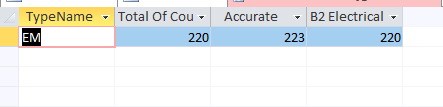
example.PNG
. Ignore the total column, that is going to be removed as it isn't relevant. From project to project, the contractors can change, but there are typically never more 4. How could I get a report to work off this crosstab query? The column headers would be the contractor name, so I couldn't manually set the column headers as my db has upwards of 70 contractors.

Based on my research, this is going to require VBA to accomplish. I would like the report to look almost like a monthly report. Where the contractors name are the months if that makes sense.

I know more info/detail will likely be needed, so ask away.
 
The way I have approached this in the past is like below, though this is for a form.
This way the columns headings are dynamic by what is in strCaller variable.

HTH
Code:
Public Sub Form_Open(Cancel As Integer)
Dim strCaller As String, strSql As String, strQuery As String

strCaller = PersonList()

strQuery = "qryWeekCallSummary_Crosstab"

'strSQL = "PARAMETERS pCallSystem Text ( 255 );"
strSql = strSql & " TRANSFORM Sum([SumOfCallSecs]/86400) AS Duration"
strSql = strSql & " SELECT qryWeekCallSummary.WeekEndDate"
strSql = strSql & " FROM qryWeekCallSummary "
If Len(gCallSystem) > 0 Then
    strSql = strSql & " WHERE qryWeekCallSummary.CallSystem = '" & gCallSystem & "'"
End If
strSql = strSql & " GROUP BY qryWeekCallSummary.WeekEndDate"
strSql = strSql & " ORDER BY qryWeekCallSummary.WeekEndDate DESC"
strSql = strSql & " PIVOT qryWeekCallSummary.Caller IN (" & strCaller & ")"

'CurrentDb.QueryDefs(strQuery).Parameters("[pCallSystem]") = gCallSystem
CurrentDb.QueryDefs(strQuery).SQL = strSql
Me.RecordSource = strSql
End Sub

Public Function PersonList() As String
    Dim lngCount  As Long
    Dim strSql    As String
    Dim strPeople As String
    giMaxPeople = 10
    
    
    strSql = " SELECT [CallerName]" & _
             " FROM tblCaller" & _
             " WHERE [Required] = True" & _
             " ORDER BY [CallerName]"
             
    With CurrentDb.OpenRecordset(strSql)
        Do Until .EOF
            lngCount = lngCount + 1
            If lngCount > giMaxPeople Then Exit Do
        
            strPeople = strPeople & Chr(34) & !CallerName & Chr(34) & ","
            .MoveNext
        Loop
    End With
    
    If Right(strPeople, 1) = "," Then
        PersonList = Left(strPeople, Len(strPeople) - 1)
    End If
    
End Function
 
I am looking at your example db now Pat and trying to understand what all is happening. I will let you know if I cant figure something out.
 
@Pat Hartman I am having trouble finding your sequence of events. What you have going on here is pretty complex (from my eyes).

It appears with the first button, you clear the temp table, but you almost instantly lose me the moment I try to make heads or tails of your ResetSeed module. My best guess is the two are resetting the autonumber fields? That is purely based off your in code comments. From there you go back into your SQL string (which in of itself I don't fully understand what it is doing).

This whole thing I think is beyond my current ability to understand (which is probably why I had trouble reading the articles I posted). I may have to pass on this one for now.
 
Resetting the autonumber makes sense. I can sort of follow that as I am stepping through it. I am currently trying to wrap my head around the rest of it and adapting it for my use.

I will mess with this for a bit and see if I can grasp it and get it working, or run out the door screaming in failure.
 
Yeah, I am going to have to come up with another method other than a crosstab. This is far too advanced for me. I read something that suggested using a report for row headings as a parent report, then make the column headings a subreport then the values another subreport.
 
Yeah, I am going to have to come up with another method other than a crosstab. This is far too advanced for me. I read something that suggested using a report for row headings as a parent report, then make the column headings a subreport then the values another subreport.
My method might not be as slick, but it is a lot simpler?
 
Yours was a good bit easier to understand Gas. I think I am going to try and shy away from the crosstab however. It is proving to be a huge pain for someone of my level to contend with.
 
Yours was a good bit easier to understand Gas. I think I am going to try and shy away from the crosstab however. It is proving to be a huge pain for someone of my level to contend with.
Not really. As I said in your other thread, I have not used crosstabs that much. I used one when I created a DB when working at a bank, and that had hardcoded column headers. After I left they called me on how to change a column heading for a team leader.

Then I progressed to dynamic column headers by that method shown.
If I had to do one again, then I would review the one I have already created, so once you get one under your belt, you can always refer to that one.?

Up to you, but if the report requires it, then you need to get stuck in. :)

That one shown was for me to show total time spent on the phone from a call recording/logging system and only made sense in that format.
 
Gas, I am trying your method now. Would I make the crosstab a subform and put at code in it?
 
I am having a rough time changing your SQL statements to what I need them to be. My knowledge of SQL is a little lacking to be able to understand what your code is doing to be able to change it to my needs.
 
I never (well hardly ever) write SQL from scratch, especially for joins etc.
I use the query QBE window?

So these are the steps I take.
Create the query with the data you need.
Then change it to a crosstab.

Then take the sql generated and amend that last PIVOT line to reflect the dynamic column headings. For now though, just get the crosstab working with fixed headings. That is how that code I posted was created.

Small steps, small steps. :)
 
I see. That makes much more sense. Let me take another stab at it and I will get back to you.
 
After getting a slew of errors that I think I managed to fix correctly, I am getting "Cannot specify fixed column heading "1" in a crosstab query more than once" error. The modified code is:
Code:
Option Compare Database

Public Sub Form_Open(Cancel As Integer)
Dim strContractor As String, strSql As String, strQuery As String

strContractor = Contractorlist()

strQuery = "ContractorCountQry_Crosstab"

strSql = "PARAMETERS [Forms]![JobQuote]![JobID] Short;"
strSql = strSql & " TRANSFORM First(ContractorCountQry.Count) AS FirstOfCount"
strSql = strSql & " SELECT ContractorCountQry.TypeName"
strSql = strSql & " FROM ContractorCountQry "
strSql = strSql & " GROUP BY ContractorCountQry.TypeName"
strSql = strSql & " PIVOT ContractorCountQry.Contractor IN (" & strContractor & ")"


CurrentDb.QueryDefs(strQuery).SQL = strSql
Me.RecordSource = strSql
End Sub

Public Function Contractorlist() As String
    Dim lngCount  As Long
    Dim strSql    As String
    Dim strContractor As String
    giMaxContractor = 8
    
    
    strSql = " SELECT [Contractor]" & _
             " FROM tblContractors" & _
             " ORDER BY [Contractor]"
            
    With CurrentDb.OpenRecordset(strSql)
        Do Until .EOF
            lngCount = lngCount + 1
            If lngCount > giMaxContractor Then Exit Do
        
            strContractor = strContractor & Chr(34) & !Contractor & Chr(34) & ","
            .MoveNext
        Loop
    End With
    
    If Right(strContractor, 1) = "," Then
        Contractorlist = Left(strContractor, Len(strContractor) - 1)
    End If
    
End Function
 
Last edited:
I think I figured it out. But I will leave the above edited post to show the changed code.
 
Firstly my PARAMETERS statement was commented out for some reason.
You want the contractor names, not their ID as that will be the column headings?

Plus I was taking my users from a user table, where they only occur once?. You appear to be taking from a ContractorJobs table where they likely exist more than once, so will need to group by ContractorID to get only one of each.

Try and take some time to understand how this is working.
 
Yeah I am still tinkering. I tend to post as the thought rolls through, which gets me in trouble from time to time.
 
Got it!
Code:
Public Sub Form_Open(Cancel As Integer)
Dim strContractor As String, strSql As String, strQuery As String

strContractor = Contractorlist()

strQuery = "ContractorCountQry_Crosstab"

strSql = "PARAMETERS [Forms]![JobQuote]![JobID] Short;"
strSql = strSql & " TRANSFORM First(ContractorCountQry.Count) AS FirstOfCount"
strSql = strSql & " SELECT ContractorCountQry.TypeName"
strSql = strSql & " FROM ContractorCountQry "
strSql = strSql & " WHERE (((ContractorCountQry.JobID)=[Forms]![JobQuote]![JobID]))"
strSql = strSql & " GROUP BY ContractorCountQry.TypeName"
strSql = strSql & " PIVOT ContractorCountQry.Contractor IN (" & strContractor & ")"


CurrentDb.QueryDefs(strQuery).SQL = strSql
Me.RecordSource = strSql
End Sub

Public Function Contractorlist() As String
    Dim lngCount  As Long
    Dim strSql    As String
    Dim strContractor As String
    giMaxContractor = 8
    
    
    strSql = " SELECT tblContractors.Contractor" & _
             " FROM tblContractors INNER JOIN tblContractorJob ON tblContractors.ContractorID = tblContractorJob.ContractorID" & _
             " GROUP BY [Contractor]" & _
             " ORDER BY [Contractor]"
            
    With CurrentDb.OpenRecordset(strSql)
        Do Until .EOF
            lngCount = lngCount + 1
            If lngCount > giMaxContractor Then Exit Do
        
            strContractor = strContractor & Chr(34) & !Contractor & Chr(34) & ","
            .MoveNext
        Loop
    End With
    
    If Right(strContractor, 1) = "," Then
        Contractorlist = Left(strContractor, Len(strContractor) - 1)
    End If
    
End Function

The only problem I currently foresee is when a job is being done and there is no data to populate the crosstab, it still has all the headers from the previous time the code ran (granted all rows are empty). Granted I would "assume" my users wouldn't open the form until there is data they actually want to see.
 
Well obviously I do not know your system, and cannot tell if that join only selects contractors that have jobs?
There is a limit to how many columns you can have on the report. The form you can scroll.

You could always check to see if any records are produced by the strSQL statement? and adjust accordingly?

I wouldn't rely on the users not opening the form. My thoughts would be that they would use it to see how the situation looks at that time.? If empty then great. ? :)

Code:
Debug.Print "recordcount is " & Me.Recordset.RecordCount
 
Last edited:
I just ran a couple test, and if there is no data, the form (which I set as a pop up) comes up blank. I was worried it would show with the previous columns, which while the query itself does, the form does not. So I am perfectly content with that result.

Thank you so much for your help Gas!
 

Users who are viewing this thread

Back
Top Bottom