Value List drop down?

matt beamish

Registered User.
Local time
Today, 22:55
Joined
Sep 21, 2000
Messages
215
Hi. Within a form I have created a number of Combo boxes, and Value lists. I wanted to stick to value lists where possible to minimise the number of extra tables I had to create. However, I cannot make a "Value List" drop down in the same way that a Combo box will - it stays as one line with scroll arrows - and I cannot find a "List Rows" attribute for the Value List to increase the number of rows displayed. Is this a limitation of "Value Lists"? Should I abandon the Value List and switch to the Combo box?

Thanks

Matt
 
I wanted to stick to value lists where possible to minimise the number of extra tables I had to create.
This is only good if the list is static and you don't ever need to add items easily.
However, I cannot make a "Value List" drop down in the same way that a Combo box will
When you say value list, are you talking about a listbox and not a combo box? A value list is a manually typed list of values that can be in either a combo or a listbox.
it stays as one line with scroll arrows - and I cannot find a "List Rows" attribute for the Value List to increase the number of rows displayed.

Can you either post a screen shot of your form in design mode (with what you're calling the value list selected and the properties window up) and also one with it in form view. Or, post the database here so we can see what you're talking about because I think we may be off on some terminology here.
 
Hello Bob.
By "Value List" I mean where I have typed a list of possible values separated by ";" into the Row Source of the table or form. These values are generally static and rarely need changing or enlarging.

When I use a Combobox, I generally set Row Source either directly to a table or a query sorting a table in some way.

Two screenshots attached. Thanks for your time.
 

Attachments

  • magsrbform-desa.jpg
    magsrbform-desa.jpg
    87.1 KB · Views: 151
  • magsrbforma.jpg
    magsrbforma.jpg
    94.4 KB · Views: 140
ah, you need to use a combo box or list box. You aren't going to be able to use a text box as your list becomes actually one big value and selecting one is not really going to work.

In the combo box, if you put it on the form via the wizard it lets you specifiy that you want to use a list of values and then you can type those in. Otherwise, if you already have one on your form, you need to change the Row Source Type from Table/Query to Value List and then type the list of values in the Row Source property, separated by semi-colons ( ; ).
 
Sorry I am not being clear. What you describe is what I have done. But the value list does not "drop down" when clicked, it simply displays one line. This is why I was looking for a variable to change the number of displayed rows (List Rows).Screenshot better showing design attached.
 

Attachments

  • magsrbform-des2.jpg
    magsrbform-des2.jpg
    96.4 KB · Views: 148
If you are using a list box, it doesn't drop down. If you want it to drop down you have to use a combo box. A list box will only display as much as the space it is given. Right now you it is the height of one row so that's what it displays.
 
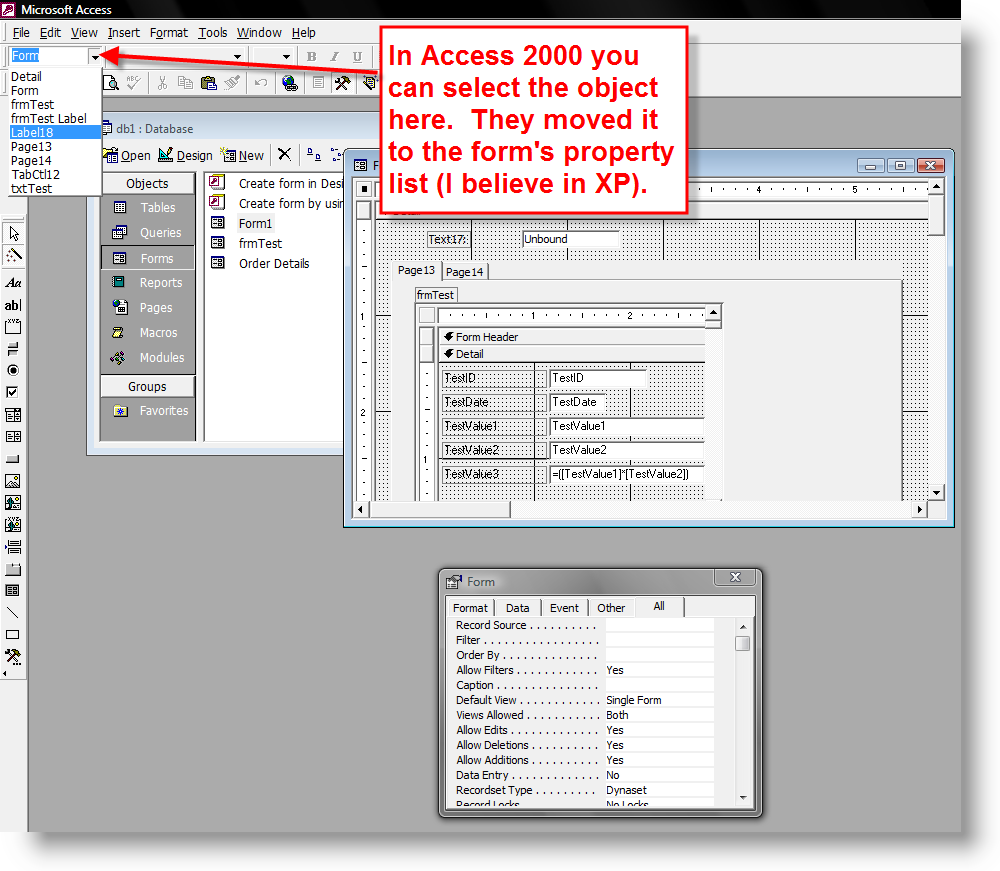
What version of Access is this? Or is it even Access? The reason I ask is, in looking at the attached screen shots, the Property Box has a dropdown box for choosing the object whose properties you want to view/change. This is a feature I wish Access had, but doesn't, at least not in version 2000! It is, however, a feature of Visual Basic 6! And while many things are the same in Access and Visual Basic, not everything is, especially in dealing with combo boxes and list boxes!
 
Last edited:
It's Access. I don't remember if it happened in XP or in 2003, but it's there alright. The same box is there in 2000, but it's on the tool bar and not on the properties window.
 
A dropdown box for selecting an object? On which toolbar? I ask because I occasionally hide controls then can't remember where I hid them (I've got a steel trap mind, but it's been left out in the rain too much!) and it would be great to access the properties that way!
 
Thanks, Bob! Amazing the things you see but don't observe, as Shelock Holmes would say! ;0)>
 

Users who are viewing this thread

Back
Top Bottom