Which is easiest to control?

tkd1987

Registered User.
Local time
Today, 21:31
Joined
Jan 3, 2006
Messages
26
Hello all,
in your oppinion which would you say was easiest to control through forms, more information per table, or
more tables with less information in each?

Thanks
 
A slightly odd question.;) Forms should have a query as their recordset not tables. Then you can have the fields you require from any table

Col
 
Also, you shouldn't design your tables structure around your forms. Your tables should be designed along the rules of normalisation (there are many posts in the forum along normalisation).
 
basically all i have is member information for my TKD Academy
so far i have 6 tables
student infor
membership infor
rolling register
emergency info
grading info
mandate info

but most of this information will be on the same form, to me it doesnt matter where in a table it is stored as i will be viewing it through forms.

but at the moment i am having trouble get the form to open a field from another table that is y i asked the question!
 
so you have the form based on a query? have you checked your relationships are correct?

Col
 
i think they are...
in the student table an autonumber to create the students ref number then in everyother table it is linked via that.

attached is what i have which i most probs 99% WRONG
#
 

Attachments

You need to delete all the AutoNumbers from all tables except the Student Info table. Then you can see the fields on the form

Also, your Grading table needs to be changed. Your fields of tags and belts all need to be deleted. Access tables work vertically not horizontally as they do in Excel.
The Grading table - I would have as a SubForm and should have these fields

StudentID
Level
DateOfLevel

Then have ComboBox for the colours and belts and tags and select from there.

If you leave the tags and belts fields as they are, you'll run into problems when you want to do analysis of who has what etc.

Col
 
Yes, because in the gradings case - a student can have many gradings so its easier to just scroll down a SubForm list and view their grades.

Just noticed your question to which this is the answer has disappeared

Col
 
i deleted it as i fort i wwas being stupid then worked out i wasnt lol thanks for that i am gona try it out now... i think i have the emergency details working using a subform
 
ok i have them working, using subforms,

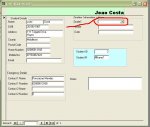
for the grading section i think this i what you meant,

in the attached file you can see that the grade and date will be displayed once the grade is selected from the combo box??

i can work out how to do that on the main form but not on a subform?

 

Attachments

  • form.JPG
    form.JPG
    50.2 KB · Views: 150

Users who are viewing this thread

Back
Top Bottom