
Crosstab Query & Calculating differences

MattioMatt

Registered User.
Local time
Today, 09:05
Joined
Apr 25, 2017
Messages
99
I'm currently using a Crosstab query to be able to output statistics on a month by month basis. This is providing me with a count of statuses based on an inventory month by month.
I'm going to be uploading my data from Excel on a monthly basis. I've added a field to populate the date at which the data was uploaded on.

An example of what I'm acheiving at the moment (which is what I wanted) is the below:
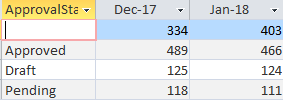
attachment.php


My query is as follows:
Code:
TRANSFORM Count(tbl_Inventory.ID) AS CountOfID
SELECT tbl_Inventory.ApprovalStatus
FROM tbl_Iventory
GROUP BY tbl_Iventory.ApprovalStatus
PIVOT Format([UploadDate],"mmm-yy");

I'd like to calculate the change between the months. I was looking at having a change column for each month, but quickly found I couldn't do this within the Crosstab query, simply because I've not been able to use a field for any calculations. If I try to use The UploadDate or CountOfID Access says it can't find a field with that name.
I then tried to created a new query and use the crosstab query as the source. The problem I've ran into here is that the month fields are dynamic and making the calculation is manual. Is there a way to 'automate' this?


attachment.php
 

Attachments

  • CT_Query_Example.PNG
    CT_Query_Example.PNG
    3.9 KB · Views: 1,499
  • Query_Manual_Process.PNG
    Query_Manual_Process.PNG
    1.6 KB · Views: 1,457
So what will happen when you get new entries for Feb, Mar etc?
Difference columns for each pair of months?

One way of doing this is to create a make table query based on your crosstab
Then create another query to calculate the difference using that table.
 
you can make it dynamic by using by using a generic term for your month headings (e.g. 'last month', 'this month'). However your data shows 2 months but the query implies there could be many months so this may not be sufficient.

Or you could use a separate query.

You need to provide more information about how your data is structured. If only 2 months of data then you can use an alias as above or you will need to use a numerical formatted value for the month that can be sorted e.g. 201712, 201801
 
It's possible, but you'll need to use a union to determine the change in counts, then turn THAT into a crosstab.

Example HERE.

There's probably a much easier workaround, however. How does this data get to the people it's for? You could either drop it into a report in Access and add a control that does that, or you could export it to Excel (either manually or via automation), then modify the cells to the right of your second data column to show the difference (which you can do en masse). Both would be pretty straightforward to implement.

And if you need help there, HERE is a guide on how to create a crosstab report.
 
@OP,
Will this be for a static period or for a rolling period? Also will you be prompting for an end date? For ApprovalStatus, is this coming from a static list of statuses or are they subject to change?
 
Thanks for the all of the replies so far

Ridders/CJ/Mark, yes, there will be more months to follow, currently it is only showing as two as thats where I've been collecting the data for. Ultimately it will grow as the dataset grows which is an upload that will occur once a month.
The ApprovalStatus is subject to change.

Frothingslosh, Are you saying use the crosstab within a union and then create a new cross tab or are you saying use a union query then create the crosstab query?
 
yes, there will be more months to follow
SO still not clear what you are asking - are you only interested in this month/last month or do you want to see a whole range of months. Either way, as the months progress you will also need to add criteria to limit the months to be viewed.
 
You need to create a function then display it in a datasheet form.
 
Apologies CJ.

I initially wanted it to be each month, this is what I'd still prefer to have. However if it's only possible with the last month in the cycle then I'm happy with that.
 
Give me something to work with. Post a sample data on excel and the expected result in same excel.
 
@OP

When you are done, how many months will this cover? Please don't say "All of them" as that means you are asking for a perpetual count that would need to be done in a report, not a query. In most businesses they are only interested in what the changes were over the last year, often a rolling year. If you are not sure, please clarify your specifications. Otherwise you will be asked what the difference was between February 713 and March 713, then have to clarify if they want "The one before Rome became an empire or the one after Rome collapsed?"

For ApprovalStatus, is this coming from a static list of statuses or are they subject to change? I am guessing this won't change unless you will be reworking your database. Once more, please find out. It will help us answer how you can do what you are looking for. Likewise this is something that should be in specification.
 
Pat, thank you so much for your detailed look at this and thank you for the attachment. I will of course have a look through this. I've particularly taken onboard the notes about the dates and how to format them.
 
@OP

When you are done, how many months will this cover? Please don't say "All of them" as that means you are asking for a perpetual count that would need to be done in a report, not a query. In most businesses they are only interested in what the changes were over the last year, often a rolling year. If you are not sure, please clarify your specifications. Otherwise you will be asked what the difference was between February 713 and March 713, then have to clarify if they want "The one before Rome became an empire or the one after Rome collapsed?"

For ApprovalStatus, is this coming from a static list of statuses or are they subject to change? I am guessing this won't change unless you will be reworking your database. Once more, please find out. It will help us answer how you can do what you are looking for. Likewise this is something that should be in specification.

Hi Mark - thanks for you reply.
This is to be a 12 month rolling period.

The statuses do not currently from another table in which and ID is used - obviously that would be the right way to do it, but due to the data being premature and working through issues I'm currently basing my queries on imported data from excel.
At the moment the statuses are static but I cannot say for sure if they will/will not change in the future.
 

Users who are viewing this thread

Back
Top Bottom