lookforsmt
Registered User.
- Local time
- Today, 21:40
- Joined
- Dec 26, 2011
- Messages
- 672
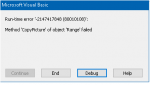
Thanks arnelgp and everyone for the inputs and suggestions, unfortunate i am too getting the same error mentioned in post #17 by ridders.


Sub CreateQRCode()
Dim chtO As ChartObject
Dim x As Integer
With gxlWB
    .Sheets(1).textbox1.Value = Form_Form1.txtSample & ""
    .Sheets(1).textbox1_change
    .Sheets(1).CommandButton1_Click
    While gxlApp.CalculationState <> 0 'xlDone
        DoEvents
    Wend
    .Sheets(2).CommandButton1_Click
    While gxlApp.CalculationState <> 0
        DoEvents
    Wend
    x = Choose(.Sheets(1).Range("B3"), 21, 25, 29, 33, 37, 41, 45, 49, 53, 57, 61, 65, 69, 73, 77, 61, 85, 89, 93, 97, 101, 105, 109, 113, 117, 121, 125, 129, 133, 137, 141, 145, 149, 153, 157, 161, 165, 169, 173, 177)
    .Sheets(2).Range(.Sheets(2).Cells(2, 2), .Sheets(2).Cells(1 + x, 1 + x)).CopyPicture appearance:=xlScreen, Format:=xlBitmap
    Set chtO = .Sheets(2).ChartObjects.Add(1, 1, 200, 200)
End With
With chtO
    .Chart.Paste
    .Chart.Export FileName:=CurrentProject.Path & "\test.bmp", FilterName:="BMP"
    .Delete
End With
End Sub
Private Sub cmdGenerate_Click()
    If Trim(Me.txtSample & "") <> "" Then
        'GenQRCode Me.imgQRCode, Me.txtSample
        CreateQRCode
    End If
End Sub .Sheets(1).textbox1.Value = Form_Form1.txtSample & ""If Dir(CurrentProject.Path & "\QRCodeImages", vbDirectory) = "" Then
the good news is ive found yet another excel qr generator. It doesnt use vba. The inly vba is the one i added to oroduce the bitmap. Will post sample tomorrow with excel and no password.
The inly catch is ut will only accept 15 chard (enough for real world app).
Yes, I scanned the QCode and it worked!
Interesting website, that!