Solved Conditionally Omitting Blanks

NavyBlueBolt

New member
Local time
Today, 06:31
Joined
Sep 9, 2020
Messages
9
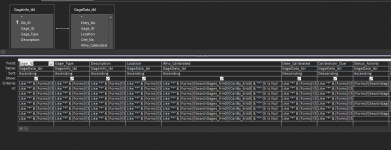
I'm working with a query set to be a search engine of sorts. The search form has multiple unbound text fields (for partial searches) that send to the query in question and back onto a subform on the main form., I need to show blanks when all the fields are null and omit blanks when one of the fields are not null. Currently, any searches or null searches include blanks. I had tried the choose and iff functions, but I get the "expressions are too complex" dialogue box. Any suggestions on how to get the search engine I'm looking for?


I'm off for the weekend. :D stay safe
 

Attachments

  • Capture.PNG
    Capture.PNG
    31.1 KB · Views: 190
I'm almost afraid to ask, but can you switch that to SQL VIEW and show us what gets built?

Not only that, but I'm not sure I understand the goal of the query anyway. You only expanded one column and everything in that column looks the same to me, so I don't know what you are trying to accomplish. I can't tell the difference between any of the rows that have text in them other than a couple of design rows that have blanks under Status_Activity.
 
Don't do it that way. Check out the form filter property:


I'm guessing the query feeds data on your form. What you do is strip out all the criteria from your query and instead filter the form to show just the results you want. That way, you can dynamically build the filter string using just the criteria submitted. In the query you have to account for all criteria/null combinations. With the form.filter you just use the ones they want.
 
you only write the Criteria "once" and not every row (if you have same criteria).
 
Oh, where to begin. I'm learning vba and access through the University of Youtube so be prepared if much of what I do doesn't make sense or seems redundant. I'm doing my best just to make this function. I haven't even begin to touch SQL.

When the user opens the search form, there is a subform for the query that I am working on. The text fields are loaded null so that all possible results will show (being that it passes two field criteria: latest entry and valid entry). The way it is currently made, you type in what you want to search and the Like function does the rest. The issue I'm bumping into is when searching, I don't want blanks for that entered field to show. Example: If I type Johnson in the Calibrated By field, I want only Johnson and Like Johnson to appear without nulls for Calibrated By. I only want nulls to show with all other records if the related text field is null. I'm sorry if this isn't clear.

@The_Doc_Man Attached is the SQL code for that query.

@plog I'll look into the filter proper when I get a free moment. It looks useful regardless of how this get solved so thank you for bringing it to my attention.

@arnelgp I tried cleaning that up to a single row, but it didn't run properly when I tried. There are some fields near the end that have criteria that are placed in different rows so I think that stopped it from working for me.

@Pat Hartman My boss stressed that I not use combo boxes (though it pains me to do so for the ID in the least). "It affects usability and disincentives the end user from using the program." There is no BE file for this; it's just the one database that holds everything sitting on a server that I have no control over. It wasn't until later that I learned how to grab data from other databases/files. That's when I made a backup database that imports the data from the working database. All done with vba. I'll need some time to figure out how you did your process to even respond to the rest of your advice. It's alot for me right now.

Thank you everyone for being so helpful and patient with me.

Capture.PNG
 

Attachments

Does not compute:) I think you are going to have to give us a set of data and show us what you mean.
I need all records to show, nulls included when the matching unbound textbox is null. Knowing that, how do you omit null values in a specific field when the correlating text field is not null?
 
Does not compute:)
A query returns x rows and y columns. The selection criteria controls the number of rows that will be returned but the selected columns are fixed. I don't know what "omit null values in a specific field" means. Are you saying that you don't the column to be returned in the query?
I do want the column. I want the criteria to read as:
iif( [calibrated_by_txtbx] <> null, like "*" & [calibrated_by_txtbx] & "*", like "*" & [calibrated_by_txtbx] & "*" or is null)
I tried putting something like that in, but to no avail.
 
I am confused as well as @Pat Hartman but I think you are trying to do this;

like "*" & [calibrated_by_txtbx] & "*" or [calibrated_by_txtbx] is null

To include everything if there is nothing selected in the combo box.

Edit: And if the combo's only list actual values you can get rid of the Like "*" wildcards completely as you will only be searching for exact values?
 
I am confused as well as @Pat Hartman but I think you are trying to do this;

like "*" & [calibrated_by_txtbx] & "*" or [calibrated_by_txtbx] is null

To include everything if there is nothing selected in the combo box.

Edit: And if the combo's only list actual values you can get rid of the Like "*" wildcards completely as you will only be searching for exact values?
That's about what I'm looking for! I got the combo box for ID's set. I can apply this to a text box. The "is null" is to include null values in the search, right? Wouldn't this line just show everything regardless of what's in the box?
 
That's about what I'm looking for! I got the combo box for ID's set. I can apply this to a text box. The "is null" is to include null values in the search, right? Wouldn't this line just show everything regardless of what's in the box?
No - It only applies when the combo IS Null. That evaluates to True so the criteria are ignored if null or applied if not.
That was also the reason for my suggestion of removing the Like parts of the criteria statements. If the combos can only show real data values, then the Like portion becomes redundant.

This will also speed up how it runs. Wildcards at the beginning of criteria render the index useless, slowing down searching.
 
No - It only applies when the combo IS Null. That evaluates to True so the criteria are ignored if null or applied if not.
That was also the reason for my suggestion of removing the Like parts of the criteria statements. If the combos can only show real data values, then the Like portion becomes redundant.

This will also speed up how it runs. Wildcards at the beginning of criteria render the index useless, slowing down searching.
I plugged it in and it works. Thank you so much for your help.

May the deities of the programming bless your codes. .
 

Users who are viewing this thread

Back
Top Bottom