Problem importing CSV file into Table

Lateral

Registered User.
Local time
Yesterday, 19:16
Joined
Aug 28, 2013
Messages
388
Hi Guys

My Access 2007 application uses DoCmd.TransferText option to import numerous CSV files into various tables and has been working well for years.

The want to change one of these Imports as there is an additional field in the CSV file that needs to be imported into the table. It is called "AvailOrder" and is a Yes/No field. Please note that there is also another Yes/No field already in the CSV file called "Avail".

I have added the new field to the "Web_Parts" table, its called "AvailOrder"

The header record of the CSV file also contains the new field as per the following example:

Active,AvailOrder,Web_Category,DateAdd,Web_Product_ID,ImageURL,PartURL,PartName,UnitPrice,Ref,Wholesale,SOH,Manufacturer
"0","1","Home > Brake Parts > Discs/Rotors & Hubs","2014-09-14 16:06:20","342","https://rodpenroseracing.com.au/img/p/6/7/2/672.jpg","https://rodpenroseracing.com.au/dis...-and-short-swing-axle-direct-replacement.html","4 x 130 Lug Rotor - Rear - IRS and short Swing axle - direct replacement","116.50","RPR-10342","0.00","9997","EMPI"
"0","1","Home > Brake Parts > Discs/Rotors & Hubs","2014-09-25 06:43:22","496","https://rodpenroseracing.com.au/img/p/9/3/5/935.jpg","https://rodpenroseracing.com.au/dis...y-custom-stud-pattern-direct-replacement.html","Blank Rotor - Rear - for any custom stud pattern - direct replacement","119.00","RPR-10496","0.00","9999","EMPI"

DoCmd.TransferText acImportDelim, "ImportWebParts", "Web_Parts", "C:\testmiport.csv", True, ""

Ok, now that's the background.

The problem I have is that if I use the "External Data" option on the ribbon to do the import WITHOUT a specification, it imports all of the records correctly.

When I use a specification that includes the new field, I get the following error:
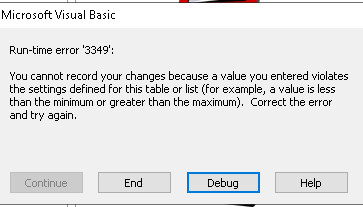
1667624435016.png


I have spent hours and hours trying to figure out what is wrong to no avail.

Here is the table specs for Web_Parts:
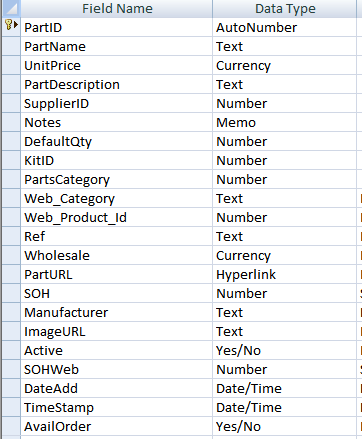
1667624589666.png


Any help is much appreciated.

Cheers
Greg
 
Not that it should care, but try making the 'true' field -1 instead of +1.
 
Thanks doc man. I’ll try this tomorrow and let you know.

cheers
Greg
 
The problem I have is that if I use the "External Data" option on the ribbon to do the import WITHOUT a specification, it imports all of the records correctly.
then don't use any import/export specification for your import:

DoCmd.TransferText acImportDelim, , "Web_Parts", "C:\testmiport.csv", True, ""
 
then don't use any import/export specification for your import:

DoCmd.TransferText acImportDelim, , "Web_Parts", "C:\testmiport.csv", True, ""
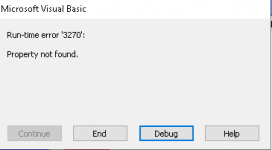
I have tried "DoCmd.TransferText acImportDelim, , "Web_Parts", "C:\testmiport.csv", True, "" this and get the following error:

1667698094166.png


If I don't use a Specification, how does it know what the Text Qualifier is?
 
Not that it should care, but try making the 'true' field -1 instead of +1.
Hi Docman,

I changed it to "-1" but still get the error message when using a Specification but not when I don't use a Specfication.

This is driving me nuts................
 
OK, if that doesn't work then the question is what it really wants for that field when importing. If you can open the input specification you can see what data type is being assigned for the two Y/N fields. I suspect that the problem occurs because the numeric inputs aren't what was expected. Which means I can't swear to you that it isn't the "0" that is tripping you just as much as the "1" (or "-1").

When you import WITHOUT a specification, there is an implied data type conversion between what you submitted in the CSV and what you stored in the table. In that case, the 0 and 1 or -1 for a Boolean field will not cause heartache. They will convert to what you want without problems. On the other hand, if you have a specific data type other than integer for those fields, you might have to play with using True and False or Yes and No for the two fields in question.
 
DoCmd.TransferText acLinkDelim, "ImportWebParts", "Web_Parts", "C:\testmiport.csv", True, ""

Link the CSV. This allows you to see what content is actually being delivered. Using a recordset on it, you can check the resulting data types of the fields (Field.Type). You can use an append query to test how the data is accepted by the target table and perhaps draw new conclusions from it.
As part of the query, you could make any necessary additional reformatting.
 
Last edited:
Thanks for all of the suggestions guys, I will get back onto this in a few days time and let you know the outcome.

Cheers
Greg
 
you can try to use a function to import the textfile.
see this demo.
 

Attachments

Going back to the first error. It tells you that there is a data problem. Doing an import without the spec confirms that. The earlier suggestion to not use a y/n data type will solve the problem. There is probably a row with a null value. Changing to integer will allow nulls unless you set the field to require a value.

Go back and do the import without a spec again, what data type did Access assign to the field?
Hi Pat,

This is what I have just done:

1. The [AvailOrder} field in the Web_Parts table is defined as a YES/NO field.

2. I then ran an import (via the External Data/text option) using a single record without a Specification and it worked perfectly and the data from the AvailOrder field in the CSV field was imported correctly into the corresponding AvailOrder YES/NO field in the Web_Parts table.

3. I then ran the import again (via the External Data/ text option) using a larger CSV file (1887 records) without a Specification and it also imported all records including the AvailOrder data correctly into the Web_Parts table.
Are you trying to open the app with an old version of Access?

Hi Pat

I'm using Access 2007
 
then don't use any import/export specification for your import:

DoCmd.TransferText acImportDelim, , "Web_Parts", "C:\testmiport.csv", True, ""

It appears that the acImportDelim option needs a Specification otherwise you get the following error:
 
It appears that the acImportDelim option needs a Specification otherwise you get the following error:
 

Attachments

  • 1667962771265.png
    1667962771265.png
    2.3 KB · Views: 224
Hi Pat,

I re-ran the import via the External Data/text option with using a Specification and only specifying the "First Row Contains Field Names" and the text Qualifier. I then had it create a new table. All of the fields of the new table were TEXT.

I then ran the import again without a Specification and only specifying the "First Row Contains Field Names" and the text Qualifier and pointed it to the Web_Parts table that has the fields defined as YES/NO etc and it works fine and all of the data is imported correctly.
 
Everything has been working fine for a very long time.
And what is the data type of the Yes/No fields when you import the file without a spec? Are they STILL Y/N???? Please go back and read #10 again. I can't see your file.

Also, you can link the spreadsheet. Then view it and sort on the new Y/N column. First ascending and then descending. Does EVERY row have a value?
This is like pulling teeth.

Hi Pat

As I said it #19, without a Specification defined and outputting to a new table, ALL of the fields in the new table are defined as TEXT.

If I then rerun the Import without a Specification and point the output to the existing Web_Parts table, ALL of the data is imported without any errors.
 
read back to see the structure.
 
If all the fields are defined as text, that tells you that there is INVALID data in the file. If the data were valid, the data types would be numeric where appropriate. Your join date is 2013. You should, by this time, have some concept of debugging.

Hi Pat,

Thanks for the sarcastic and disappointing comments.

Perhaps you need to read my replies a bit better as I have been providing detailed information that you seem to be having trouble interpreting.

Thanks everybody for trying to help me but I'm signing off and will find a solution elsewhere....

Cheers
Greg
 

Users who are viewing this thread

Back
Top Bottom