
Sorting of Blank Date

Alejo

Member
Local time
Tomorrow, 01:35
Joined
Jun 14, 2021
Messages
78
Hi Good day to all,

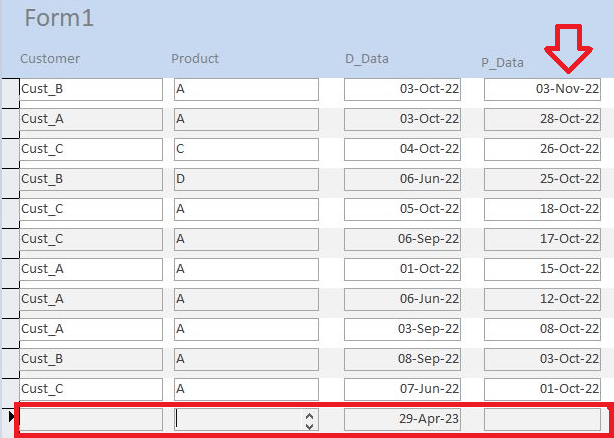
i sorted the P_Date in descending (thru Query1) and provided the result correctly.
However, I prefer that the Blank row in RED (with default value of Date today on D_Data) should be on the top.

I tried the option MySort: IIF(IsNull([P_Date],999999,[P_Date]) but does not work.
Can you please help me to formulate my required output (attached is the sample databse)

Thank you

1682776377289.png
 

Attachments

There is no record with an empty P_Date in your example file.

SQL:
SELECT ...
FROM Table1
ORDER BY Nz([P_Date],#12/31/2999#) DESC;
 
There is no record with an empty P_Date in your example file.

SQL:
SELECT ...
FROM Table1
ORDER BY Nz([P_Date],#12/31/2999#) DESC;
Hi,
I tried the suggestion but it doest work, still showing the blank page at the bottom (i meant blank page, a new row to insert new information).

SELECT Table1.Customer, Table1.Product, Table1.D_Date, Table1.P_Date
FROM Table1
ORDER BY Nz([P_Date],#12/31/2999#) DESC;


May I request to please directly put the code to the attached database?
 
Are you sure that is Null and not a ZLS?
DB to late a version for me to look at. :(

If that is a new record and the default for D_Date is Date, then there is no value?
 
This is the line for a new record.
Yes Josef, this is the line for new record.

I just make a default value for D_Date, since the new record will always use TODAY date for D_Date
 
New records always appear at the bottom. No way round it from a display perspective. What you can do is have a subform in the header section to capture the new record data. On save, requery the main form
 
New records always appear at the bottom. No way round it from a display perspective. What you can do is have a subform in the header section to capture the new record data. On save, requery the main form
Thanks CJ for the info.

I still leave it unresolved for future references.
 
Thanks CJ for the info.

I still leave it unresolved for future references.
I think the only reason you see a date there in the D_Date field for the new record would be that it's a default value waiting to be used IF a record is created.
 
I still leave it unresolved for future references.
FYI, there is a difference between unresolved and impossible.
It is impossible in datasheet or continuous form view to have a new record appear at the top of the list. No amount of code or workarounds exist to change that.
 
see attached for example as I suggested

It works, but no points for presentation or functionality - that is up to you

Note that as a rule it is not a good idea to have forms which show all records - a few hundred is fine but you will start to see slower performance when the numbers get higher
 

Attachments

Thank you all for your response, appreciated.
 

Users who are viewing this thread

Back
Top Bottom