Hi all,
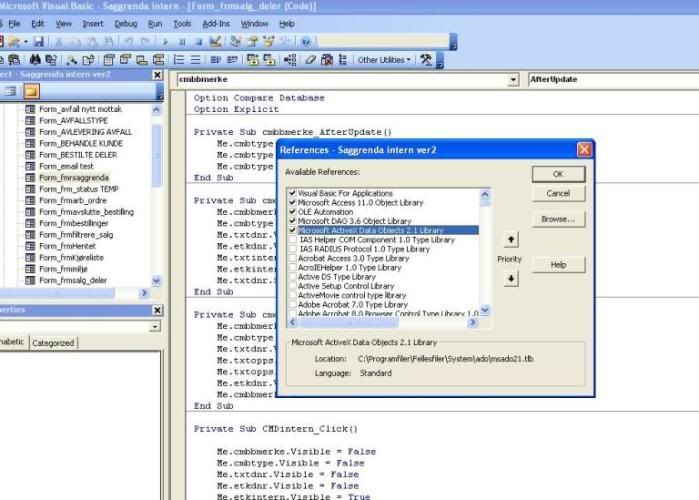
I am new to access 2007 and have brought a database through from 2003. I am having trouble getting some code to work which is run from a button on a form. Is there a major change in the code for 2007 to make the following stop working:
Private Sub ExcelExport()
'Declare a variable named MySheetPath as String.
Dim MySheetPath As String
Dim rs As ADODB.Recordset
Dim o As Object
Dim db As Database
Dim cnn As ADODB.Connection
'Note: You must change the path and filename below
'to an actual Excel .xls file on your own computer.
MySheetPath = "C:\Documents and Settings\TMMY\My Documents"
MySheetPath = MySheetPath + "\My Sheet.xls"
'Set up object variables to refer to Excel and objects.
Dim Xl As Excel.Application
Dim XlBook As Excel.Workbook
Dim XlSheet As Excel.Worksheet
'Open an instance of Excel, open the workbook.
Set Xl = CreateObject("Excel.Application")
Set XlBook = GetObject(MySheetPath)
'Make sure everything is visible on the screen.
Xl.Visible = True
XlBook.Windows(1).Visible = True
'Define the topmost sheet in the Workbook as XLSheet.
Set XlSheet = XlBook.Worksheets(1)
'Copy GrandTotal to FromAccess cell in the sheet.
'XlSheet.Range("FromAccess").Locked = False
'Set XlSheet.Range("FromAccess") = chart
Set cnn = CurrentProject.Connection
Set rs = New ADODB.Recordset
Set rs.ActiveConnection = cnn
'Set o = Application.DBEngine
'Set db = o.Workspaces(0).Databases(0)
rs.Open ("Chart")
XlSheet.Range("A2").CopyFromRecordset rs
rs.Close
Set rs = Nothing
Set o = Nothing
'Boldface the new value (optional).
XlSheet.Range("FromAccess").Font.Bold = True
'Dim i As Integer, j As Integer
'For i = 0 To rs.RecordCount - 1
' For j = 0 To rs.Fields.Count - 1
' With XlSheet
' .Range(
' End With
' Next j
'Next i
'Save the sheet with the new value (optional).
XlBook.Save
'Close the Access form (optional).
DoCmd.Close acForm, "OrderSummaryForm", acSaveNo
'Clean up and end with worksheet visible on the screen.
Set Xl = Nothing
Set XlBook = Nothing
Set XlSheet = Nothing
End Sub
Thanks Tom
I am new to access 2007 and have brought a database through from 2003. I am having trouble getting some code to work which is run from a button on a form. Is there a major change in the code for 2007 to make the following stop working:
Private Sub ExcelExport()
'Declare a variable named MySheetPath as String.
Dim MySheetPath As String
Dim rs As ADODB.Recordset
Dim o As Object
Dim db As Database
Dim cnn As ADODB.Connection
'Note: You must change the path and filename below
'to an actual Excel .xls file on your own computer.
MySheetPath = "C:\Documents and Settings\TMMY\My Documents"
MySheetPath = MySheetPath + "\My Sheet.xls"
'Set up object variables to refer to Excel and objects.
Dim Xl As Excel.Application
Dim XlBook As Excel.Workbook
Dim XlSheet As Excel.Worksheet
'Open an instance of Excel, open the workbook.
Set Xl = CreateObject("Excel.Application")
Set XlBook = GetObject(MySheetPath)
'Make sure everything is visible on the screen.
Xl.Visible = True
XlBook.Windows(1).Visible = True
'Define the topmost sheet in the Workbook as XLSheet.
Set XlSheet = XlBook.Worksheets(1)
'Copy GrandTotal to FromAccess cell in the sheet.
'XlSheet.Range("FromAccess").Locked = False
'Set XlSheet.Range("FromAccess") = chart
Set cnn = CurrentProject.Connection
Set rs = New ADODB.Recordset
Set rs.ActiveConnection = cnn
'Set o = Application.DBEngine
'Set db = o.Workspaces(0).Databases(0)
rs.Open ("Chart")
XlSheet.Range("A2").CopyFromRecordset rs
rs.Close
Set rs = Nothing
Set o = Nothing
'Boldface the new value (optional).
XlSheet.Range("FromAccess").Font.Bold = True
'Dim i As Integer, j As Integer
'For i = 0 To rs.RecordCount - 1
' For j = 0 To rs.Fields.Count - 1
' With XlSheet
' .Range(
' End With
' Next j
'Next i
'Save the sheet with the new value (optional).
XlBook.Save
'Close the Access form (optional).
DoCmd.Close acForm, "OrderSummaryForm", acSaveNo
'Clean up and end with worksheet visible on the screen.
Set Xl = Nothing
Set XlBook = Nothing
Set XlSheet = Nothing
End Sub
Thanks Tom