Access search for form

electricjelly

Registered User.
Local time
Today, 02:32
Joined
Apr 3, 2014
Messages
26
Hello,

I am not sure how to do this. I have a database with a table with [Time IN] and [Time OUT] as two seperate fields along with other fields (Employee ID and Employee Name). I would like it so that if I input an Employee ID Access would search for the last record with the same Employee ID and whether the [Time IN] or [Time OUT] has a filled record and then input the new data in the opposite field.

For Example: I input something into the Employee ID Field. Then Access searches for the last record in the employee ID field with matching information. After that Access checks whether the last record has either the field [Time IN] or [Time out] filled in, lets assume [Time IN] was filled with "9am" then Access will fill in the [Time OUT] field with the current time and date (=Now()) or vice versa in the new record.

This is a little tough to explain so please do not hesitate to ask for a rephrasing or similar. I am confused on how I could accomplish this, Thank you to whomever is able to help.
 
Rather than having a timein and timeout field I would have a InOut boolean field (0/false means in an -1/true means out) and for the sake of clarity rename one of your timein/timeout fields as TimeStamp and delete the other one - make now() the default for the field so you don't need to complete it

So given you have this field then to return the last record, the code would be

Code:
dim rst as recordset
set rst=currentdb.openrecordset("select InOut from tblemployees where id=" & me.id & " AND TimeStamp=(Select max(TimeStamp) from tblemployees as tmp where id=" & me.id & ")")
me.InOut=not rst!InOut
set rst=nothing
I would put this code in your form on current event so it is populated every time you move to a new record - but it does depend on how your form works.
 
Rather than having a timein and timeout field I would have a InOut boolean field (0/false means in an -1/true means out) and for the sake of clarity rename one of your timein/timeout fields as TimeStamp and delete the other one - make now() the default for the field so you don't need to complete it

So given you have this field then to return the last record, the code would be

Code:
dim rst as recordset
set rst=currentdb.openrecordset("select InOut from tblemployees where id=" & me.id & " AND TimeStamp=(Select max(TimeStamp) from tblemployees as tmp where id=" & me.id & ")")
me.InOut=not rst!InOut
set rst=nothing
I would put this code in your form on current event so it is populated every time you move to a new record - but it does depend on how your form works.

Thanks CJ for the reply,

I have used your code but I keep running into error 3021 "no current record"

I have been trying to figure this out on my own but I dont know how to remedy this error :confused:
 
I have used your code but I keep running into error 3021 "no current record"
this means a record has not been found or you have reached EOF or BOF

Have you modified the code to refer to your specific table, fields and form and are they populated with relevant data?

You will need to post the code you are actually using plus some sample data from your tblemployees and form
 
Thank you again CJ,

I took a step back and learned a few things about access VBA before I attempted to continue working on this. I learned a little more and experimented a bit and I discovered this:

when Access applies the code you gave me it looks at the next record and not the previous record, essentially looking right instead of left. Then it applies the opposite of that record to the InOut field, I am trying to get it search in the opposite direction, but I do not know how. I was receiving the "no Current Record error" because I was EOF and i believe it is looking for the next record, which of course, do does not exist.

Code:
Private Sub EmployeeID_AfterUpdate()

On Error GoTo ErrorHandler

TimeStamp.Value = Now()
Dim rst As Recordset
Set rst = CurrentDb.OpenRecordset("select InOut from TblEmployeeClockIn where id=" & Me.ID & " AND TimeStamp=(Select max(TimeStamp) from TblEmployeeClockIn as tmp where id=" & Me.ID & ")")
[COLOR=Red]If rst.EOF Then
Me.InOut = -1 [COLOR=Blue](This is just me experimenting)[/COLOR]
Set rst = Nothing[/COLOR]
ElseIf Not rst.EOF Then
Me.InOut = Not rst!InOut
Set rst = Nothing
End If

ExitSub:
    Exit Sub

ErrorHandler:
    MsgBox ("An error has occured, restart the form")
    Resume ExitSub
    
DoCmd.GoToRecord acForm, "FrmEmployeeClockIn", acNewRec


End Sub

Thanks again for helping me out
 
not quite sure what you mean - I would expect

Code:
Set rst = CurrentDb.OpenRecordset("select InOut from TblEmployeeClockIn where id=" & Me.ID & " AND TimeStamp=(Select max(TimeStamp) from TblEmployeeClockIn as tmp where id=" & Me.ID & ")")
to only return either zero records because there are no previous records for ID or one record, which is the latest record for that ID although technically it could return more if there are more than one record with identical ID and timestamps.
 
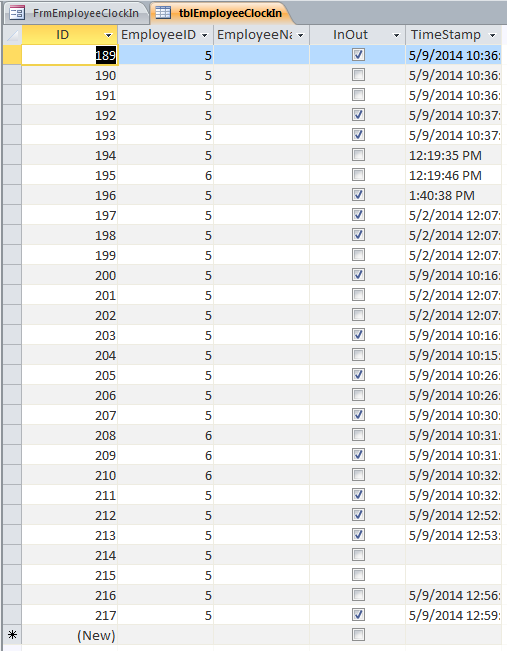
Here is some sample data
ukProgrammers1.png


I will try and explain this better, if I input data into the 218th (new) record through the form I created it will give me a "no current record" error. I discovered that this is caused because I am at the end of records and trying input new data then access is trying to look at the record after my new record, which does not exist yet. I am trying to get it to look at the the last record that had the same ID in the [EmployeeID] field as the one I just inputted and then apply the opposite to the Boolean field [InOut] (-1/0)

Hey dude I really appreciate the patience you have with this, I am learning alot by doing this and maybe one day ill be able to help someone else out.
 
OK, I think I'm beginning to understand.

The SQL refers to me.id which from your image would appear to be the autonumber field - from the headings I would expect you to use the following

Code:
Set rst = CurrentDb.OpenRecordset("select InOut from TblEmployeeClockIn where [COLOR=red]EmployeeID[/COLOR]=" & [COLOR=red]Me.EmployeeID[/COLOR] & " AND TimeStamp=(Select max(TimeStamp) from TblEmployeeClockIn as tmp where [COLOR=red]EmployeeID[/COLOR]=" & [COLOR=red]Me.EmployeeID[/COLOR] & ")")
 
So this is strange, it seems to work, no more errors but its not really doing anything besides applying a -1 to the Boolean field [InOut].

Let me try and explain this from the top and from that I hope to clear any confusion.

I am trying to implement a system in which an Employee will enter in their Employee ID into the [EmployeeID] field and hit the enter key. From then Access will look for the last entry with the same Employee ID and then look at the InOut field and apply the opposite for whichever number is there (i.e. 0 if the last entry had a [InOut] value = -1 and vice versa) to the [InOut] field.

I do not know how to have Access search for the last record with an [EmployeeID] that is matching the one I just inputted. Also, I assume that the applying of -1 or 0 to the Boolean field is quite simple and only needs an if/then statement.

I hope this makes things clear.
 
So this is strange, it seems to work, no more errors but its not really doing anything besides applying a -1 to the Boolean field [InOut]. /QUOTE]That is all it is supposed to do

I do not know how to have Access search for the last record with an [EmployeeID] that is matching the one I just inputted
That is what the sql in the after update event does


Also, I assume that the applying of -1 or 0 to the Boolean field is quite simple and only needs an if/then statement.
go back to my original post that is what

me.InOut=not rst!InOut

does
 

Users who are viewing this thread

Back
Top Bottom