I use a make table Query to make a table which I then reference in another query.
To reference the table in the subsequent query I need to manually add an auto index field.
Is there anything I can add to SQL in the make table query which will add and auto index field to the table?
if I run the second query from the first it is very slow, 1.7 million lines with 2 Dcounts.
If I make the table first the second query is much faster as it doesn't seem to have to recalculate first query. I used the table, rightly or wrongly, to "fix the data" so it runs faster in second query
I am sorry Jdraw but I have not a clue what the process is that you are trying to explain to me.
The make table query puts the fields into the table. I have to manually add the auto number field as the next query will not run without that field.
I just thought, rather in hope than expectation, that I could add a line or something into the SQL of my maketable query.
My thought was this:
-manually create the table you need
-supply each field and type
-identify the proper field as the PK
-now the table exists
-next run your query to append records to the new table.
OR programmatically vba code along this set up to create your table and autonumber Primary Key
Would it be possible to create the Table and run the SQL to populate it?
It means learning something completely new and it pleases me that you think I am capable of that, but I have only just got it working after several weeks of frustration through SQL.
I was thinking of running a Macro to run several of the make table queries automatically and a deviation onto VBA would be outside my current level of understanding.
Would it be possible to create the Table and run the SQL to populate it?
It means learning something completely new and it pleases me that you think I am capable of that, but I have only just got it working after several weeks of frustration through SQL.
I was thinking of running a Macro to run several of the make table queries automatically and a deviation onto VBA would be outside my current level of understanding.
You will eventually need to use VBA for any serious Access development; macros are okay for the light end stuff but they are inherently limited. Here, you can accomplish what you need to do more readily with VBA, so now is a good time to expand your knowledge.
You can create a table once. Then reuse it, as previously suggested. I liken it to building a wooden box to hold firewood for your fireplace. If you create a new box each time you want to bring in firewood, you have to invest extra time and effort to do that. The alternative is to reuse the old one and just refill it as needed.
sSQL = "SELECT * INTO NewTable FROM OldTable"
db.Execute sSQL, dbFailOnError
sSQL = "ALTER TABLE NewTable ADD COLUMN Idx COUNTER"
db.Execute sSQL, dbFailOnError
sSQL = "CREATE INDEX idx_name ON NewTable (Idx)"
db.Execute sSQL, dbFailOnError
So you can create the field later and also index it, all within a VBA procedure.
However, since redundant data and saved calculation results are created here, the entire process should be classified in the temporary tables area. The interim use of temporary tables can very quickly lead to a simplification of query runs, and targeted indexing/re-indexing can contribute greatly to performance.
If you create the table first, empty but with all fields including your auto-number defined, then use an Append type query to populate your table second, the auto-number will populate correctly in that process. But by making the table first without the field and then going back to add the auto-number field, you force Access to go back and revisit EVERY RECORD - because by adding the new field as a second step, you force it to rewrite every already-existing record to have a populated auto-number. Access tends to "squeeze" records together tightly with no slack space between records. Adding that auto-number, every record just got one field larger so has to be copied and repopulated. Plus, Access has to go back and delete the now-obsolete original record. That combination has to be slower than molasses in the Arctic Circle.
But I'm more interested in the reason for this. The "first query" extracts data from somewhere. Is that a table? Because it seems to me that, rather than building a "helper table", you should be running the "second query" to directly compute your counts from the original source, which would be the right answer. But you can't really do that because of structural issues in the original database that is "too big to fail." I might point out that if it is this hard to gather what you wanted, it may already be failing. Failing to support the company's needs.
I recall that you are working with a non-Access back-end from a different machine. You are grabbing data from an ODBC source, Visual Foxpro. By making a local table first, you make the "data fetch" portion of subsequent operations local rather than networked. That can certainly make a profound difference in speed so, for efficiency, this might still be your best bet.
So you have created this "helper table." You run that next query that requires a suitable auto-number field. What do you do with the "helper table" when you are done with it? Particularly if it involved 1.7 million records, that is a LOT of database bloat if you are just going to delete it. Looking back through your prior threads, this is something you want to run every day. You are going to have such a bad bloat problem very quickly. Do you run frequent Compact & Repair operations? Or do you start fresh each day by copying your DB to a work area and only using the "working copy," not the "master copy"?
This thread also seems to be a near-direct continuation of another thread:
Good Afternoon Good People, I have converted a query to a table. I need to add a unique ID to each row Is there a simple way to add an auto number index field, I thought that it may ask me on creation but it did not.
www.access-programmers.co.uk
When the question changes, there are reasons for starting a new thread and that is perfectly OK. But when the question hasn't changed, you COULD continue in the same thread. I know you are struggling here with bulky data and the need to extract statistics from a complicated source. You are also fighting an environment that (based on your comments) is new to you.
I'm not trying to give you a hard time. I'm just commenting that if the topic hasn't changed, splitting the question now makes us look in more than one place to gain any sense of continuity. It's a fine line to cross and you are DEFINITELY not the first person to have faced the problem of when to start a new thread. Call this a friendly side comment that sometimes continuity is more important and sometimes a change IS needed. The trick is to recognize that "New/Continue line" when you approach it.
SELECT FilterTable2.odate, FilterTable2.OrderId, Sum(FilterTable2.UnitPrice) AS SumOfUnitPrice
FROM FilterTable2
GROUP BY FilterTable2.odate, FilterTable2.OrderId;
I wish to clarify something I implied in post #13.
When you are creating an auto-number field and adding it to an existing table with the intent that it be populated, design the table empty and then populate it. Auto-numbers are a special case AND the indexes are monotonically increasing.
HOWEVER, if the field to be indexed is NOT auto-numbered, your better bet is to build the table non-indexed and then come back to add an index (for an already populated field.) The difference is that in the non-auto-number field, the indexed field's values are not predictable. In that case, it is easier to build the index after-the-fact because less memory is being "churned" in the process.
I had to look that one up before I offered the correction.
This is counterproductive at this point and will dramatically worsen performance.
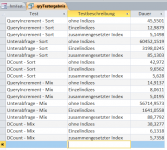
I had conducted my own experiments in this regard with measurement results like the ones in the picture to generate ranks.
Unterabfrage ... subquery
QueryIncrement ... own method
Dauer ... duration