If I create a continuous form and then put a button on the record row to open the related record in a form it works. When I try to do this with a continuous form as a subform it doesn't. Furthermore the button wizard does not open. Is there a common understood reason for this? Thanks

You are using an out of date browser. It may not display this or other websites correctly.
You should upgrade or use an alternative browser.
You should upgrade or use an alternative browser.
Button on Subforms - showing related records
- Thread starter MatthewB
- Start date


- Local time
- Today, 01:02
- Joined
- Feb 28, 2001
- Messages
- 30,903
That type of control doesn't work in continuous forms, because a continuous form considers all rows in the form's Detail section to be the same row for control purposes. You cannot put a control on the record row because ALL rows are the record row. More specifically, every row of a continuous form is driven from the same definition - the continuous form's design-view detail section, which defines every row to have the same appearance. There IS such a thing as conditional formatting to, for example, alternate colors on rows or to highlight a field in some rows, but that has nothing to do with the "buttons in continuous rows" problem.
You could put buttons on the sub-form in a non-detail section, either a header or footer. Of course, that means when you click something, your cursor is not on a row to be identified. Here is a discussion and sample of some code that would highlight the selected record.
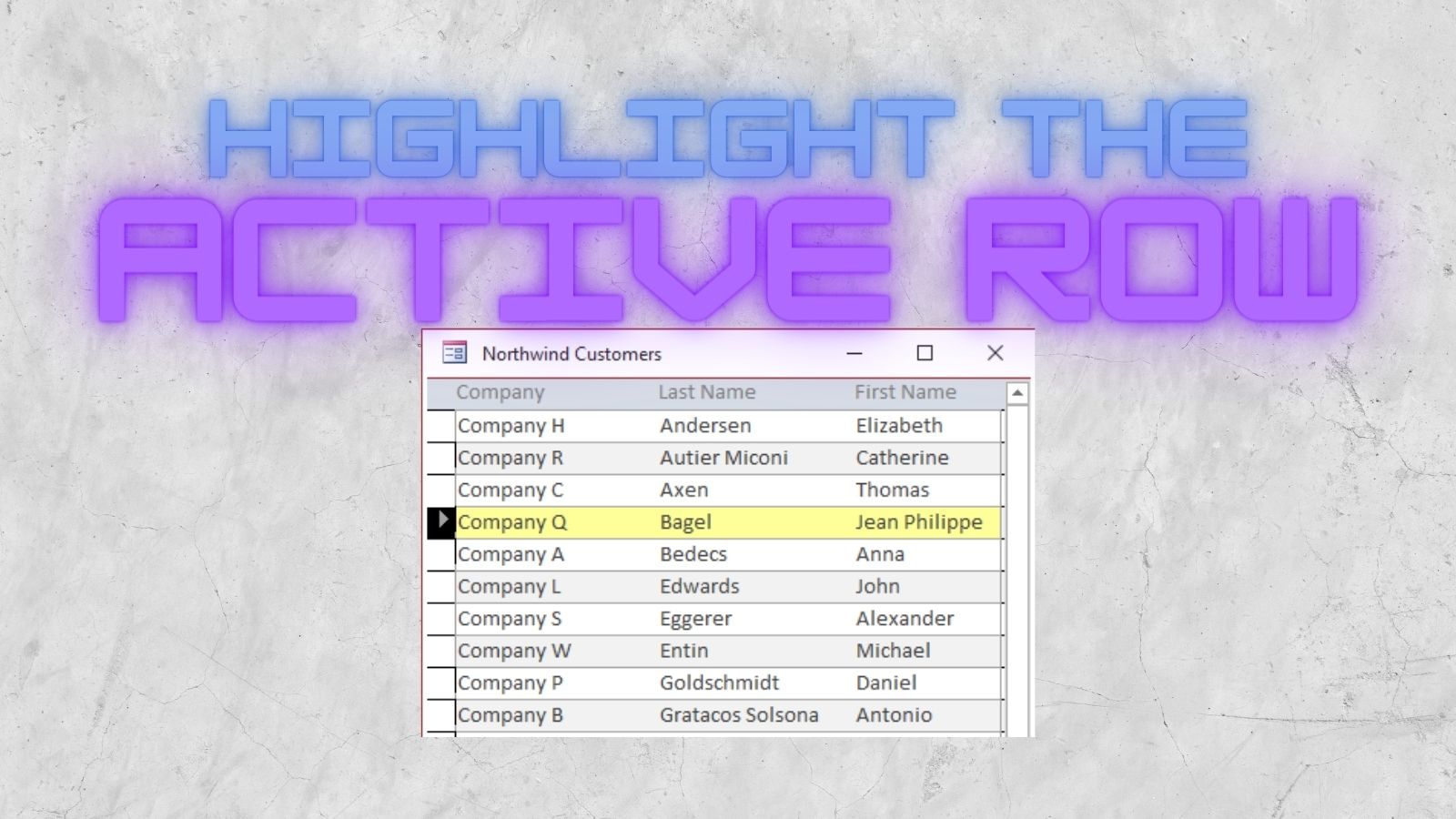
 nolongerset.com
You could have a click event on a particular field in the continuous form and have that event (which is the same for EVERY ROW) go in to determine which is the form's .CurrentRecord, and there are other ways to deal with that, like have a bound checkbox as a field called "SelectedMe" - and if you click that box, since it is bound, it only affects one record. So you could have it identify the record by the fact of being clicked and then reset the value once you know which row you are looking at. Many ways to skin this cat.
You could put buttons on the sub-form in a non-detail section, either a header or footer. Of course, that means when you click something, your cursor is not on a row to be identified. Here is a discussion and sample of some code that would highlight the selected record.
How to Highlight the Current Record in a Continuous Form
Step-by-step instructions for applying a custom highlight to the currently selected record in a continuous form in Microsoft Access.
nolongerset.com
You could have a click event on a particular field in the continuous form and have that event (which is the same for EVERY ROW) go in to determine which is the form's .CurrentRecord, and there are other ways to deal with that, like have a bound checkbox as a field called "SelectedMe" - and if you click that box, since it is bound, it only affects one record. So you could have it identify the record by the fact of being clicked and then reset the value once you know which row you are looking at. Many ways to skin this cat.
- Local time
- Today, 06:02
- Joined
- Feb 19, 2013
- Messages
- 17,819
what code do you have behind your button?
and what is the sql to the recordsource to the form you are trying to open to display the related record?
I suspect one or the other or both are not taking into account the fact the button is on a subform
and what is the sql to the recordsource to the form you are trying to open to display the related record?
I suspect one or the other or both are not taking into account the fact the button is on a subform

JonXL
Active member
- Local time
- Today, 01:02
- Joined
- Jul 9, 2021
- Messages
- 152
I've used buttons on continuous forms many times. For continuous forms,That type of control doesn't work in continuous forms, because a continuous form considers all rows in the form's Detail section to be the same row for control purposes. You cannot put a control on the record row because ALL rows are the record row. More specifically, every row of a continuous form is driven from the same definition - the continuous form's design-view detail section, which defines every row to have the same appearance.
Me.{whatever}should refer to the record currently selected.
- Local time
- Today, 01:02
- Joined
- Feb 28, 2001
- Messages
- 30,903
I believe the problem relates to which kind of button the OP was discussing. For some actions, you are correct - Me.xxx should indeed refer to the current record. But if you did Me.control.BackColor=0 from a continuous form, it does not refer to the currently selected record. ALL of the .control back colors will fade to black at once. That is why conditional fomatting is needed on continuous forms.
JonXL
Active member
- Local time
- Today, 01:02
- Joined
- Jul 9, 2021
- Messages
- 152
Yep. Can't do conditional formatting like that except to 'fake it' as you point out. I might have missed that on your first post.
I think the OP is running into an issue trying to reference the subform as a subform from the subform, which doesn't work. He'll need to do the reference with a simple
I think the OP is running into an issue trying to reference the subform as a subform from the subform, which doesn't work. He'll need to do the reference with a simple
Me.ID (for example).Hello JonXLYep. Can't do conditional formatting like that except to 'fake it' as you point out. I might have missed that on your first post.
I think the OP is running into an issue trying to reference the subform as a subform from the subform, which doesn't work. He'll need to do the reference with a simpleMe.ID(for example).
Sorry but I am painfully new to Access. Me.ID. How does that help?
Last edited:
- Local time
- Today, 06:02
- Joined
- Feb 19, 2013
- Messages
- 17,819
@mathewB so far you have described your issue, not shown it. Makes it difficult for us to provide you specific advice, only point you in what we believe to be the right direction for you to sort out yourself. See this link for how to reference controls in a form from other places.

MajP
You've got your good things, and you've got mine.
- Local time
- Today, 02:02
- Joined
- May 21, 2018
- Messages
- 10,083
There is no reason this should not work. So that means your code is incorrect. But we cannot guess at what your code is. However it should be identical to the code in the main form.

Auntiejack56
Registered User.
- Local time
- Today, 17:02
- Joined
- Aug 7, 2017
- Messages
- 177
The OP is quite right. He is talking about design view, the cue being his reference to the button wizard.
When you create a continuous form, and drop a button on it, the button wizard opens.
If you then add the continuous form to a main form as a subform, the behaviour is different. If you drop a button onto the subform in this configuration, the wizard doesn't open.
To answer the OP's question, I haven't a clue why this happens - I never use the button wizard!!
Jack
When you create a continuous form, and drop a button on it, the button wizard opens.
If you then add the continuous form to a main form as a subform, the behaviour is different. If you drop a button onto the subform in this configuration, the wizard doesn't open.
To answer the OP's question, I haven't a clue why this happens - I never use the button wizard!!
Jack
JonXL
Active member
- Local time
- Today, 01:02
- Joined
- Jul 9, 2021
- Messages
- 152
Where is your button and what action is it supposed to carry out?Hello JonXL
Sorry but I am painfully new to Access. Me.ID. How does that help?
Here is a redacted DB. On the stratas list form hit the button you get the related record. On the Stratas Form Detail in the Contracts section - I cannot set up a button to take me to the related record. The data resource is the Contracts_T. Since this button is within the record I thought it would be 'self-referencing' like on the stratas list. Thoughts? Thanks
Attachments
WHEN PEOPLE START USING UPPER CASE IT IS LIKE BEING SHOUTED AT. On the other hand, when people use sentence case you feel like you are in a conversation. The administrators should force all formatting into sentence case with underlining for emphasis.
- Local time
- Today, 06:02
- Joined
- Feb 19, 2013
- Messages
- 17,819
@MatthewB - we are now on post#19 for a question that should only have required a couple of responses. We are all volunteers here and your reluctance to provide any meaningful information is frustrating. Criticising those trying to help will not earn you any brownie points.
I've taken a look at your db - finally found what I believe to be the right form (stratas_F_C) and taken a look at the the button which has an embedded macro, not vba as we have been talking about. Adding a new button opens up the wizard. Wizards do not work on existing buttons.
I don't use macros as they are notoriously difficult to debug when things don't work as expected, but I do notice you are trying to open the other form using the strata name, not the ID.
What I don't see is where your problem is per post #1 'continuous form as a subform'
I've taken a look at your db - finally found what I believe to be the right form (stratas_F_C) and taken a look at the the button which has an embedded macro, not vba as we have been talking about. Adding a new button opens up the wizard. Wizards do not work on existing buttons.
I don't use macros as they are notoriously difficult to debug when things don't work as expected, but I do notice you are trying to open the other form using the strata name, not the ID.
What I don't see is where your problem is per post #1 'continuous form as a subform'
Thanks for your reply.Yes, it is unfortunately drawn out. I am challenged for time. I tried to provide meaningful information by striping out my DB and posting it. When I go to the Stratas_F_C (Strata Form Continuous) and put a button within a record I am able to open the Stratas_F document. So I can access the details of a strata through a list of stratas.@MatthewB - we are now on post#19 for a question that should only have required a couple of responses. We are all volunteers here and your reluctance to provide any meaningful information is frustrating. Criticising those trying to help will not earn you any brownie points.
I've taken a look at your db - finally found what I believe to be the right form (stratas_F_C) and taken a look at the the button which has an embedded macro, not vba as we have been talking about. Adding a new button opens up the wizard. Wizards do not work on existing buttons.
I don't use macros as they are notoriously difficult to debug when things don't work as expected, but I do notice you are trying to open the other form using the strata name, not the ID.
What I don't see is where your problem is per post #1 'continuous form as a subform'
Within the strata_F there is a tab called Contracts (there are recurring issues from year to year to track). Within Contracts is a Contracts_F_C, however this time when I put the button within the record it does not open the Contracts_F.
So I read to not put buttons within an embedded subform, but to edit the subform directly.
I am not adept with VBA coding and use the Wizard and alike at this point in my learning.
I will try Pat Hartman's solution. Again I work at a job and I am trying to develop a db for myself in my spare time. I am challenged for time. Regards.
Last edited:
I am back again. Trying to understand the commentary. For everyones info, I do not know enough VBA so I use the Wizard at this point in my learning
Since I started this thread I have created a Query that puts the Service and Supplier organized a2z.
Generally I am trying to show records related to the current StrataPlanNr (LMS2430 ect) . If there are 30 suppliers it would be better to just open the related Contract_T subform to see more. Is this possible?
How do I reference the StrataPlanNr to show only the records related to the current StrataPlanNr.
Updated db attached
Thanks
Since I started this thread I have created a Query that puts the Service and Supplier organized a2z.
Generally I am trying to show records related to the current StrataPlanNr (LMS2430 ect) . If there are 30 suppliers it would be better to just open the related Contract_T subform to see more. Is this possible?
How do I reference the StrataPlanNr to show only the records related to the current StrataPlanNr.
Updated db attached
Thanks
Attachments
Thanks for your insights. I learned about relational databases using Filemaker. For some reason I cannot get the hang of how relationships work in Access. It is probably just terminology but I am not comfortable with what I am doing with Access. I will take your advice and reconfigure my db to the norm this weekend. Regards
Similar threads
- Replies
- 29
- Views
- 659
- Replies
- 31
- Views
- 1,801
- Replies
- 4
- Views
- 615

Users who are viewing this thread
Total: 1 (members: 0, guests: 1)