
You are using an out of date browser. It may not display this or other websites correctly.
You should upgrade or use an alternative browser.
You should upgrade or use an alternative browser.
Cancel Record Entry if fields are incomplete
- Thread starter raziel3
- Start date

GPGeorge
George Hepworth
- Local time
- Yesterday, 20:49
- Joined
- Nov 25, 2004
- Messages
- 3,420
One approach would be to use the Before Update event of the FORM.
In the Form's Before Update event, you can display a MsgBox asking the user if they want to cancel the update/entry of the current record. This will only fire if the record is dirty, i.e. has been started and not saved, or edited and not saved. There is another complication that I'll address below.
If the user wants to cancel the update, you can cancel it there in the Form's Before Update event.
Now, this will always fire in the Form's Before Update event, so if your goal is only to do so if the user wants to move to an existing record, that gets more tricky because I'mnot sure how you can determine where the user has tried to move focus at this point.
The other complication is what you mean by "incomplete fields". Are all fields required, some fields required? What constitutes an incomplete field in this scenario? Is it ever permissible to leave a field unchanged at this point? Does this requirement only apply sometimes, i.e. when the user wants to select an existing record before saving the current record?
Thank you for illuminating the process and rules.
In the Form's Before Update event, you can display a MsgBox asking the user if they want to cancel the update/entry of the current record. This will only fire if the record is dirty, i.e. has been started and not saved, or edited and not saved. There is another complication that I'll address below.
If the user wants to cancel the update, you can cancel it there in the Form's Before Update event.
Now, this will always fire in the Form's Before Update event, so if your goal is only to do so if the user wants to move to an existing record, that gets more tricky because I'mnot sure how you can determine where the user has tried to move focus at this point.
The other complication is what you mean by "incomplete fields". Are all fields required, some fields required? What constitutes an incomplete field in this scenario? Is it ever permissible to leave a field unchanged at this point? Does this requirement only apply sometimes, i.e. when the user wants to select an existing record before saving the current record?
Thank you for illuminating the process and rules.

raziel3
Registered User.
- Local time
- Yesterday, 23:49
- Joined
- Oct 5, 2017
- Messages
- 315
There are 4 fields.The other complication is what you mean by "incomplete fields". Are all fields required, some fields required? What constitutes an incomplete field in this scenario? Is it ever permissible to leave a field unchanged at this point? Does this requirement only apply sometimes, i.e. when the user wants to select an existing record before saving the current record?
PDate - Required
Item - Required
Quantity - Required
Cost - Required
Vatable (check box) - Can be checked or not
So if I start a new record entry and PDate is filled but I scroll up and set focus to a prior record. The New record should be cancelled and undo the data entry for PDate or whatever fields were filled.
raziel3
Registered User.
- Local time
- Yesterday, 23:49
- Joined
- Oct 5, 2017
- Messages
- 315

MajP
You've got your good things, and you've got mine.
- Local time
- Yesterday, 23:49
- Joined
- May 21, 2018
- Messages
- 10,070
Code:
Private Sub Form_BeforeUpdate(Cancel As Integer)
DoCmd.SetWarnings False
'PDate -Required
'Item -Required
'QUANTITY -Required and not zero
'Cost -Required and not zero
Dim strMsg
Dim invalid As Boolean

strMsg = "The Following Field/s Need to be entered:" & vbCrLf

If IsNull(Me.UPC) Then
  strMsg = strMsg & "UPC" & vbCrLf
  invalid = True
End If

If Not IsDate(Me.PurDate) Then
  strMsg = strMsg & "Purchase Date" & vbCrLf
  invalid = True
End If

If Me.QUANTITY <= 0 Then
  strMsg = strMsg & "Quantity" & vbCrLf
  invalid = True
End If

If Me.Cost <= 0 Then
  strMsg = strMsg & "Cost"
  invalid = True
End If

If invalid Then
   strMsg = strMsg & vbCrLf & vbCrLf & "Please fix or hit escape to clear."
   MsgBox strMsg, vbInformation, "Required"
   Cancel = True
   'Me.Undo
End If

End Sub
Last edited:
MajP
You've got your good things, and you've got mine.
- Local time
- Yesterday, 23:49
- Joined
- May 21, 2018
- Messages
- 10,070
I am going to assume a quantity of 0 and cost of 0 are invalid. If they are valid choices then do not default these to 0. The reason is there is a difference between a default value of 0 symbolizing no entry and a purposeful entry of 0. You would not be able to tell which is intended.
raziel3
Registered User.
- Local time
- Yesterday, 23:49
- Joined
- Oct 5, 2017
- Messages
- 315
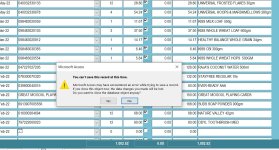
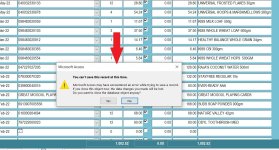
I'm still getting the "You can't save this at this time" notification. How to suppress this?
If I press Esc to undo the record entry, it closes no problem, but as long as a field is populated I get the error before close. Can the form automatically clear the partial record entry then close without prompting "You can't save this at this time"?
If I press Esc to undo the record entry, it closes no problem, but as long as a field is populated I get the error before close. Can the form automatically clear the partial record entry then close without prompting "You can't save this at this time"?
MajP
You've got your good things, and you've got mine.
- Local time
- Yesterday, 23:49
- Joined
- May 21, 2018
- Messages
- 10,070
raziel3
Registered User.
- Local time
- Yesterday, 23:49
- Joined
- Oct 5, 2017
- Messages
- 315
The code works at it should. There is no problem there.
What I wanted to know is if this message box (see attachment) can be bypassed or suppressed?
After escaping the message box from @MajP code this one pops up when I try to close the form (clicking "x" on the form control box). I think it's an Access default for saving the record.
What I did so far was added Me.Undo
On closing the form, this clears the incomplete record but then the "You can't save this at this time" notification pops up.
What I wanted to know is if this message box (see attachment) can be bypassed or suppressed?
After escaping the message box from @MajP code this one pops up when I try to close the form (clicking "x" on the form control box). I think it's an Access default for saving the record.
What I did so far was added Me.Undo
Code:
Private Sub Form_BeforeUpdate(Cancel As Integer)
     If Not IsValid Then
       Cancel = True
       Me.Undo
    End If
End Sub
On closing the form, this clears the incomplete record but then the "You can't save this at this time" notification pops up.
Attachments
tvanstiphout
Well-known member
- Local time
- Yesterday, 20:49
- Joined
- Jan 22, 2016
- Messages
- 715
A more elegant (if I may say so) implementation of field level validation of required fields, including optionally required fields (if status=X then the field is required) can be found in the Northwind 2 Dev edition template. Per the documentation, it takes only 3 lines of code to validate a form.Code:Private Sub Form_BeforeUpdate(Cancel As Integer) DoCmd.SetWarnings False 'PDate -Required 'Item -Required 'QUANTITY -Required and not zero 'Cost -Required and not zero Dim strMsg Dim invalid As Boolean strMsg = "The Following Field/s Need to be entered:" & vbCrLf If IsNull(Me.UPC) Then strMsg = strMsg & "UPC" & vbCrLf invalid = True End If If Not IsDate(Me.PurDate) Then strMsg = strMsg & "Purchase Date" & vbCrLf invalid = True End If If Me.QUANTITY <= 0 Then strMsg = strMsg & "Quantity" & vbCrLf invalid = True End If If Me.Cost <= 0 Then strMsg = strMsg & "Cost" invalid = True End If If invalid Then strMsg = strMsg & vbCrLf & vbCrLf & "Please fix or hit escape to clear." MsgBox strMsg, vbInformation, "Required" Cancel = True 'Me.Undo End If End Sub
View attachment 115789
Not OP, but I wish when experts here refer us to northwind2, they could be a little bit more specific. May I ask in which form should I see these 3 lines for validation and see how it's done?(if status=X then the field is required).............it takes only 3 lines of code to validate a form.
I searched the whole project for "status", 188 lines were found. I's hard to go through all and check what is what.
I searched for "If status=", the result was 0.
In which form's validation I can see how it's done.
Thanks.
tvanstiphout
Well-known member
- Local time
- Yesterday, 20:49
- Joined
- Jan 22, 2016
- Messages
- 715
Did you follow the link? If so, you would have seen it's about the Orders form, specifically frmOrderDetails.Not OP, but I wish when experts here refer us to northwind2, they could be a little bit more specific. May I ask in which form should I see these 3 lines for validation and see how it's done?
I searched the whole project for "status", 188 lines were found. I's hard to go through all and check what is what.
I searched for "If status=", the result was 0.
In which form's validation I can see how it's done.
Thanks.
There is a vldeo where I discuss validation as well.
-Tom.
Yes, and No. I clicked it, but didn't read the article. I was in my 15 min break time and your link title (Documentation) gave me the idea of a long article.Did you follow the link?
I jumped to Northwind. I had a feeling searching "Status", may be faster.
Anyway, thanks.
Similar threads

- Replies
- 10
- Views
- 761


- Replies
- 23
- Views
- 607

Users who are viewing this thread
Total: 1 (members: 0, guests: 1)