Checkboxes

bigbadbess24

Registered User.
Local time
Today, 10:39
Joined
Mar 9, 2006
Messages
83
I have 4 check boxes represent 4 grade levels. When I click on a grade I have a query run for me a list of all 9th graders or 10th graders or both together.
When I run the form for the first time, all four boxes are check, when I unclick all of them and I click which ones I want the form does not work. But if I leave them click the report will work. Basically what is happening is when I unclick them, the lose their value.
I have the check box set up with a Default Value as "09" or "10" base on what Grade Level there is.
So my two questions are, how do I keep the value of the check boxes after I unclick and click again and Secondly, is there a way to have the boxes unchecked when I run the program?
 
Ok I see what you mean when I have the text box, and it switches between 1and 0. But how do I get it to work? It showed me how it goes between -1 and 0
 
Here is SQL of the query

SELECT [tbl STUDENT DATA - ACTIVE].SchoolDistrict, [tbl STUDENT DATA - ACTIVE].Grade, [tbl STUDENT DATA - ACTIVE].First, [tbl STUDENT DATA - ACTIVE].Last
FROM [tbl STUDENT DATA - ACTIVE]
WHERE ((([tbl STUDENT DATA - ACTIVE].SchoolDistrict)=[Forms]![frm Grade/District Chkbox]![cboDistrict]) AND (([tbl STUDENT DATA - ACTIVE].Grade)=[Forms]![frm Grade/District Chkbox]![chk9] Or ([tbl STUDENT DATA - ACTIVE].Grade)=[Forms]![frm Grade/District Chkbox]![chks10] Or ([tbl STUDENT DATA - ACTIVE].Grade)=[Forms]![frm Grade/District Chkbox]![chk11] Or ([tbl STUDENT DATA - ACTIVE].Grade)=[Forms]![frm Grade/District Chkbox]![Chk12]));
 
It may be a good idea but its not the look they are looking for. I am actually not going to use checkboxes but instead radio buttons but I know they are one of the same. Thanks for your help anyway. I will try to fumble around with IF statements and see what I can come up with.
 
This SQL might be your solution

Hi Bess

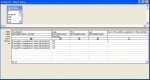
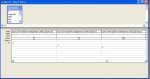
I have had a look at what I think you want to do and have come up with the following SQL statement...

Code:
SELECT [tbl STUDENT DATA - ACTIVE].SchoolDistrict, [tbl STUDENT DATA - ACTIVE].Grade, [tbl STUDENT DATA - ACTIVE].First, [tbl STUDENT DATA - ACTIVE].Last
FROM [tbl STUDENT DATA - ACTIVE]
WHERE 
((([tbl STUDENT DATA - ACTIVE].SchoolDistrict)=[Forms]![frm Grade/District Chkbox]![cboDistrict]) AND (([tbl STUDENT DATA - ACTIVE].Grade)="09") AND (([Forms]![frm Grade/District Chkbox]![chk9])=-1)) OR 
((([tbl STUDENT DATA - ACTIVE].SchoolDistrict)=[Forms]![frm Grade/District Chkbox]![cboDistrict]) AND (([tbl STUDENT DATA - ACTIVE].Grade)="10") AND (([Forms]![frm Grade/District Chkbox]![chks10])=-1)) OR 
((([tbl STUDENT DATA - ACTIVE].SchoolDistrict)=[Forms]![frm Grade/District Chkbox]![cboDistrict]) AND (([tbl STUDENT DATA - ACTIVE].Grade)="11") AND (([Forms]![frm Grade/District Chkbox]![chk11])=-1)) OR 
((([tbl STUDENT DATA - ACTIVE].SchoolDistrict)=[Forms]![frm Grade/District Chkbox]![cboDistrict]) AND (([tbl STUDENT DATA - ACTIVE].Grade)="12") AND (([Forms]![frm Grade/District Chkbox]![Chk12])=-1))
ORDER BY [tbl STUDENT DATA - ACTIVE].Grade;

What this does is look at whether the check-boxes have been set (Value of -1) for each grade year (I'm assuming years 9 - 12), being in the UK, the US grades are lost on me :o

I did notice that the years are stored as strings and that in a sample db you posted a while back, your 9th Grade is stored as "09". This makes sorting the list work, but maybe this should be changed to numeric (byte) with upper and lower limits of 9 and 12. - Just a thought.

I did put in extra Cr/Lf into the statement after the WHERE for readability sakes and these should probably be removed when you copy it into your query/code.

For completeness, I have added screen dumps of the query builder for you.

To get the check-boxes / radio buttons to appear unchecked when the form opens, set their default values to 0.

Hope this helps as the thought of putting in IF statements was too much to bear thinking about...

Regards
Rod
 

Attachments

  • query1.JPG
    query1.JPG
    63.9 KB · Views: 126
  • Query2.JPG
    Query2.JPG
    56.3 KB · Views: 121
Last edited:
Amazing

Wow! That worked. I never really thought about setting up that way. I knew that my default value was wrong. Once again thanks for your help on another problem!
 

Users who are viewing this thread

Back
Top Bottom