I have a table which is used to record electric billing period dates, total kWh and costs for a list of locations each month. I would like to compare the quarter total kWh and costs for this year "2013" against same quarter last year "2012". I have created two queries, the 1st is capturing data from 2013 and the 2nd is capturing data from 2012. I created a 3rd query which joins the 1st and 2nd together by month where fields match. Both tables have the same fields, however there is more records in 2012 than 2013. How can I join the tables together so months that have no data are left blank? :banghead:

You are using an out of date browser. It may not display this or other websites correctly.
You should upgrade or use an alternative browser.
You should upgrade or use an alternative browser.
Comparing data from current to previous years
- Thread starter jsbarroso
- Start date
You're kind of all over the place: you start off talking about a table, but then you have 2 tables with the same fields; you want data by quarter but you created a query which joins data by month. Can you post some sample data (along with field names and table names)? Then based on that sample data, post what the ultimate result of your query should be.
Sorry. Let me start over. I have a table used to record electricity usages each month when the energy invoices are paid. I have attached a sample database with a copy of the actual table, and a simple query that calculates the various total usages and costs.
I would like to create a report from the query table that allows the users to enter a date range i.e. 1/1/2013 to 3/31/2013 (Qtr 1) which compared the total kWh and amount against a previous year.
The report results show look like the example below:
Location |2012 Total kWh |2012 Total Amount |2013 Total kWh |2012 Total Amount
106068 – 1 Robbins Rd |100,000 |$10,000 |125,000 |$12,500
I would like to create a report from the query table that allows the users to enter a date range i.e. 1/1/2013 to 3/31/2013 (Qtr 1) which compared the total kWh and amount against a previous year.
The report results show look like the example below:
Location |2012 Total kWh |2012 Total Amount |2013 Total kWh |2012 Total Amount
106068 – 1 Robbins Rd |100,000 |$10,000 |125,000 |$12,500
Attachments
Last edited:
- Local time
- Today, 22:38
- Joined
- Feb 19, 2013
- Messages
- 17,756
Had a quick look at your data, there are a number of clarifications required before a proper solution can be suggested
- Presumably you want to use the period start/end dates rather than the billing date?
- Utilities usually have a service start date and end date, I see you don't (unless it is in another table, which would be the right practice) so what do you want to do about the situation where last year you don't have full billing for the period - perhaps it was a new location, perhaps the bill has not been posted?, or this year the location was disposed of?
- looking at your first location 107884L - 2535 HWY 121 Bldg C there are gaps in the period start/end dates -for example one period ends 28th Sept 2012 next one starts 1st October. You also have overlaps where the startdate and end date are the same or the end date of one record is later than the start date of the next record (look at period ending 28/12/2012, next one starts 27/12/2012 - are these anomolies to be ignored or accounted for? I presume you have incomplete data for 2012?
Thank you for the quick response.
· Yes. I do want to use the period start/ending dates to divine the reporting period.
· In this case the utilities start/end dates are the “period start/end dates”. A number of locations are new to the portfolio in 2013. I assumed any location with no billing data for 2012 would be left blank.
· The 2012 data is still being entered and cleaned up; once completed there should not be any gaps between period ending and the next starting.
· Yes. I do want to use the period start/ending dates to divine the reporting period.
· In this case the utilities start/end dates are the “period start/end dates”. A number of locations are new to the portfolio in 2013. I assumed any location with no billing data for 2012 would be left blank.
· The 2012 data is still being entered and cleaned up; once completed there should not be any gaps between period ending and the next starting.
Last edited:
My first thought was to create two separate queries; the 1st would capture the data for the current year i.e. “2013”. The 2nd query would capture the same data for the previous year “2012”. Then, create a 3rd query to join the two tables together. Is this possible?
- Local time
- Today, 22:38
- Joined
- Feb 19, 2013
- Messages
- 17,756
It is - you can either do as you suggest or in one query which uses subqueries.
Sorry, more questions:
If the period requested is from 1st Jan to 31st March and the billing period is monthly commencing 15th of the month, do you want to prorate the two billing periods which straddle the start and end dates requested? Or do you simple want to add up the Kwhrs based on the billing end date?
If the former, since the period start is the same as the period end for the previous record you will double count that date so you need to adjust one - e.g. instead of using period end date you use period end date less one day. Which one would you want to adjust?
Sorry, more questions:
If the period requested is from 1st Jan to 31st March and the billing period is monthly commencing 15th of the month, do you want to prorate the two billing periods which straddle the start and end dates requested? Or do you simple want to add up the Kwhrs based on the billing end date?
If the former, since the period start is the same as the period end for the previous record you will double count that date so you need to adjust one - e.g. instead of using period end date you use period end date less one day. Which one would you want to adjust?
- Local time
- Today, 22:38
- Joined
- Feb 19, 2013
- Messages
- 17,756
I've gone with the 3 query route and provided a solution. There appears to be an anomaly where your currency is dollars but the date format is UK. This may have an impact on the date comparisons so you will need to doublecheck you are getting the right result.
The queries are
QCY=current year
QPY=prior year
QCYPY combines the two
Note this prompts for start and end dates, you will probably need to change all the occurences to refer to controls on a form
The queries are
QCY=current year
QPY=prior year
QCYPY combines the two
Note this prompts for start and end dates, you will probably need to change all the occurences to refer to controls on a form
Attachments
CJ_London,
We need to compare the [Total kWh] and [Total Amount] instead of the [Billing kW] and [Delivery Amount]. Therefore, I am using the qryPortfolioEnergyDetail query to capture the data.
I changed the QPY and QCY expressions accordingly. But, when I run the QCYPY query the CY looks good however, the PY [Total kWh] and [Total Amount] data is shown as a negative numbers. I am puzzled! See attached sample database.
Any assistance would be greatly appreciated.
Thank you,
We need to compare the [Total kWh] and [Total Amount] instead of the [Billing kW] and [Delivery Amount]. Therefore, I am using the qryPortfolioEnergyDetail query to capture the data.
I changed the QPY and QCY expressions accordingly. But, when I run the QCYPY query the CY looks good however, the PY [Total kWh] and [Total Amount] data is shown as a negative numbers. I am puzzled! See attached sample database.
Any assistance would be greatly appreciated.
Thank you,
Attachments
- Local time
- Today, 22:38
- Joined
- Feb 19, 2013
- Messages
- 17,756
Sorry - don't have time to look now, I'm out all day.
But re your points:
But re your points:
Open the query, remove the group by and you will see all the individual records than make up the total - conentrate on the ones that are showing a negative valuedata is shown as a negative numbers
Yes - if you don't want to prorate. Just do sum ([Total kWh])Is it possible to capture the sum of [Total kWh] and [Total Amount] for a PY and CY period for each location without the prorated factor?
CJ_London,
I solved the problem after I posted my thread last night “long day”. For this piece we just need to total the kWh. I need to validate the data but, it seems to be working.
Thank you again for your quick response.
I solved the problem after I posted my thread last night “long day”. For this piece we just need to total the kWh. I need to validate the data but, it seems to be working.
Thank you again for your quick response.
I am using the “period ending date” on a utility invoice as the factor to determine the month, quarter and year the period usage (kWh) falls under. But, when a period ending date is for example equal or less than the 15th day of each month; I want to consider the energy usage to be for the previous month. Any recommendations on how can I write an expression in a query to do this?
CJ_London,
I have another question. I need to show our energy consumption comparing results current to previous year by month. I have tried a few different approaches such; as adding a month field to both pervious and current year queries but, I either get the correct data from current or previous. How can I achieve this?
Any help would greatly appreciated.
I have another question. I need to show our energy consumption comparing results current to previous year by month. I have tried a few different approaches such; as adding a month field to both pervious and current year queries but, I either get the correct data from current or previous. How can I achieve this?
Any help would greatly appreciated.
CJ London,
The sample database includes the actual tables and queries. I have also attached a sample of the report which I am currently populating manually and I would like to automate the process using the data.
The sample database includes the actual tables and queries. I have also attached a sample of the report which I am currently populating manually and I would like to automate the process using the data.
Attachments

Hi CJ Landon,
Your recommendation to create two separate queries to capture kWh totals from current to previous year than a third query to joined them together by location worked great. But, now I would like to show the kWh detail by month for each location. Any recommendation on how I can achieve this?
Any assistance would be greatly appreciated.
jsbarroso
Your recommendation to create two separate queries to capture kWh totals from current to previous year than a third query to joined them together by location worked great. But, now I would like to show the kWh detail by month for each location. Any recommendation on how I can achieve this?
Any assistance would be greatly appreciated.
jsbarroso
- Local time
- Today, 22:38
- Joined
- Feb 19, 2013
- Messages
- 17,756
you should just need to drag month down into the query - but will probably need to allow for missing months etc.
Something like this should do - but you need to check it is giving the results you require - for example I haven't allowed for values last year and nothing this year - the below allows for values this year and nothing last year
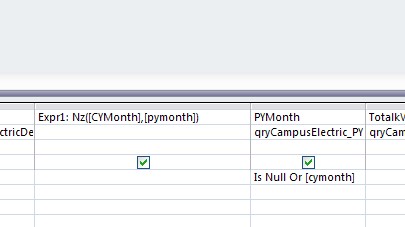
Something like this should do - but you need to check it is giving the results you require - for example I haven't allowed for values last year and nothing this year - the below allows for values this year and nothing last year
Attachments

Similar threads

- Replies
- 3
- Views
- 695
- Replies
- 6
- Views
- 946

- Replies
- 5
- Views
- 420

Users who are viewing this thread
Total: 1 (members: 0, guests: 1)