
ConcatRelated Count in a report

iaasiqbal

New member
Local time
Today, 11:53
Joined
Mar 30, 2022
Messages
26
Dear sir
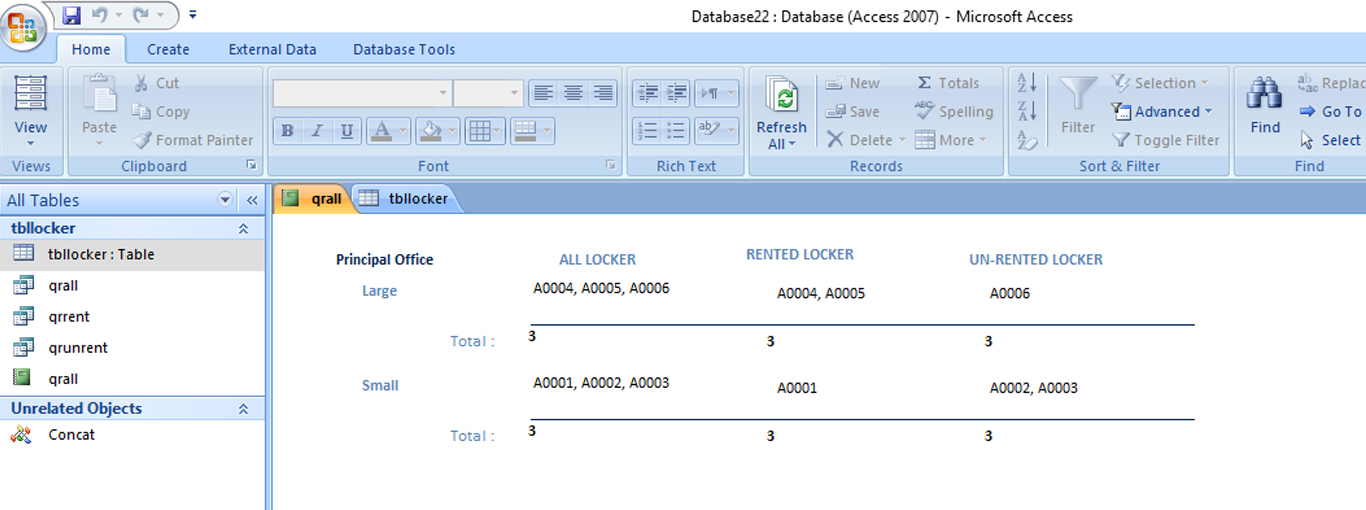
I have a database of locker inventory. (All, rented & unrented category) . In a report I can count total as all ,but cant not counted rented and un rented column . please help in this regards . i have uploaded db here
summary.jpg
 
I have a database of locker inventory. (All, rented & unrented category) . In a report I can count total as all ,but cant not counted rented and un rented column . please help in this regards . i have uploaded db here
The solution depends entirely on the structure of your data, which we can't see in the picture.
Please post your application (or part of it) on the forum.
 
Hi. Welcome to AWF!

Lots of options for you. Which one to use depends on your setup. You could try using DCount() too.
 
my db here
ALL LOCKER:
Code:
=DCount("LockerNo";"qrall";"BranchName=""" & [BranchName] & """ and LockerSize='" & [LockerSize] & "'")
RENTED LOCKER:
Code:
=DCount("LockerNo";"qrall";"BranchName=""" & [BranchName] & """ and LockerSize='" & [LockerSize] & "' AND Rented = True")
UN-RENTED LOCKER:
Code:
=DCount("LockerNo";"qrall";"BranchName=""" & [BranchName] & """ and LockerSize='" & [LockerSize] & "' AND Rented = False")

See to "tx" report ...
 

Attachments

will only work on Print Preview.
 

Attachments

ALL LOCKER:
Code:
=DCount("LockerNo";"qrall";"BranchName=""" & [BranchName] & """ and LockerSize='" & [LockerSize] & "'")
RENTED LOCKER:
Code:
=DCount("LockerNo";"qrall";"BranchName=""" & [BranchName] & """ and LockerSize='" & [LockerSize] & "' AND Rented = True")
UN-RENTED LOCKER:
Code:
=DCount("LockerNo";"qrall";"BranchName=""" & [BranchName] & """ and LockerSize='" & [LockerSize] & "' AND Rented = False")

See to "tx" report ...
thanks a lot , it is working fine , thanks again
 

Users who are viewing this thread

Back
Top Bottom