Counting a group of text box values if not blank

weilerdo

Registered User.
Local time
Today, 18:44
Joined
Apr 21, 2005
Messages
109
Hi All, I have a question that I can't seem to get my head around. I have a form that has 10 text boxes ( txtDate1 to txtDate10 ) which get populated by a datepicker. I need a way to count how many of the text boxes have a value in them. I have tried Dcounts and Nz Nulls but cant seem to figure it out. Example:

txtDate1 = 7/10/07
txtDate2 = 7/15/07
txtDate3 = 7/16/07
txtDate4 =
txtDate5 =

txtTotal= 3

Thank you in advance for looking at this and for any assistance.
 
I do something similar with Stock and I realise this is not probably what you want but play around with it. I can remember were I found this:

On the form are Fields 1-24 ([Records2Select])

Dim intI As Integer
Dim intN As String
Dim intV As String
Dim MyObject As Object
Set MyObject = CodeContextObject

For intI = 1 To MyObject![Records2Select]
intV = MyObject(CStr(intI)).Value
If MyObject![SelectNum] = "N" Then
If intI = 1 And intV <> "0" Then
intN = "'" & intV & "'"
ElseIf intI <> 1 And intV <> "0" Then
intN = intN & ",'" & intV & "'"
End If
Else
If intI = 1 And intV <> 0 Then
intN = intV
ElseIf intI <> 1 And intV <> 0 Then
intN = intN & "," & intV
End If
End If
Next
GetSelectedRecords = intN
End Function

At the end of this I get something usable for an IN statement

Simon
 
Simon - for code this long please use the code tags so that it displays with the spaces and indents intact (for easier reading). Let me know if you aren't sure how to do it.
 
Bob,

I dont mean to obtuse but I don't know what you mean by code tags. Can you tell me how do this properly. I have been cut and pasting which is obviously wrong.

Simon
 
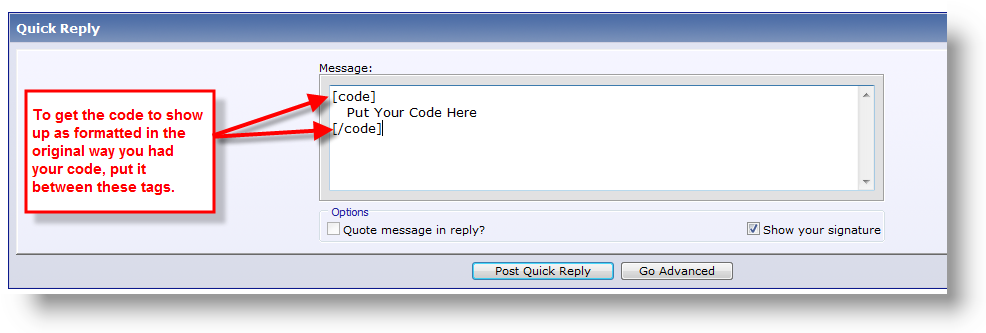
Copying and pasting is fine, but just before the start of the code put the word code in between two square brackets [] and then at the end of the code put /code in between two square brackets.
 
A quick screenshot to help:

codetags.png
 
RE: Counting a group of text box valve if not blank

Thanks Simon, VB is not my strongest point. Im not sure if I am understanding your code exactly. Is it a function?, and would I repeat the code 10 times 1 for each text box? I think I would call it from the text box that I want the total in correct. Im just very confused on this one.


Thanks
Don:confused:
 
Basically it is a FOR loop

On your Form have a numeric field FieldstoInclude (Name Change)
in your case 5

Declare:

Code:
With CodeContextObject
Dim intName as String
Dim IntField as String
dim intCount as Integer
intName = txtDate

For i = 1 to 5
intField = "txtDate" & i
if Not isnull(intField) then
IntCount = i
End If
Next
MsgBox "TxtTotal = " & intCount

All you are trying to do is to scope how namy times to test txtDaten not null, progress through the fields and report i.

My code may not be 100% because my fields for simplicity are numeric 1 -24.

Simon
 
Thanks Simon, I will play around with it and make it work. I appreciate all your help......
 

Users who are viewing this thread

Back
Top Bottom