

isladogs
Access MVP / VIP
- Local time
- Today, 22:19
- Joined
- Jan 14, 2017
- Messages
- 19,311
Ah I see. There are plenty of others to choose from... 


 :banghead:
Look in the navigation pane
Linked tables have a small blue arrow next to the table name
Local tables do not
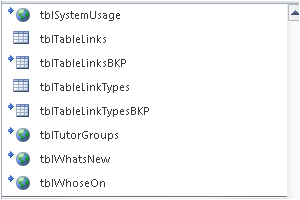
If you hover over a linked table you will see the linked connection details.
If you do that over a local table you just see the table name.
If they are local tables, the easiest solution will be to replace that users' FE with a working version
BUT before you do so you need to save a copy of the current FE so the data can be extracted and saved to the BE file
Hope that helps
:banghead:Look in the navigation pane
Linked tables have a small blue arrow next to the table name
Local tables do not
If you hover over a linked table you will see the linked connection details.
If you do that over a local table you just see the table name.
If they are local tables, the easiest solution will be to replace that users' FE with a working version
BUT before you do so you need to save a copy of the current FE so the data can be extracted and saved to the BE file
Hope that helps


