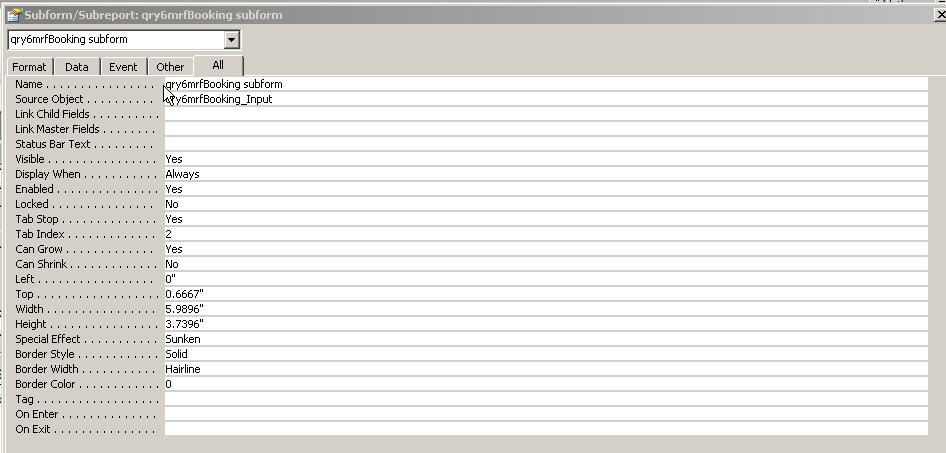
I have a set of nested forms (image below) where I have an input box on the main form that I need to set to null on form open and I need the results to be displayed in the second form. This second form is based on a query and is where we will be editing the data.
Using a form that was provided by a user here I have built my form and am now trying to get the code to work.
The question I have is the source form used a single table with all of the data, My query is pulling from 2 tables that have a single field (strSulzerReferenceID) as the relation field. I do not think that should matter, also I am not using the relationship field as the search value, I am using (dblSTARSID) which is in the primary data table (tblStarsMaster) and not in the secondary table (tbl6mrfWorkingData) What am I missing?
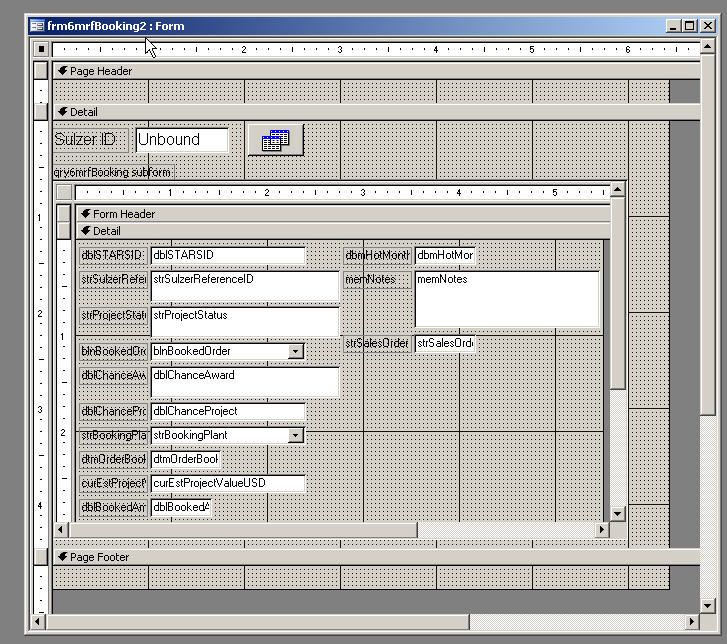
Using a form that was provided by a user here I have built my form and am now trying to get the code to work.
Code:
[FONT="Fixedsys"]Option Compare Database

Sub SetFilter()

    Dim LSQL  As String

    LSQL = "select * from Customers"
    LSQL = LSQL & " where CustomerID = '" & cboSelected & "'"

    Form_frmCustomers_sub.RecordSource = LSQL

End Sub

Private Sub cboSelected_AfterUpdate()

    'Call subroutine to set filter based on selected CustomerID
    SetFilter

End Sub

Private Sub Form_Open(Cancel As Integer)

    'Call subroutine to set filter based on selected CustomerID
    SetFilter

End Sub[/FONT]
The question I have is the source form used a single table with all of the data, My query is pulling from 2 tables that have a single field (strSulzerReferenceID) as the relation field. I do not think that should matter, also I am not using the relationship field as the search value, I am using (dblSTARSID) which is in the primary data table (tblStarsMaster) and not in the secondary table (tbl6mrfWorkingData) What am I missing?