
Data Update Form using nested forms and input box for search

bweldon

Registered User.
Local time
Today, 05:32
Joined
May 22, 2012
Messages
24
I have a set of nested forms (image below) where I have an input box on the main form that I need to set to null on form open and I need the results to be displayed in the second form. This second form is based on a query and is where we will be editing the data.

Using a form that was provided by a user here I have built my form and am now trying to get the code to work.

Code:
[FONT="Fixedsys"]Option Compare Database

Sub SetFilter()

    Dim LSQL  As String
    
    LSQL = "select * from Customers"
    LSQL = LSQL & " where CustomerID = '" & cboSelected & "'"
    
    Form_frmCustomers_sub.RecordSource = LSQL
    
End Sub

Private Sub cboSelected_AfterUpdate()
    
    'Call subroutine to set filter based on selected CustomerID
    SetFilter
    
End Sub

Private Sub Form_Open(Cancel As Integer)
    
    'Call subroutine to set filter based on selected CustomerID
    SetFilter
    
End Sub[/FONT]

The question I have is the source form used a single table with all of the data, My query is pulling from 2 tables that have a single field (strSulzerReferenceID) as the relation field. I do not think that should matter, also I am not using the relationship field as the search value, I am using (dblSTARSID) which is in the primary data table (tblStarsMaster) and not in the secondary table (tbl6mrfWorkingData) What am I missing?
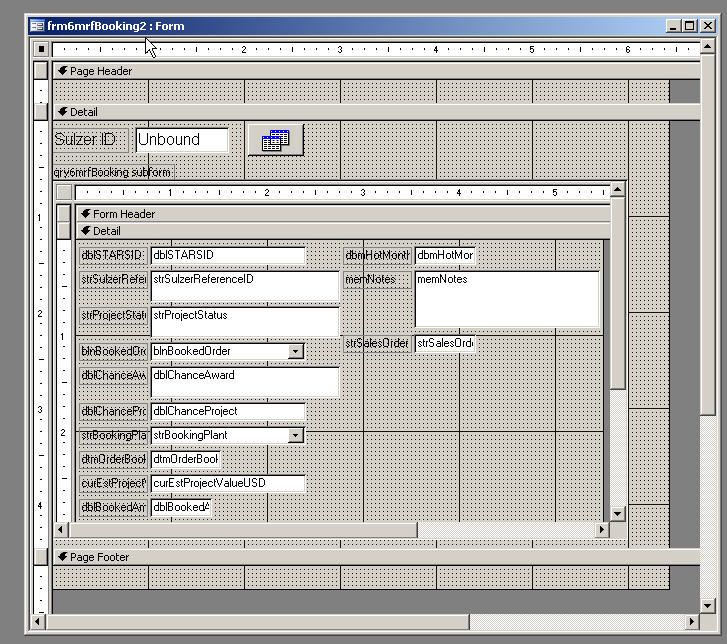
form1.jpg
 

Attachments

  • form1.jpg
    form1.jpg
    102.4 KB · Views: 110
Check your LSQL Statement. I'm assuming your problem is that no records are showing up in your subform?? You should be a bit more specific as to what the actual issue is. Anyways, first off I don't see any control in your screenshot called cboCustomer? But your code references it in SetFilter. You should put a breakpoint where you set the recordsource of your form and check the SQL Statement. Also, on Form_Open if cboCustomer is blank you are still setting the filter. Are you getting any error message??
 
Thanks I should have put my code in there

Code:
    Dim LSQL  As String
    
    LSQL = "select * from tblStarsMaster"
    LSQL = LSQL & " where dblStarsID = '" & dblStarsID_frm & "'"

This is mine where I have changed things to what I thought I should have, but then the last line Form_frmCustomers_sub.RecordSource = LSQL
is the one that is causing the error when run, maybe this makes the issue clearer.
 
I am getting a run-time error '424' Object required
 
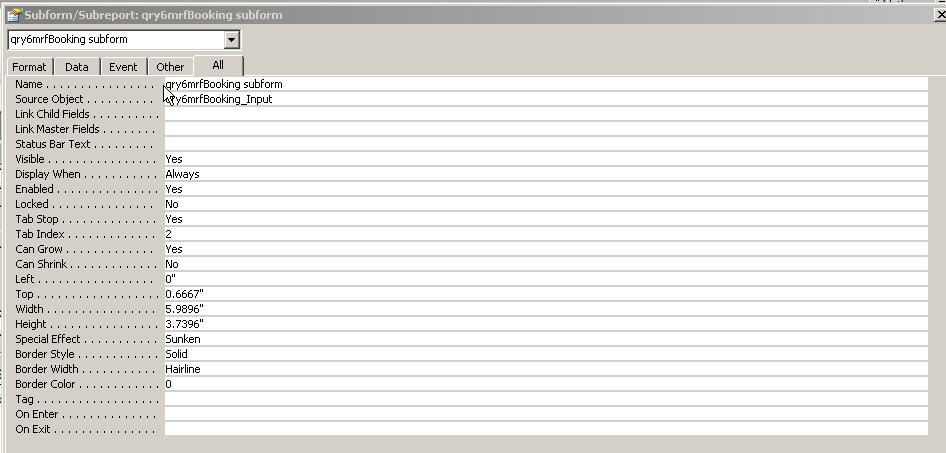
check your subform name. You can check by using the Me. keyword in the code window and you should see all of the object names in your form. It looks like the form name is actually the name of the query. You can also find the name by double-clicking the subform (with the outer border selected - not the actual subform) and check the form name property.
 
Started looking I thought this is what your are looking for?

form2.jpg
 
Yes. You need to change your code! here...
Code:
[FONT=Courier New]Form_frmCustomers_sub.RecordSource = LSQL[/FONT]
SHOULD BE
Code:
[qry6mrfbooking subform].recordsource = LSQL

also I would not put spaces in the form names. It makes it more difficult to reference because now you have to enclose the form name in brackets. If you change it to qry6mrfbookingsubform you can just then reference it like this:
Code:
[code]qry6mrfbookingsubform.recordsource = LSQL
 
Ok should I be using the subform name or the source object?
 
Made the change to the form name to eliminate the space, qry6mrfBookingsubform

Code:
Sub SetFilter()
    Dim LSQL  As String
    
    LSQL = "select * from tblStarsMaster"
    LSQL = LSQL & " where dblStarsID = '" & dblStarsID_frm & "'"
    
    qry6mrfBookingsubform.RecordSource = LSQL

Now I get a compile error: Method or data member not found
 
Make sure your tblStarsMaster table actually does have a field called dblStarsID. You are calling that field in your WHERE statement. If it doesn't exist in the table you would get the method or data member not found error.
 
I have an field called dblSTARSID, am I safe to assume that the name is case sensative?
 
You will have to post your project. Not sure what else the issue is without more info.
 

Users who are viewing this thread

Back
Top Bottom