
DSum for Running Total

FlashNZ

New member
Local time
Tomorrow, 03:19
Joined
Sep 29, 2021
Messages
5
Hi,

I have a table (Table is called "Item Data")where I am trying to calculate a running total per Item.

This is my expression: DSum([Quantity Purchased],"Item Data","[ItemID]=" & [ItemID])

Trouble is it's not calculating it correctly as you can see in the screen shot. ItemID 1775 should calculate to 5 at the last entry but instead it calculates to 60?

Please help.
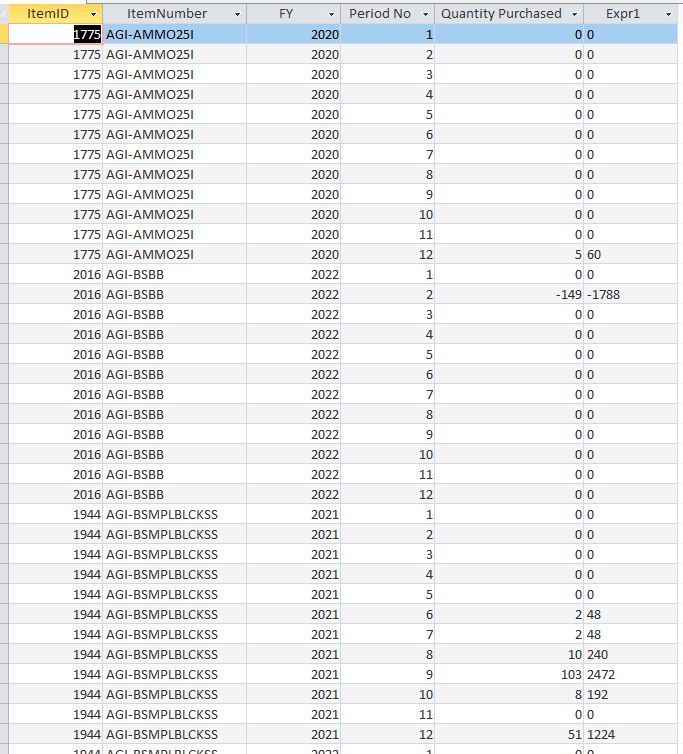
DSum.JPG
 
DSum([Quantity Purchased],"Item Data","[ItemID]=" & [ItemID] & " And [FY] <= " & [FY] & " And [Period No] <= " & [Period No])
 
DSum([Quantity Purchased],"Item Data","[ItemID]=" & [ItemID] & " And [FY] <= " & [FY] & " And [Period No] <= " & [Period No])
Thanks but it still calculates to 60?
 
copy and paste to new query (SQL view).
Code:
SELECT [Item Data].ItemID,
[Item Data].ItemNumber,
[Item Data].FY,
[Item Data].[Period No],
[Item Data].[Quantity Purchased],
(SELECT Top 1 Sum(T.[Quantity Purchased])
FROM [Item Data] AS T
Where T.ItemID = [Item Data].ItemID And
T.FY <= [Item Data].FY And
T.[Period No] <= [Item Data].[Period No]) AS Expr1
FROM [Item Data]
ORDER BY [Item Data].ID;
itemdata.png
 
Isn't that query the same as the DSum?
 
Not sure but it works. I added a Index column to my data and included that in the code so that it didn't recalculate after the end of a period. Thanks to arnelgp for the help.
 
Not sure but it works. I added a Index column to my data and included that in the code so that it didn't recalculate after the end of a period. Thanks to arnelgp for the help.
Hi. Welcome to AWF!

I'm just puzzled by your sample query. Do you know (or can you explain) where the 60 is coming from? Using DSum([Quantity Purchased],"Item Data","[ItemID]=" & [ItemID]), I was expecting to see a 5 in all the rows for the ItemID 1775. I must be missing something.
 
Hi, I have no idea, that's why I posted in the forum. I tried different options but could never get the answer I wanted. I have never used DSum before and can't quite get my head around the proper syntax. My data has approx 45000 rows and previously I was calculating a running total in Excel using SUMIFS. It would take ages to calculate so that's why I was trying to get a solution in Access.
 
Hi, I have no idea, that's why I posted in the forum. I tried different options but could never get the answer I wanted. I have never used DSum before and can't quite get my head around the proper syntax. My data has approx 45000 rows and previously I was calculating a running total in Excel using SUMIFS. It would take ages to calculate so that's why I was trying to get a solution in Access.
Okay, thanks for the additional information. I guess we don't have to worry about it now, since the problem is already fixed. Good luck with your project.
 

Users who are viewing this thread

Back
Top Bottom