Error 1904 Access with new pc

vagman

Member
Local time
Today, 18:59
Joined
Nov 10, 2021
Messages
45
I put my old Access mdb on my new pc windows 10 and when installing office 2000 or 2003 I see e
Error 1904.Module C:\Program Files\Common Files\System\OLE DB\MSOLAP.DLL failed to register.

I click ignore and the installation is done but when I open db and click a button the db is closing immediately
The same db works perfect in 5 other pc
 
Neither of those versions of Access have been officially supported since Windows 7.


You may be lucky if you are able to properly register that DLL file
However, the fact that you got either version to work on other workstations is surprising and you may find other problems later.
Recommend you upgrade to a newer version of Access
 
Neither of those versions of Access have been officially supported since Windows 7.


You may be lucky if you are able to properly register that DLL file
However, the fact that you got either version to work on other workstations is surprising and you may find other problems later.
Recommend you upgrade to a newer version of Access
the problem was in windows installation and admin user
I refreshed win10 and installed office 2000 and db worked
When installing office 2013 an later the db works with 2013 and not with office 2000
To work with office 2000 again I have to uninstall office 2013
 
It is possible to run multiple versions of Office on the same workstation.
Indeed I run A365 and A2010 (both 32-bit) on my main development PC which runs Windows 10 64-bit.
Prior to that, I had a dual install of A2010 & A2003 on a Win 7 PC

However there are issues that you need to take into account. See my article:
 
it is possible to have only access 2000 from office 2000 and office 2019 without access 2019 (only word excel outlook)?
 
You can certainly install parts of old Office suites such as Access 2000.
However, click to run installations of new versions such as 365 can only be installed in their entirety. I expect that applies to Office 2016/19/21 as well.

Like Pat, I see no benefit in you installing A2000 along with Office 2019.
But if you really want to use A2000, install that and the entire Office 2019 suite but take care with using A2019 or just ignore it completely.
 
the problem is that when I have installations of access 2000 or 2003 and office2016-2019 access 2000 or 2003 give me errors of vb... If I uninstall office 2016- 2019 access 2000 works great
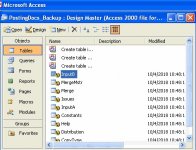
I prefere access 2000-2003 because have fast and simple menus
The menus of later versions of access are nightmare
 
Newer versions of Access are less tolerant of coding errors which is generally a good thing but may mean errors that need fixing.
Anyway, its your choice on how to proceed.
 
if I can find a way to have this menu it will be great and I will stop using access 2000-2003
 

Attachments

  • zPtdQ.jpg
    zPtdQ.jpg
    69.5 KB · Views: 228
Have a look at my database objects utility

You may also find my navigation pane helper app helpful.

It is also available as a stand alone app for importing into your own database
 
Last edited:
Have a look at my database objects utility

You may also find my navigation pane helper app helpful.

It is also available as a stand alone app for importing into your own database
thank you very much (y)
I will check it
 
My suggestion is that you just accept the nav pane is different from the old database window and learn how to use it efficiently. However, there are some like you who dislike it and it is for those people that my utilities in the links are designed
 
After installing various versions of access 2000 2003 2007 2016 2019..
Access 2000 or 2003 crach when I click to open a form
I had in the past same problem but when I uninstall access version later than 2003 it worked
Now no
I think is conflict with vba and and don't want to reinstall windows to solve
 
You may have leftover files or registry entries from your multiple installations.
Try using MS SARA (Support and Recovery Assistant) to remove all traces of Office and start again.
 
You may have leftover files or registry entries from your multiple installations.
Try using MS SARA (Support and Recovery Assistant) to remove all traces of Office and start again.
Colin,
Do you need to install that, or can you just run it?
 
You may have leftover files or registry entries from your multiple installations.
Try using MS SARA (Support and Recovery Assistant) to remove all traces of Office and start again.
not working for access 2000-2003 2017 2019
Only Access 2013 opens correctly mdb file
Also I don't see the fast scrolling function when you hold the previous or next record button on the navigation button bar on the bottom of a form like Access 2003
 
Last edited:
I tried many times MS SARA and everytime said found versions of Access but the problem remains
I don't know if the conflict is with access versions or vba or net framework or something else
 
I believe if you have A2000 and Outlook 2016, say, you may not be able to send emails through outlook.
 

Users who are viewing this thread

Back
Top Bottom