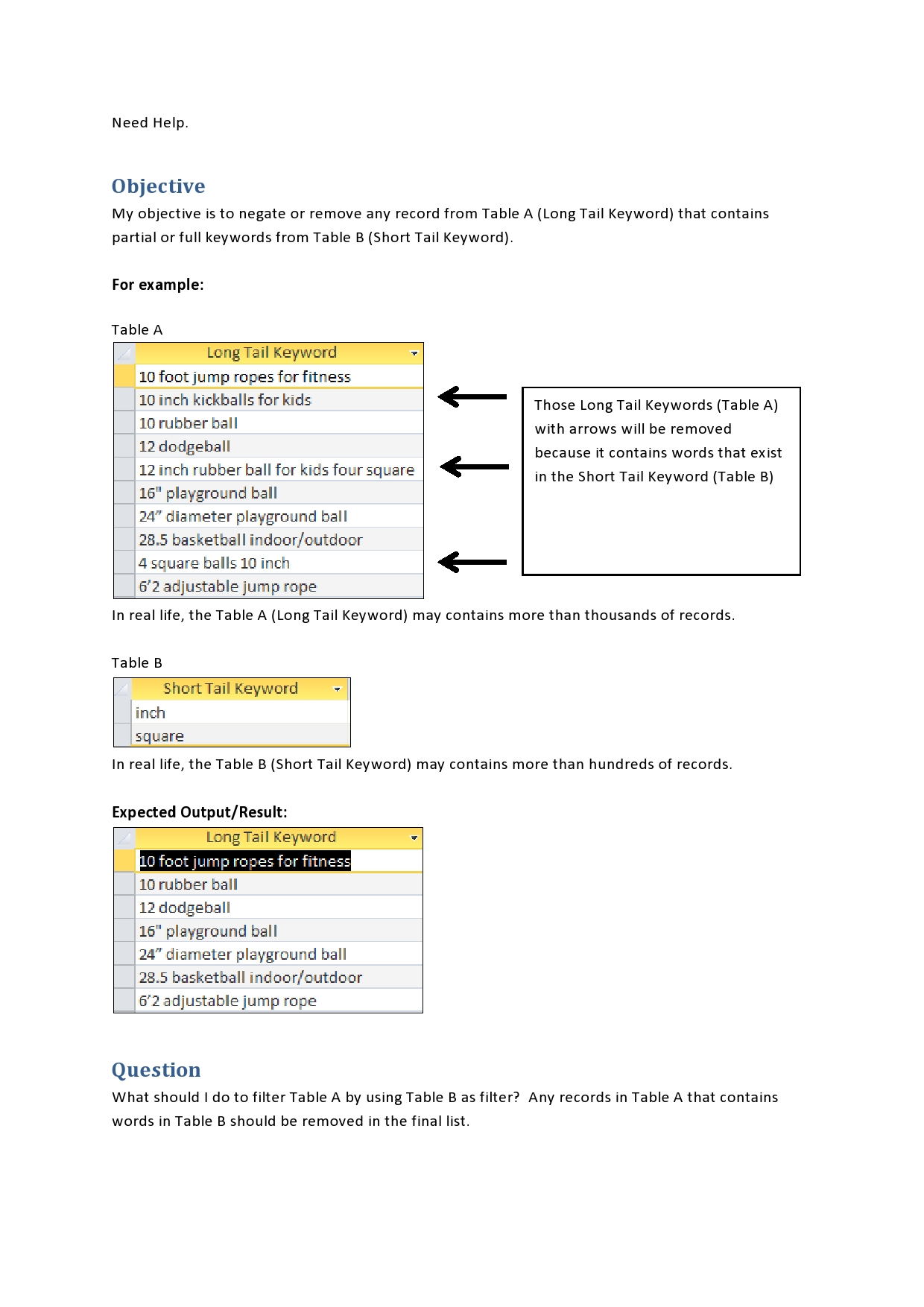
What should I do to filter Table A by using Table B as filter? Any records in Table A that contains words in Table B should be removed in the final list. (please see attached image for more details).
I tried to change the syntax by adding an ampersand (&) and double quotation mark before the word "Not" and after the last close parenthesis. See the changes below:
If you are looking for only full words, "LIKE" won't work. "Ball" is an example. Dodgeball would match playground ball
Access has no good way to do this. If you have no alternative method, then you need to use VBA. Depending on how many rows you have to match, the most efficient might be to loop through the long table and using Split() create a temp table with a row for each "word" along with the record ID. Then you can match the temp table with the short table and get the IDs of the records you want to delete.
TableA consist of thousand keywords and TableB consist of hundred keywords.
Per record of TableA will loop to the hundred keywords of TableB. And taking into account also that I need to split the keyword of TableA into multiple words.
Using VBA, what should I do to filter Table A by using Table B as filter? Any records in Table A that contains words found in Table B should be removed in the final list. (please see attached image for more details).
What's that mean? In the above example you have a record with "10 inch kickballs for kids"; does that mean you want to have "10", "inch", "kickballs", "for", and "kids" all split out?
If so, do that first then a simple JOIN query will allow you to identify the records comprised of words you want to omit.
I will be honest - but I'm not trying to be harsh. It is just that sometimes being direct comes across as fairly harsh.
Your tables are set up incorrectly for efficiency. Your "string" is being searched as individual words (for filtration) but is not stored as individual words. Technically, this is a normalization error.
The way to fix this is to build a table based on your Table A (that has the long phrases) and make a table APrime that contains the individual words split out so that each record's individual words are recognized. If Table A has something to act as a prime key (PK), say an autonumber or some natural ID number, then APrime would have the PK and one word from A per record. Now add a flag to A to say "Candidate" (for deletion).
Unfortunately, this sort of thing would require the SPLIT function or some other VBA tool to pick apart the words in a VBA recordset-based loop. This would be painfully slow. I don't think a pure query would do this.
If A is the main table, APrime is the split-out table containing AID (A ID) and MatchWord as one of the split-out words, and B is the keyword list...
Query1:
UPDATE A SET Candidate = FALSE ;
Query2:
SELECT A.LongName AS LongName, A.Candidate AS Candidate, APrime.MatchWord AS MatchWord, B.Keyword AS Keyword
FROM A INNER JOIN APrime ON A.RowID = APrime.AID INNER JOIN B ON APrime.MatchWord = B.Keyword ;
Query3:
UPDATE QUERY2 SET Candidate = TRUE ;
Query4:
DELETE * FROM A WHERE CANDIDATE = TRUE ;
Query 1 resets the "candidate" flag in preparation for steps 2 & 3. Query 2 works by doing inner joins to expose A.Candidate for cases where one member of APrime's list of potential matching words matches something in B. So Query2 selects a virtual record that includes one of those unwanted words. Query 3 marks all records revealing a match. Query 4 does the erasure.
In this proposed structure, APrime is like a child table of A and has many records for each A record. So there is a one-many relationship - A (one) to APrime (many).
SELECT tableA.[long tail keyword]
FROM tableA
WHERE (((tableA.[long tail keyword])
Not In
(SELECT A.[long tail keyword] FROM tableA AS A, tableB AS B
WHERE A.[long tail keyword] Like "*" & B.[short tail keyword] & "*")));
I thank you all guys for helping me and the problem was solved.
I selected the solution suggested by Pat Hartman.
To help other MS Access user who have encountered similar problem, I will post below the solution I have done.
Before I proceed, I would like to share my actual objective on this project. My objective is to remove any brand names from Keyword Search Terms. So I have two tables:
1. Table for Keyword Search Term with Primary ID (Autonumber)
2. Table for list of Brands Names that I don't want to be included in the final list of Keyword Search Terms
Below are the high level steps of the process
1. Merge all keywords into one table from various downloads.
2. Create a table that will store search terms candidate for exclusions
3. Create a table free from any brand names
4. Review keywords candidate for exclusions. (Subjective decision - To see any keywords that may still needed to be in the final list)
5. Add selected keywords that you want to add in the table which is free from any brand names.
Most of the steps above were implemented using queries except to step number 2, which I used a function to split the Long Tail Keywords.
Below is the VBA code I used for splitting the Long Tail Keywords.
Code:
Public Function SplitSearchTerm() As Integer
    On Error GoTo Error_Handler

    SplitSearchTerm = 0

    Dim db As DAO.Database
    Dim rs As DAO.Recordset
    Dim sSQL As String
    Dim lPK As Long
    Dim sKW As String
    Dim aKW As Variant
    Dim i As Long

    Set db = CurrentDb

    sSQL = "SELECT tblSearchTerm.SearchTermID, tblSearchTerm.[Customer Search Term] FROM tblSearchTerm"
    Set rs = db.OpenRecordset(sSQL, dbOpenSnapshot)

    With rs
        If .RecordCount <> 0 Then

            Do While Not .EOF
                lPK = rs!SearchTermID
                sKW = rs![Customer Search Term]
                aKW = Split(sKW)

                For i = 0 To UBound(aKW)
                    sKW = aKW(i)

                    If InStr(sKW, "'") > 0 Then
                        sKW = Replace(sKW, "'", "''")
                    End If

                    sSQL = "Insert Into tempTableA (ID, Keyword) Values (" & lPK & ", '" & sKW & "');"

                    db.Execute sSQL, dbFailOnError

                Next i
                .MoveNext
            Loop

        End If

    End With


Error_Exit:
    If Not rs Is Nothing Then
        rs.Close
        Set rs = Nothing
    End If

    Set db = Nothing

    Exit Function

Error_Handler:
    SplitSearchTerm = Err.Number
    MsgBox Err.Number & "," & Err.Description
    Resume Error_Exit

End Function
If you are looking for only full words, "LIKE" won't work. "Ball" is an example. Dodgeball would match playground ball
Access has no good way to do this. If you have no alternative method, then you need to use VBA. Depending on how many rows you have to match, the most efficient might be to loop through the long table and using Split() create a temp table with a row for each "word" along with the record ID. Then you can match the temp table with the short table and get the IDs of the records you want to delete.
I will be honest - but I'm not trying to be harsh. It is just that sometimes being direct comes across as fairly harsh.
Your tables are set up incorrectly for efficiency. Your "string" is being searched as individual words (for filtration) but is not stored as individual words. Technically, this is a normalization error.
The way to fix this is to build a table based on your Table A (that has the long phrases) and make a table APrime that contains the individual words split out so that each record's individual words are recognized. If Table A has something to act as a prime key (PK), say an autonumber or some natural ID number, then APrime would have the PK and one word from A per record. Now add a flag to A to say "Candidate" (for deletion).
Unfortunately, this sort of thing would require the SPLIT function or some other VBA tool to pick apart the words in a VBA recordset-based loop. This would be painfully slow. I don't think a pure query would do this.
If A is the main table, APrime is the split-out table containing AID (A ID) and MatchWord as one of the split-out words, and B is the keyword list...
Query1:
UPDATE A SET Candidate = FALSE ;
Query2:
SELECT A.LongName AS LongName, A.Candidate AS Candidate, APrime.MatchWord AS MatchWord, B.Keyword AS Keyword
FROM A INNER JOIN APrime ON A.RowID = APrime.AID INNER JOIN B ON APrime.MatchWord = B.Keyword ;
Query3:
UPDATE QUERY2 SET Candidate = TRUE ;
Query4:
DELETE * FROM A WHERE CANDIDATE = TRUE ;
Query 1 resets the "candidate" flag in preparation for steps 2 & 3. Query 2 works by doing inner joins to expose A.Candidate for cases where one member of APrime's list of potential matching words matches something in B. So Query2 selects a virtual record that includes one of those unwanted words. Query 3 marks all records revealing a match. Query 4 does the erasure.
In this proposed structure, APrime is like a child table of A and has many records for each A record. So there is a one-many relationship - A (one) to APrime (many).