
Getting a date to repeat itself in the same form

robwhiting

New member
Local time
Today, 08:36
Joined
Jan 12, 2022
Messages
11
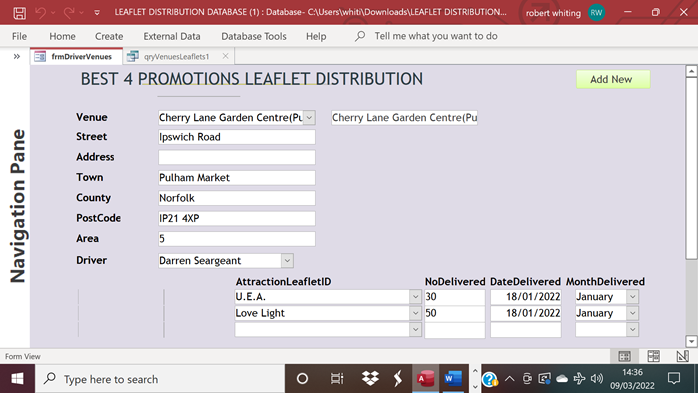
Ive set up a database form which is one to many, ie, 1 venue with up to 30 leaflets against the specific venue....the problem is we have to put a date against each entry, which is becoming time consuming. So after putting the first date in i want the date to be put in automatically as per first date....any idea on how to do this....see picture attached;-
The date shown is the 18/01/2022
regards
robert
1646837647743.png
 
Code:
Dim dOldDate As Date

'Remember the value to transfer to the new record
    dOldDate = Me!StartDate
    Me.Recordset.AddNew 'Creating new record in form
'Set the value from the previous record
    Me!StartDate = dOldDate
 
Sounds like a design issue. Once you have more than one of something, you have many and many requires a separate table. Hope you aren't using columns to hold the leaflets.

You must not have looked at the picture. ;)
 
Perhaps I was misled by "Ive set up a database form which is one to many"
 
And why save month delivered in another field? This can be extracted from DateDelivered.
 
There is a subform.

Did you try either suggestion? I recommend pbaldy's.

Again, why have user select month when it can be calculated from DateDelivered?
 
There is a subform.

Did you try either suggestion? I recommend pbaldy's.

Again, why have user select month when it can be calculated from DateDelivered?
Your right about the Month, it can be calculated from the date.
Im a bit of a novice with Access, I have found the After update event against the date delivered, however I'm not sure what code to type in to make it work.
i did attach the database as requested on my last reply
 
I'm not sure what code to type in to make it work.

Adapting the code from the link:

Code:
Private Sub DateDelivered_AfterUpdate()
  Const cQuote = """"  'Thats two quotes
  Me.DateDelivered.DefaultValue = cQuote & Me.DateDelivered.Value & cQuote
End Sub
 
Adapting the code from the link:

Code:
Private Sub DateDelivered_AfterUpdate()
  Const cQuote = """"  'Thats two quotes
  Me.DateDelivered.DefaultValue = cQuote & Me.DateDelivered.Value & cQuote
End Sub
Many thanks, i'll give it a go
Again thanks for your assistance
 
Why would the DefaultValue solution require 'touching' each subform record? This is intended to work for data entry of new records going forward, not edit existing records. Apparently data is already in existing records by normal data entry.
 
Adapting the code from the link:

Code:
Private Sub DateDelivered_AfterUpdate()
  Const cQuote = """"  'Thats two quotes
  Me.DateDelivered.DefaultValue = cQuote & Me.DateDelivered.Value & cQuote
End Sub
Sorry, Ive only just tried it and it works a treat, thanks very much for your assistance, much obliged.
 
So, you ARE populating the date on data entry? BEFORE the delivery is made?
WHY is the date in the child table and not in the parent table if it is the same for all rows?
No, we are populating the entries possibly up to a week after they have been made and therefore we need to put the date of delivery, not the date of entry into the system.
Your possibly right about it being in the parent form.
 

Users who are viewing this thread

Back
Top Bottom