Have several form letters that I want have available in Access. Watched a few videos, tried stuff from the web, each had a good solution, but you had to type the letters in manually. I have the letters in Word, tried saving them to RTF then copy and paste into a text box on a form. However the thing never pastes. I understand that Access is not designed to do this stuff, but in the videos they can create form letters, and when you need them, you put the contact info into the letter then print or email it. I am lazy enough to not want to type in a form letter that is longer than one page. (And my typing really sux) The letters are in machine sensible form, so, what part don't I understands.

You are using an out of date browser. It may not display this or other websites correctly.
You should upgrade or use an alternative browser.
You should upgrade or use an alternative browser.
Getting a Word doc into Access
- Thread starter jpl458
- Start date

- Local time
- Today, 11:14
- Joined
- Jan 23, 2006
- Messages
- 15,498
See this thread and post
You may also find a sample or relevant info in the similar threads at the bottom of this page.
You may also find a sample or relevant info in the similar threads at the bottom of this page.

moke123
AWF VIP
- Local time
- Today, 11:14
- Joined
- Jan 11, 2013
- Messages
- 4,751
I was just about to recommend Albert's code but figured I'd check your link first.See this thread and post
You may also find a sample or relevant info in the similar threads at the bottom of this page.


- Local time
- Today, 10:14
- Joined
- Feb 28, 2001
- Messages
- 30,552
You might wish to look in the "Similar Threads" list under this sequence of posts. Looks like at least two mail-merge articles are called out.
In my app there are, at most 5 or 6 letters that are in Word, Each of the letters is a bit over 1 8.5 X 11 sized paper. To get this started I just need to know how to copy/paste, or import into ACCES, or Export from word, those document into a Form with a text box or a report. There is no mail merge involved, because the letters are sent infrequently and to one address. I have tried copy and paste with no result. and size seems/might be a limiting factor. According to the Office ads, all these thing are supposed to be easily integrated with each other.I was just about to recommend Albert's code but figured I'd check your link first.

GPGeorge
George Hepworth
- Local time
- Today, 08:14
- Joined
- Nov 25, 2004
- Messages
- 3,288
I think you may be trying to cross one bridge too far by importing a Word doc into an Access database application. They do work together really well, e.g. via mail merge as has been suggested. That's what "integration" means. It doesn't mean you can make one work the way the other works.In my app there are, at most 5 or 6 letters that are in Word, Each of the letters is a bit over 1 8.5 X 11 sized paper. To get this started I just need to know how to copy/paste, or import into ACCES, or Export from word, those document into a Form with a text box or a report. There is no mail merge involved, because the letters are sent infrequently and to one address. I have tried copy and paste with no result. and size seems/might be a limiting factor. According to the Office ads, all these thing are supposed to be easily integrated with each other.
You are not likely to be able to put a Word doc into a text box or report.
Ultimately, what you need is the text from the Word doc to be available in a different form in a text box control in an Access form. THAT you can do. You could format the text using Rich Text so that it resembles the same text in a Word doc. Or better yet, you could create a report with that same text, formatted the way the Word doc is formatted. Then you can print the report as a PDF whenever you want to send it out as a letter, etc.
I keep coming back to the idea of somehow combining Word docs with Access forms. An analogy might be wanting to combine your dishwasher and microwave somehow so that you can cook food and wash the cooking dish with the same appliance. They work together in the process of preparing a meal and cleaning up afterwards, but they simply don't do the same task in that process.
moke123
AWF VIP
- Local time
- Today, 11:14
- Joined
- Jan 11, 2013
- Messages
- 4,751
My version of Alberts code that JDraw linked to is a bit more complicated than Alberts original code.
Alberts Original code can be found here . . . http://www.kallal.ca/msaccess/msaccess.html (scroll down to Super easy word merge)
I'm assuming you want to take some data from your database and insert it into a form letter using word.
Alberts code has a lot of different options and is well documented. I'd suggest you download it and read through his comments.
It lives up to its name "Super Easy" word merge.
Alberts Original code can be found here . . . http://www.kallal.ca/msaccess/msaccess.html (scroll down to Super easy word merge)
I'm assuming you want to take some data from your database and insert it into a form letter using word.
Alberts code has a lot of different options and is well documented. I'd suggest you download it and read through his comments.
It lives up to its name "Super Easy" word merge.
- Local time
- Today, 10:14
- Joined
- Feb 28, 2001
- Messages
- 30,552
In my app there are, at most 5 or 6 letters that are in Word, Each of the letters is a bit over 1 8.5 X 11 sized paper. To get this started I just need to know how to copy/paste, or import into ACCES, or Export from word, those document into a Form with a text box or a report. There is no mail merge involved, because the letters are sent infrequently and to one address. I have tried copy and paste with no result. and size seems/might be a limiting factor. According to the Office ads, all these thing are supposed to be easily integrated with each other.
I may have misunderstood your original requirement. Are you suggesting that the documents in question are always the same, just sent literally as-is? Because if so, opening a Word application object (still using Access to drive the process) might be a simpler solution. I think you are adding steps that you don't need to add.
Tell us more about these documents you want to send including whether they need to be modified before sending - and if so, what is the nature of the modification? The answer to your problem might be a lot less complex than you think.
I just looked at what has to be done in order to use mail merge and it requires a fair number of steps. My concept, which may be undoable is that the letters exist in Access. Then, when I need to print a letter, and all the data is where it should be, I wanted to reduce the work to select one of the few letters, push a button the data is written into the letter and then printed. Like I said there are few letters and they are sent occasionally. Want to make it as simple as I can.I think you may be trying to cross one bridge too far by importing a Word doc into an Access database application. They do work together really well, e.g. via mail merge as has been suggested. That's what "integration" means. It doesn't mean you can make one work the way the other works.
You are not likely to be able to put a Word doc into a text box or report.
Ultimately, what you need is the text from the Word doc to be available in a different form in a text box control in an Access form. THAT you can do. You could format the text using Rich Text so that it resembles the same text in a Word doc. Or better yet, you could create a report with that same text, formatted the way the Word doc is formatted. Then you can print the report as a PDF whenever you want to send it out as a letter, etc.
I keep coming back to the idea of somehow combining Word docs with Access forms. An analogy might be wanting to combine your dishwasher and microwave somehow so that you can cook food and wash the cooking dish with the same appliance. They work together in the process of preparing a meal and cleaning up afterwards, but they simply don't do the same task in that process.
I just tried formatting the RTF document to match the Word doc. But the problem now is that I can only copy about 1/2 of a page of the RTF into a text box on a form. Any more than that and I get a "Text Too Long To Edit" message. IS there some constraint on how much data you can fit into a textbox?
I'll keep pecking away at it.
1. Changed to long text
2. Was in RTF
3. This is telling, think I'll look at keeping the letters in Word
Now I have to learn how to link the data in ACCESS to the documents in Word. This begs a question: If 99.9% of the work is done in ACCESS is it possible to pass data to the Word docs without leaving ACCESS, so the user doesn't have to go back and forth when a doc needs to be printed? Not asking how to do it, just can it be done..
Thank you
2. Was in RTF
3. This is telling, think I'll look at keeping the letters in Word
Now I have to learn how to link the data in ACCESS to the documents in Word. This begs a question: If 99.9% of the work is done in ACCESS is it possible to pass data to the Word docs without leaving ACCESS, so the user doesn't have to go back and forth when a doc needs to be printed? Not asking how to do it, just can it be done..
Thank you
moke123
AWF VIP
- Local time
- Today, 11:14
- Joined
- Jan 11, 2013
- Messages
- 4,751
Here's an example of Alberts code in its simplest form.
All you need is a form with the information you need. In the onclick event of a button just put MergeSingleWord
A window opens, you select the document from the list, and click "ok merge to word"
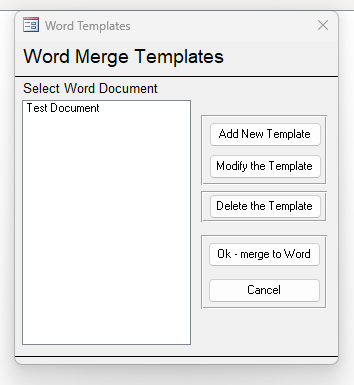
There are a lot of options which you'll see in the code comments.
That's about as easy as it gets.
All you need is a form with the information you need. In the onclick event of a button just put MergeSingleWord
Code:
Private Sub Command6_Click()
MergeSingleWord
End Sub
A window opens, you select the document from the list, and click "ok merge to word"
There are a lot of options which you'll see in the code comments.
That's about as easy as it gets.
Attachments
Last edited:
You always send good stuff. Will go through it.Here's an example of Alberts code in its simplest form.
All you need is a form with the information you need. In the onclick event of a button just put MergeSingleWord
Code:Private Sub Command6_Click() MergeSingleWord End Sub
A window opens, you select the document from the list, and click "ok merge to word"
View attachment 104034
There are a lot of options which you'll see in the code comments.
That's about as easy as it gets.
- Local time
- Today, 10:14
- Joined
- Feb 28, 2001
- Messages
- 30,552
Regarding the question I asked earlier, if you have to build a document from scratch, a discussion of some of the trouble I had using Word driven from Access might be helpful to you... or not.
This was something I figured out how to do and there were some painful lessons to be had. Not for the faint of heart, but heck, it IS part of a correctly working solution that builds a Word document from scratch.
Solved - What is the correct way to linearly insert text into Word?
I have searched this site and many others. Web searches galore, but nothing seems to work quite right for me. I am making a document linearly. I.e. providing headers and text and bookmarks and other material in the sequence that I would expect them to be read. But it ain't working. I think...
www.access-programmers.co.uk
This was something I figured out how to do and there were some painful lessons to be had. Not for the faint of heart, but heck, it IS part of a correctly working solution that builds a Word document from scratch.
I took an easy approach. This is not a complex app with a lot of data, and the letter that are used are sent infrequently. I found this bit of code at allows me to open a word document from inside Access;
It works well enough for the purposes intended. But, there are 2 things that need to be addressed. First when Word opens it is behind Access on the screen. I need a way to make it open on top of Access. I have to research that. Second, I want the ability to have data that is in Access, like name address etc. put into the open word doc......... (Bring to front?)
Code:
Dim oApp As Object

   'Path to the word document
   LWordDoc = "c:\RData\Templates\Template2.docx"

   If Dir(LWordDoc) = "" Then
      MsgBox "Document not found."

   Else
      'Create an instance of MS Word
      Set oApp = CreateObject(Class:="Word.Application")
      oApp.Visible = True

      'Open the Document
      oApp.Documents.Open FileName:=LWordDoc
   End If
It works well enough for the purposes intended. But, there are 2 things that need to be addressed. First when Word opens it is behind Access on the screen. I need a way to make it open on top of Access. I have to research that. Second, I want the ability to have data that is in Access, like name address etc. put into the open word doc......... (Bring to front?)

MajP
You've got your good things, and you've got mine.
- Local time
- Today, 11:14
- Joined
- May 21, 2018
- Messages
- 9,991
get data from word table
Hello friends I need to get a word table to access tables I can browse the open file dialog I need to import the data only from this file word the problem I face when importing the file Enter (Newline) between and above paragraph the application converts it to a new row my data is grouped...
www.access-programmers.co.uk
Copying currency values from Access to paste into Word
Our computer system has a variety of Word templates with prompts for currency values to be entered one at a time to populate a grid within the letter. The users have been using an Excel spreadsheet to calculate the values and then selected the group of cells and pasted them into the Word...
www.access-programmers.co.uk
Up to 6 different letters and want the usual on each, Name Addr, City etc. And on some of the letters I would like to copy the contents of a list box as text and insert or paste into a letter. Found a vba copy and paste example I am exploring. Reading trying, make slow progress.I may have misunderstood your original requirement. Are you suggesting that the documents in question are always the same, just sent literally as-is? Because if so, opening a Word application object (still using Access to drive the process) might be a simpler solution. I think you are adding steps that you don't need to add.
Tell us more about these documents you want to send including whether they need to be modified before sending - and if so, what is the nature of the modification? The answer to your problem might be a lot less complex than you think.
I set it up but it's for a 32 bit machine, and I have a 64 bit rig. I read his stuff and filed it away. I got a message telling me what to do, so I'll give it a try. But, what I basically want to do is to move data from a list box or a query that updates the corresponding field that are bookmarked in a prewritten document. I would like to do that via vba, if possible. It's just one line of data in ACCESS, with name, addr, etc. and put those fields into a particular, single document. No contact lists. No merge. Just move data from here to there.My version of Alberts code that JDraw linked to is a bit more complicated than Alberts original code.
Alberts Original code can be found here . . . http://www.kallal.ca/msaccess/msaccess.html (scroll down to Super easy word merge)
I'm assuming you want to take some data from your database and insert it into a form letter using word.
Alberts code has a lot of different options and is well documented. I'd suggest you download it and read through his comments.
It lives up to its name "Super Easy" word merge.
moke123
AWF VIP
- Local time
- Today, 11:14
- Joined
- Jan 11, 2013
- Messages
- 4,751
Machine bitness is 64 but what is your access bitness?I set it up but it's for a 32 bit machine, and I have a 64 bit rig.
I have no experience with OLE automation, but reading what you say that is what I need to learn. As I remember you have an example in the stuff you sent.Except that it is a merge if you use mail merge. Otherwise, it is OLE automation. Using OLE automation, you have a bunch of code to open the word document (always save the master as a template for safety). When you open the .dot file, it automatically copies the template and opens a copy as a regular .doc/.docx. Then you just poke each bookmark so it is one line of code for each bookmark you are filling. Save the file as a word doc or PDF.. Then print it or email it and close it. If you are not doing this from a form that is already posititoned on a record, then you also have to open a recordset.
The code in my sample assumes a batch job so it opens a recordset and prints a document for each record in the recordset. There's probably less than 20 lines of code that are relevant to your situation plus the poke for each bookmark.
64 as well, I just checked. I am synced in the business of bitness! I hope that makes things easier.Machine bitness is 64 but what is your access bitness?
Microsoft® Word for Microsoft 365 MSO (Version 2209 Build 16.0.15629.20200) 64-bit
Last edited:
Similar threads


- Replies
- 43
- Views
- 3,353


Users who are viewing this thread
Total: 1 (members: 0, guests: 1)