David Ball
Registered User.
- Local time
- Tomorrow, 09:56
- Joined
- Aug 9, 2010
- Messages
- 230
Hi,
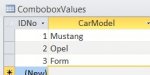
I have a query with fields Make, Model and Colour which have the values provided by a Combobox drop down in the source table.
I want to include a calculated field in the query that concatenates these together to give a description of the vehicle.
Vehicle: =[Colour]&” “&[Make]&” “&[Model]
The problem is this returns the ID’s and I get something like “1 1 3” rather than “Red Ford Mustang”.
I tried Vehicle: =[Colour].[Column](1)&” “&[Make] .[Column](1)&” “&[Model] .[Column](1) but Access rejects it.
Am I able to create such a field in my query?
Thanks very much
Dave
I have a query with fields Make, Model and Colour which have the values provided by a Combobox drop down in the source table.
I want to include a calculated field in the query that concatenates these together to give a description of the vehicle.
Vehicle: =[Colour]&” “&[Make]&” “&[Model]
The problem is this returns the ID’s and I get something like “1 1 3” rather than “Red Ford Mustang”.
I tried Vehicle: =[Colour].[Column](1)&” “&[Make] .[Column](1)&” “&[Model] .[Column](1) but Access rejects it.
Am I able to create such a field in my query?
Thanks very much
Dave