
Solved How to let repeated date information show only once in report?

yunhsuan

Member
Local time
Today, 15:39
Joined
Sep 10, 2021
Messages
54
Hello~
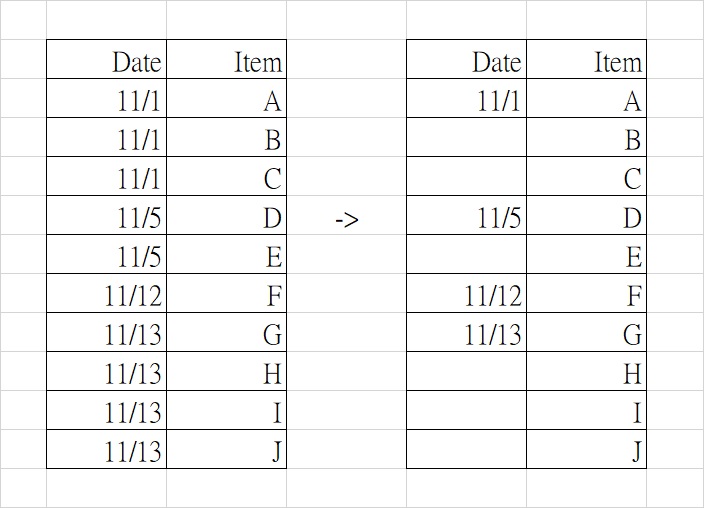
I want to make the table group by Date in the report. But I hope the information of Date shows next to the Item column, and the same date only show once(the result should look like right one below).
I just know how to let the result shows like left one, and both of Date and Item were put in detail section now. How can I make it like right one?
Thanks in advance!
1205.jpg
 
Check out the Hide Duplicates property.
 
use the report wizard and choose the block layout style - which will apply the hide duplicates property to your date column
 
Use the report wizard, choose the fields you want, with date field first, then item next

Under group by, choose the date field, choose Normal under grouping intervals.
 
Check out the Hide Duplicates property.
I turned on the Hide Duplicates property. The repeated dates disappeared successfully, but their grids also disappeared. This make my report look weird like this:
1206.jpg

Can the grids show when the dates in its cell are hide?
 
Last edited:
I turned on the Hide Duplicates property. The repeated dates disappeared successfully, but their grids also disappeared. This make my report look weird like this:
View attachment 96584
Can the grids show when the dates in its cell are hide?
Hi. I didn't know about that. You could try what @Pat Hartman suggested. Another possibility is drawing the borders yourself using the Line control.

1638812806651.png
 
I didn't try drawing the lines myself, you might want to post the code you used.
Hi. Sorry for the confusion. I drew them manually (no code needed - I just used four lines). :)

1638813587203.png
 
Last edited:

Users who are viewing this thread

Back
Top Bottom