
You are using an out of date browser. It may not display this or other websites correctly.
You should upgrade or use an alternative browser.
You should upgrade or use an alternative browser.
Solved How to set up unique customer codes based on customer types
- Thread starter asteropi
- Start date

Gasman
Enthusiastic Amateur
- Local time
- Today, 13:19
- Joined
- Sep 21, 2011
- Messages
- 17,557
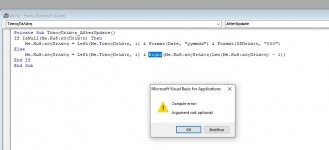
No, because you are not looking up the syntax, just making it up as you go along.
I know of someone else that does that and he has been using Access for almost 20 years. :-(
Look up the syntax and see if you can work it out yourself, or look at the Left function. The right and left has the same syntax, the Mid() is slightly different. Regardless, Google the syntax, that is the only way you will learn.
We all make mistakes, and LarryE has done so in this case, but you always need to understand any code supplied to you.
I know of someone else that does that and he has been using Access for almost 20 years. :-(
Look up the syntax and see if you can work it out yourself, or look at the Left function. The right and left has the same syntax, the Mid() is slightly different. Regardless, Google the syntax, that is the only way you will learn.
We all make mistakes, and LarryE has done so in this case, but you always need to understand any code supplied to you.

asteropi
Member
- Local time
- Today, 15:19
- Joined
- Jun 2, 2024
- Messages
- 144
I typically do, and you are right, I didn't in this case. I just needed a coma and not (). I apologizeNo, because you are not looking up the syntax, just making it up as you go along.
I know of someone else that does that and he has been using Access for almost 20 years. :-(
Look up the syntax and see if you can work it out yourself, or look at the Left function. The right and left has the same syntax, the Mid() is slightly different. Regardless, Google the syntax, that is the only way you will learn.
We all make mistakes, and LarryE has done so in this case, but you always need to understand any code supplied to you.
Do bare in mind that I started about a week ago and I built this monstrocity of a database, so it's not easy for me to understand everything.
I do have another question about order sums. Should I make another post? I thought it would be the same problem format but it seems it's not
Gasman
Enthusiastic Amateur
- Local time
- Today, 13:19
- Joined
- Sep 21, 2011
- Messages
- 17,557
That does not sound like it is going to go well.Do bare in mind that I started about a week ago and I built this monstrocity of a database, so it's not easy for me to understand everything.


- Local time
- Today, 07:19
- Joined
- Feb 28, 2001
- Messages
- 30,968
I started about a week ago
It occurs to me that something VERY useful should be undertaken very soon. If you have not previously studied "database normalization" then you need to find a few articles on this subject and study them sooner rather than later.
IF you search this forum for "normalization" you will find articles discussing this subject. If you search the general web, you need to qualify it as "database normalization" since normalization occurs in about half-a-dozen different topics including math, chemistry, politics, psychology, medicine... just be selective in your general search.

LarryE
Well-known member
- Local time
- Today, 05:19
- Joined
- Aug 18, 2021
- Messages
- 1,122
It would probably be a very good idea if you could take a screenshot of your Relationship window and post it. Maybe someone could make recommendations, so you don't run into even worse problems later.I typically do, and you are right, I didn't in this case. I just needed a coma and not (). I apologize
Do bare in mind that I started about a week ago and I built this monstrocity of a database, so it's not easy for me to understand everything.
I do have another question about order sums. Should I make another post? I thought it would be the same problem format but it seems it's not
- Local time
- Today, 07:19
- Joined
- Feb 28, 2001
- Messages
- 30,968
Honestly the randomness is not the problem so please try to see past it.
Honestly, depending on the RND() function to deliver anything unique is a problem so try to not gloss over it. I don't want to become condescending about this, but I've been doing computing things in labs, industry, home projects, and for the U.S. Government for over 55 years. When I tell you that randomness is a problem if you were looking for uniqueness, MAYBE you should ask yourself if it is POSSIBLE that I actually am giving you good advice. This is as polite as I can say it. Pat Hartman also tried to politely warn you about the RND function for this purpose. For some reason you have "random" in your head - but true randomness has NO GUARANTEE of uniqueness. ZERO guarantees.

Smiley 3636
New member
- Local time
- Today, 22:19
- Joined
- Oct 15, 2023
- Messages
- 21
Hi I have similar problem, an would appreciate help the folowing.
I need to extract the first three letters from a clients name and add a unique index number to it, as the primary key. For example
ID: FLI0001-BIZ
Type: Company
Name: Flintstone Pty Ltd
Type can be Individual (IND), while Sole Pro, Partnership, Company, Trust, SMSF & Non Profits are (BIZ)
Table:
[PK] Client Type: Client Name
FLI0001-BIZ Company Flintstone Pty Ltd
FLI0002-IND Individual Flintstone, Fred
Code: (that i don't seem to get to work)
Function clientidPK()
Dim InB
Dim dbs As Database
Dim rstProducts As Recordset
Dim rstCustomers As Recordset
Dim strSeek As String
Dim varBookmark As Variant
Dim a As Integer
Set dbs = CurrentDb
Set rstProducts = dbs.OpenRecordset("dbtClientList")
InB = Left([Name1], 3) & Format(10000, "#0000")
a = 0
With rstProducts
.Index = "Client"
strSeek = .NoMatch
Do While True
If strSeek <> "" Then
strSeek = .NoMatch
a = a + 1
ElseIf strSeek = "" Then
Exit Do
End If
bSeekMatch rstProducts, strSeek, InB, a
Loop
.Close
End With
dbs.Close
End Function
Sub bSeekMatch(rstTemp As Recordset, intSeek As String, InB, a)
Dim varBookmark As Variant
Dim strMewssage As String
With rstTemp
varBookmark = .Bookmark
.Seek "=", InB
If .NoMatch Then
.Bookmark = varBookmark
intSeek = ""
[Clientrid] = InB
Else
InB = Left([Name1], 3) & Format(10000, "#0000") + a
End If
End With
End Sub
Public Function Form()
End Function
I need to extract the first three letters from a clients name and add a unique index number to it, as the primary key. For example
ID: FLI0001-BIZ
Type: Company
Name: Flintstone Pty Ltd
Type can be Individual (IND), while Sole Pro, Partnership, Company, Trust, SMSF & Non Profits are (BIZ)
Table:
[PK] Client Type: Client Name
FLI0001-BIZ Company Flintstone Pty Ltd
FLI0002-IND Individual Flintstone, Fred
Code: (that i don't seem to get to work)
Function clientidPK()
Dim InB
Dim dbs As Database
Dim rstProducts As Recordset
Dim rstCustomers As Recordset
Dim strSeek As String
Dim varBookmark As Variant
Dim a As Integer
Set dbs = CurrentDb
Set rstProducts = dbs.OpenRecordset("dbtClientList")
InB = Left([Name1], 3) & Format(10000, "#0000")
a = 0
With rstProducts
.Index = "Client"
strSeek = .NoMatch
Do While True
If strSeek <> "" Then
strSeek = .NoMatch
a = a + 1
ElseIf strSeek = "" Then
Exit Do
End If
bSeekMatch rstProducts, strSeek, InB, a
Loop
.Close
End With
dbs.Close
End Function
Sub bSeekMatch(rstTemp As Recordset, intSeek As String, InB, a)
Dim varBookmark As Variant
Dim strMewssage As String
With rstTemp
varBookmark = .Bookmark
.Seek "=", InB
If .NoMatch Then
.Bookmark = varBookmark
intSeek = ""
[Clientrid] = InB
Else
InB = Left([Name1], 3) & Format(10000, "#0000") + a
End If
End With
End Sub
Public Function Form()
End Function

- Local time
- Today, 05:19
- Joined
- Oct 29, 2018
- Messages
- 22,796
You might consider starting a new thread and just include a reference to this one, since it's an old thread. Just a thought...Hi I have similar problem,
Smiley 3636
New member
- Local time
- Today, 22:19
- Joined
- Oct 15, 2023
- Messages
- 21
thanks will doYou might consider starting a new thread and just include a reference to this one, since it's an old thread. Just a thought...

Ken Sheridan
Active member
- Local time
- Today, 13:19
- Joined
- Jul 10, 2025
- Messages
- 470
Can't you simply use the following expression in a computed control in a form or report, or a computed column in a query:
where ClientID is the autonumber primary key of the table. Note BTW that I have removed the spaces and used CamelCase for the column names. The inclusion of spaces or other special characters can cause notational problems. Alternatively a space can be represented by an underscore character like_this.
PS: If there is a cogent reason for the ClientID numbers having to be sequential take a look at the option for Sequential Numbering in the attached file. This computes the next number when a row is inserted in a bound form, catering for possible conflicts in a multi-user environment, and allowing for the next number used to be 'seeded'.
Code:
Left(ClientName,3) & Format(ClientID,"0000") & "-" & IIf(ClientType = "Individual", "IND","BIZ")where ClientID is the autonumber primary key of the table. Note BTW that I have removed the spaces and used CamelCase for the column names. The inclusion of spaces or other special characters can cause notational problems. Alternatively a space can be represented by an underscore character like_this.
PS: If there is a cogent reason for the ClientID numbers having to be sequential take a look at the option for Sequential Numbering in the attached file. This computes the next number when a row is inserted in a bound form, catering for possible conflicts in a multi-user environment, and allowing for the next number used to be 'seeded'.
Attachments
Last edited:
- Local time
- Today, 05:19
- Joined
- Oct 29, 2018
- Messages
- 22,796
Here's a link to the new thread.
Making the primary key as the client code from the client name
Hi I have a problem, an would appreciate help with the folowing. I need to extract the first three letters from a clients name and add a unique index number to it, as the primary key. For example ID: FLI0001-BIZ Type: Company Name: Flintstone Pty Ltd Type can be Individual (IND), while Sole...
www.access-programmers.co.uk
Smiley 3636
New member
- Local time
- Today, 22:19
- Joined
- Oct 15, 2023
- Messages
- 21
i was trying make each client code unique but similarCan't you simply use the following expression in a computed control in a form or report, or a computed column in a query:
Code:Left(ClientName,3) & Format(ClientID,"0000") & "-" & IIf(ClientType = "Individual", "IND","BIZ")
where ClientID is the autonumber primary key of the table. Note BTW that I have removed the spaces and used CamelCase for the column names. The inclusion of spaces or other special characters can cause notational problems. Alternatively a space can be represented by an underscore character like_this.
Ken Sheridan
Active member
- Local time
- Today, 13:19
- Joined
- Jul 10, 2025
- Messages
- 470
i was trying make each client code unique but similar
Isn't that what the expression I posted does? Do not assign the result to a primary key column, however. Compute it on the fly.
Similar threads


Users who are viewing this thread
Total: 1 (members: 0, guests: 1)