
I type Hebrew letters in vba and get gibeerish on form label

bmkol

Member
Local time
Tomorrow, 01:26
Joined
Dec 2, 2021
Messages
39
Hi everyone.

I type Hebrew letters in vba and get gibeerish on form label.

Here is the vba code:

'Show results on labaels
Me.lblKoteret1.Caption = "יש"
Me.lblKamutChidushim.Caption = SoferReshumot
Me.lblKoteret2.Caption = "חידושים לפסוק " & Me.cmbPasuk

and this is what I get on the form:
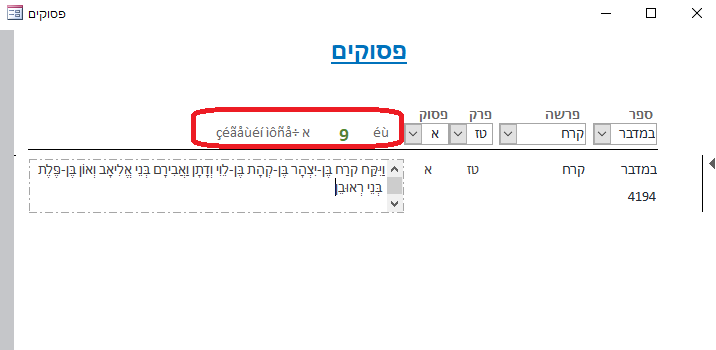
1639656556421.png


Any idea why?
 
Ranman256 is correct. Don't forget that EVERY TEXT-ORIENTED CONTROL has its own potential font setting. Since there is a limit of 768 controls on a form, you could in theory have 768 different fonts in use on the same form (though you would probably run out of resources first). You surely could have one font on a textbox and a different font for its label. Find that label in design mode, check the font name. And the UNICODE suggestion also applies.
 
can you change it to a Textbox?
 
Here is a description of the property you want to use:


If you checked, you would find that Label, ComboBox, and Listbox objects also have that property. Also Command Buttons, IF they are not using an image, can have a .Caption that would have a .FontName associated with it.
 
can you change it to a Textbox?
I changed one of them to a textbox but still the same problem

1639901219992.png


What I don't understand is that when I type in the property label manually it does work ... the problem is when I do it from vba
 
Font problem.
and make sure Access is set to use UNICODE characters.
Thank you for your reply but it is not the problem becuase I can type manually in the property itself. The problem is when I do it from VBA
 
Here is a description of the property you want to use:


If you checked, you would find that Label, ComboBox, and Listbox objects also have that property. Also Command Buttons, IF they are not using an image, can have a .Caption that would have a .FontName associated with it.
Thank you for your reply but it is not the problem becuase I can type manually in the property itself. The problem is when I do it from VBA
 
if you put those hebrew words to a table and Dlookup() the table, it will display it correctly?
see this demo.
 

Attachments

if you put those hebrew words to a table and Dlookup() the table, it will display it correctly?
see this demo.
Yes. You helpd me last time with it and it worked. This case is different. I use vba to put the Hebrew in a label or textbox

Me.lblKoteret1.Caption = "יש"
 
if you put those hebrew words to a table and Dlookup() the table, it will display it correctly?
see this demo.
Also, if I will just use something like:
Me.lblKoteret1.Caption = me.lblSample.caption
this will work too without using the dlookup like you sent me
 

Users who are viewing this thread

Back
Top Bottom
