
You are using an out of date browser. It may not display this or other websites correctly.
You should upgrade or use an alternative browser.
You should upgrade or use an alternative browser.
Import DDL database structure to Access database
- Thread starter jaryszek
- Start date
Thank you Minty for getting involved!
Sorry for example, it is poor but i do not need design it properly and i cant share fields name here.
Can you please help with only technical solution, i.e. providing SQL which solve the issues from #33 ?
Best Wishes,
Jacek
Sorry for example, it is poor but i do not need design it properly and i cant share fields name here.
Can you please help with only technical solution, i.e. providing SQL which solve the issues from #33 ?
Best Wishes,
Jacek

Minty
AWF VIP
- Local time
- Today, 03:21
- Joined
- Jul 26, 2013
- Messages
- 10,660
Field Names would not be giving away your trade secrets I'm sure unless you called them BankAcctNum3215798 SortCode 32-65-98 
In reality, you would not be able to use such a join as you can never have a null on the Primary key, and during the insertion of a new record, one or other of those joins would be to a null.
You cannot enforce such a one to one join. Think about it - one table wouldn't have an entry or the other one. Impasse.
In reality, you would not be able to use such a join as you can never have a null on the Primary key, and during the insertion of a new record, one or other of those joins would be to a null.
You cannot enforce such a one to one join. Think about it - one table wouldn't have an entry or the other one. Impasse.

- Local time
- Yesterday, 22:21
- Joined
- Jan 23, 2006
- Messages
- 15,497
Agree with minty and CJ. I think you should provide meaningful data when seeking help/advice even if you have to mock up an example. People here are not trying to "steal your data/secrets" - in fact they don't care about your real data. Use test data to confirm/resolve an issue/solution, then apply it to your "real database".
Hello,
thank you Guys.
Minty awesome explanation.
Ok so no problem with this.
But still would be nice how to create SQL 1:1 - just to know how to solve this technically.
Plus sql for composite key 1 to many relationships plus 1 to 1 composite keys, these relationships are working:
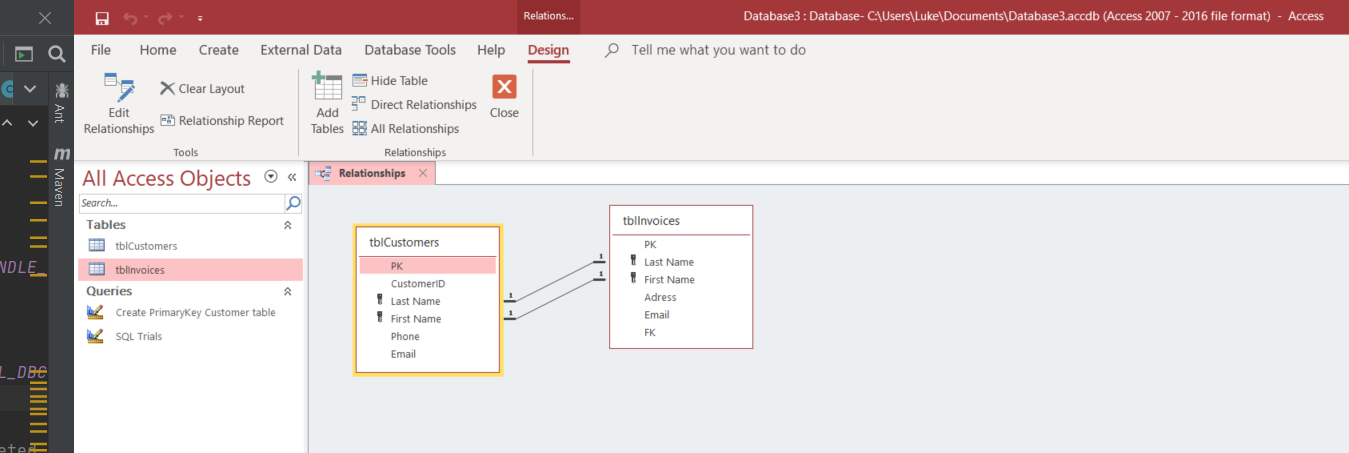
it is curious that 1:1 with only 2 primary keys is not working but for composite key is working...
Thanks for help,
Jacek
thank you Guys.
Minty awesome explanation.
Ok so no problem with this.
But still would be nice how to create SQL 1:1 - just to know how to solve this technically.
Plus sql for composite key 1 to many relationships plus 1 to 1 composite keys, these relationships are working:
it is curious that 1:1 with only 2 primary keys is not working but for composite key is working...
Thanks for help,
Jacek
Minty
AWF VIP
- Local time
- Today, 03:21
- Joined
- Jul 26, 2013
- Messages
- 10,660
I am not sure you can create that relationship in code.
Have a read here https://docs.microsoft.com/en-us/of...relationships-between-tables-using-access-sql
Have a read here https://docs.microsoft.com/en-us/of...relationships-between-tables-using-access-sql
You mean in code?
I could use VBA and ADO statements but i have to know what to pass
I tried link attached but i failed - please see post #33 :
ALTER TABLE tblInvoices
ADD CONSTRAINT FK_Test FOREIGN KEY ([PK]) REFERENCES tblCustomers ([PK])
but this is relating only 1 to many...
Please help somebody how to write this.
Jacek
I could use VBA and ADO statements but i have to know what to pass
I tried link attached but i failed - please see post #33 :
ALTER TABLE tblInvoices
ADD CONSTRAINT FK_Test FOREIGN KEY ([PK]) REFERENCES tblCustomers ([PK])
but this is relating only 1 to many...
Please help somebody how to write this.
Jacek
Thank you Pat for good lesson for me.
I know that relationship is wrong.
I only need technical solution how to write Access SQL to create composite key relationship plus 1 to 1 relationship.
And if this is possible?
Best
Jacek
I know that relationship is wrong.
I only need technical solution how to write Access SQL to create composite key relationship plus 1 to 1 relationship.
And if this is possible?
Best
Jacek
Minty
AWF VIP
- Local time
- Today, 03:21
- Joined
- Jul 26, 2013
- Messages
- 10,660
The Link I posted in post #40 has examples of both of the above, what have you tried and what is the error?Thank you Pat for good lesson for me.
I know that relationship is wrong.
I only need technical solution how to write Access SQL to create composite key relationship plus 1 to 1 relationship.
And if this is possible?
Best
Jacek
Hi Minty,
as i wrote before i tried:
ALTER TABLE tblInvoices
ADD CONSTRAINT FK_Test FOREIGN KEY ([PK]) REFERENCES tblCustomers ([PK]) --> worked
and tried:
ALTER TABLE tblInvoices
ADD CONSTRAINT FK_LastName FOREIGN KEY ([Last Name])
REFERENCES tblCustomers ([Last Name]) -- no unique index found
and tried:
ALTER TABLE tblInvoices
ADD CONSTRAINT FK_LastName PRIMARY KEY ([Last Name]) REFERENCES tblCustomers ([Last Name])
ADD CONSTRAINT FK_FirstName PRIMARY KEY ([First Name]) REFERENCES tblCustomers ([First Name]) -->> syntax error in SQL statement
ALTER TABLE tblCustomers
DROP CONSTRAINT PrimaryKey --> worked.
And some others but it didnt work for me...
Jacek
as i wrote before i tried:
ALTER TABLE tblInvoices
ADD CONSTRAINT FK_Test FOREIGN KEY ([PK]) REFERENCES tblCustomers ([PK]) --> worked
and tried:
ALTER TABLE tblInvoices
ADD CONSTRAINT FK_LastName FOREIGN KEY ([Last Name])
REFERENCES tblCustomers ([Last Name]) -- no unique index found
and tried:
ALTER TABLE tblInvoices
ADD CONSTRAINT FK_LastName PRIMARY KEY ([Last Name]) REFERENCES tblCustomers ([Last Name])
ADD CONSTRAINT FK_FirstName PRIMARY KEY ([First Name]) REFERENCES tblCustomers ([First Name]) -->> syntax error in SQL statement
ALTER TABLE tblCustomers
DROP CONSTRAINT PrimaryKey --> worked.
And some others but it didnt work for me...
Jacek
Refer to the SQL DDL Reference. Constraint Clause
Hi,
thank you for the clue. I used VBA and DAO engine.
This worked for me but creating many to one:
When want to create 1 to 1 i get error "Syntax error in ALTER statement"
This is what i tried:
and for SQL to create composite relationship i am getting stil the same error:
"No Unique index found for the referenced field of primary table"
Please help anybody,
Jacek
thank you for the clue. I used VBA and DAO engine.
This worked for me but creating many to one:
Code:
 Sub CreateTableX1()

Dim dbs As Database

    ' Modify this line to include the path to Northwind
    ' on your computer.
    Set dbs = CurrentDb

    On Error Resume Next
    sqlS = "ALTER TABLE tblCustomers DROP CONSTRAINT NewOne"
    dbs.Execute sqlS
    On Error GoTo 0

    sqlS = "ALTER TABLE tblCustomers ADD CONSTRAINT NewOne FOREIGN KEY (LastName) REFERENCES tblInvoices (LastName) "

    ' Create a table with two text fields.
    dbs.Execute sqlS

End Sub
When want to create 1 to 1 i get error "Syntax error in ALTER statement"
This is what i tried:
Code:
 Sub CreateTableX1()

Dim dbs As Database

    ' Modify this line to include the path to Northwind
    ' on your computer.
    Set dbs = CurrentDb

    On Error Resume Next
    sqlS = "ALTER TABLE tblCustomers DROP CONSTRAINT NewOne"
    dbs.Execute sqlS
    On Error GoTo 0

    sqlS = "ALTER TABLE tblCustomers ADD CONSTRAINT NewOne FOREIGN KEY (LastName) REFERENCES tblInvoices (LastName) "

    ' Create a table with two text fields.
    dbs.Execute sqlS

End Sub
and for SQL to create composite relationship i am getting stil the same error:
Code:
sqlS = "ALTER TABLE tblCustomers ADD CONSTRAINT NewOne FOREIGN KEY (FirstName,LastName) REFERENCES tblInvoices (FirstName,LastName) ""No Unique index found for the referenced field of primary table"
Please help anybody,
Jacek
Attachments
Thank you so much for your help,
Still didnt work.
I used your sql Pat:
But i am getting syntax error in ALTER statement...
Maybe it is not working at all or it is crazy SQL
Best,
Jacek
Still didnt work.
I used your sql Pat:
Code:
sqlS = "ALTER TABLE tblInvoices ADD CONSTRAINT FKLastName PRIMARY KEY ([LastName], [FirstName]) REFERENCES tblCustomers ([LastName], [FirstName])"But i am getting syntax error in ALTER statement...
Maybe it is not working at all or it is crazy SQL
Best,
Jacek

- Local time
- Yesterday, 21:21
- Joined
- Feb 28, 2001
- Messages
- 30,832
This is a delicate issue. There is almost never a time when you would seriously implement a 1-to-1 relationship in any table, manually or through code. With very few exceptions, having such a relationship makes it questionable as to whether the tables involved should be separate tables or one table. Seeking to make a 1/1 relationship makes it almost impossible to enforce relational integrity through any SQL actions that would alter one but not the other of the tables. It would become nearly unusable from a purely procedural viewpoint.
And you should note that there is nothing wrong with having a 1/many relationship between the tables if you put a separate index constraint on the second table so that you keep it unique. If there is a specified order in creating records in the two tables, put the one that is created first as the "ONE" side of the 1/many relationship. Then the other table is the MANY side. You do this because "MANY" includes "NONE" - so you can create data for the ONE side first and the MANY side second. Then just constrain the PK on the MANY side to remain unique. Everything will still work OK
And you should note that there is nothing wrong with having a 1/many relationship between the tables if you put a separate index constraint on the second table so that you keep it unique. If there is a specified order in creating records in the two tables, put the one that is created first as the "ONE" side of the 1/many relationship. Then the other table is the MANY side. You do this because "MANY" includes "NONE" - so you can create data for the ONE side first and the MANY side second. Then just constrain the PK on the MANY side to remain unique. Everything will still work OK
Similar threads
- Replies
- 22
- Views
- 1,279

- Replies
- 29
- Views
- 2,974
- Replies
- 12
- Views
- 1,748

Users who are viewing this thread
Total: 1 (members: 0, guests: 1)