Increment field by 1 based on another field

andy_25

Registered User.
Local time
Today, 11:52
Joined
Jan 27, 2009
Messages
86
Hi guys, a confusing thread title I know, I am struggling to define the question that is why I am struggling to find the answer. Here goes:

I have got a table with the following composite primary key fields:

Product_ID
Product_Version

I want the Product_Version to increment by 1 everytime I add a new version of the product. Therefore when I open a form I am looking for the code to check the current Product_Version for that Product_ID and add 1. If there is no current Product_Version I want it to return the value 1.

Any ideas? I am sure there is quite a simple way but I cannot seem to work it out.

Thanks.
 
this will give you a product version starting at 1 - assuming your product_id is numeric.

hope it makes sense.

varproductversion = nz(dmax("product_version", "tblproducts", "[product_id] = " & varproductid),0)+1

personally, i would add a separate autonumber primary key to this table, and then add an index on fields product_id, product_version
 
personally, i would add a separate autonumber primary key to this table, and then add an index on fields product_id, product_version

Thanks for that Gemma, that is what I was looking for :)

I am able to change the design if you think that will help. So you suggest I add a field something like Version_Number as an AutoNumber Primary Key?

I presume I still need the suggested code to find the next value?
 
Also as I want this to always happen, instead of adding that to the code on the form is there anyway of doing it in the table design?
 
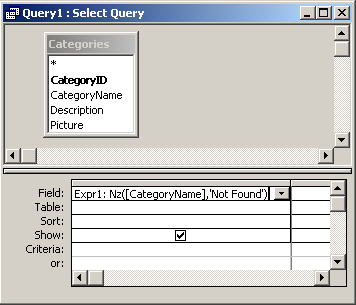
The Nz function lets you return a value when a variant is null.

The Nz function can be used in VBA code. For example:
Dim LOption As String
LOption = Nz(varChoice, "Not Found")
nz001.png

 
not in table design, no

right - let's say you want a unique incrementing number in your table
you find the highest number, and add 1 to it.

dim highestnumber as long
highestnumber = dmax("fieldname","tablename")


now, if the table is empty, this returns a null - so you need to do this instead

highestnumber = nz(dmax("fieldname","tablename"),0)

now you have the highest number, so this can be used to generate the next number, by adding 1 to it. Maybe assign the number in the before insert event, for the new record. You need to be slightly careful here, because if multiple users are doing this process, they might both get the same new number - hence, the safest way is to get the number just before writing the record.

NOW, if there is a different sequence for each product_id, then the version number is a little more complex

instead of

highestnumber = nz(dmax("fieldname","tablename"),0)

we now need

highestnumber = nz(dmax("fieldname","tablename","[productcode] = " & whatever),0)

where whatever identifies the active product. so, this works if productcode is a number, but it needs formatting a little differently if it's text.

NOW, if you have a table where the unique key consists of 2 numbers - or maybe even text+number (ie product+version no) , this becomes slightly unwieldy to use in practice. In practice it is far easier and more efficient to use a single numeric key. which you can do by adding another autonumber key. just call it ID, or somethnig similar.Some developers use the multi-column keys, others use autonumber keys. Its a matter of taste really.
 
highestnumber = nz(dmax("fieldname","tablename","[productcode] = " & whatever),0)

where whatever identifies the active product. so, this works if productcode is a number, but it needs formatting a little differently if it's text.
Thanks again for taking the time to explain that Gemma :)
I am still struggling with the whatever. The active product will be in a text box on the form (txtProductCode). Can I get it to look at that control?
 
Multicolumn keys in large tables will be slower than autonumber keys
Thanks for the input Rabbie, I agree and have added an AutoNumber as the PK rather than a composite
 

Users who are viewing this thread

Back
Top Bottom