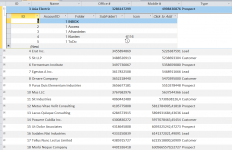
Yes. When you click the + button to the left, you get a subform control. The subform control does not provide a RowHeight property, but the form inside the subform control does. Therefore, the syntax is: Form.SubformControl.Form.RowHeight
View attachment 112807
There are just too many ways to build the reference, in the attached picture, you can see I'm using the last item in the Controls member, but I could use its name, I could also use any syntax for that, you can use bangs, dots, defaults, explicit, any way you like. The challenge will be managing those subforms, because they only become accessible when they're open, and their name is chosen by Access by default. In my case, they're called "Secundario0", "Secundario1"... by order of appearance.
After this demonstration, it's clear that table views use a Form object that can be automated. Another challenge here is giving them a code module, for example, in order to set the HasModule property of a form, it has to be in Design View and then be saved. How you manage will be interesting to see.