Joining More Than Three Tables

MatthewB

Member
Local time
Today, 09:57
Joined
Mar 30, 2022
Messages
85
A strataplan is a building
I have 4 tables
1.
Infosheet_T
(Infosheet_T is a record of services provided for the strataplan by contractors)

Field: kf_StrataPlan_ID, one to many relationship with kp_StrataPlan_ID : allows me to relate the infosheet with the strataplan record (this allows me to bring in fields from the StrataPlan_T, like the building name, or the address.
Join: 2: All of strataplan table records, only equal Infosheet (what is the equal field? - kp and kf keys?)
This is a combobox on the Infosheet record. A list of 14 building codes.

Field: kf_Services_ID, one to many relationship with kp_Services_ID : allows me to select the services the building needs, like window washing or garbage collection.
This is a combobox on the infosheet record. A list of 52 services.

Field: kf_Contractor_ID, one to many relationship with kp_Contractor_ID : allow me to selector a contractor and any related field in the contractor table, like an email, or telephone number.

So this requires joining 4 tables.
In the end I have a record that shows date but nothing is selectable. My comboboxes all show the correct list but none are selectable.

What is wrong.

Thinking that I might have 'ambiguous joins' I created joins and then used the to create joins. (the outer and inner concept makes sense but I am not sure when to choose which)

Anyhow I am seriously confused and nowhere on the internet can I find an example of joining 4 tables.

Please help.

PS: I am working on 04_Infosheet in the attached db
 

Attachments

Really should not need to bind form to a query for data entry. Form is perfectly editable bound to 04_Infosheet_T. Including 1 or more lookup table in form RecordSource should be possible, however, I cannot understand your table relationships and as you discovered, joining them fails.

Address can be included in combobox RowSource then reference appropriate combobox column by its index if you want to use address or display in a textbox. I don't see a 'building name' field.
 
The question is whether your four joins are really a great-grandparent to grandparent to parent to child relationship (4-level hierarchy), or whether they might be two or three (2-level with 3 parallel) child or lookup or translation tables. I THINK you probably have the latter, which is far easier to manage. Looking at your relationships, I note you have a really bad issue.

Your 04_Infrasheet_T table links to 30_Contractors_T which links to 82_Services_T. But there is a second link directly from 04_Infrasheet_T to 82_Services_T. This amounts to an ambiguous pathway (with and without 30_Contractors_T in the linkage) and Access CANNOT allow an update of any query that contains the beginning and end tables of this linkage. It doesn't know how to form the relationship for SQL purposes because, in essence, the wizard doesn't know which of two table/field combinations for which to build an ON clause. So it can't build the JOIN.

I don't offhand see the real thrust of the DB. Can you tell us in words other than table names and field names what you are trying to do? I.e. describe the business process you are trying to support.
 
Really should not need to bind form to a query for data entry. Form is perfectly editable bound to 04_Infosheet_T. Including 1 or more lookup table in form RecordSource should be possible, however, I cannot understand your table relationships and as you discovered, joining them fails.

Address can be included in combobox RowSource then reference appropriate combobox column by its index if you want to use address or display in a textbox. I don't see a 'building name' field.
Thanks June 7. I understand LookUps are to be avoided. The issue is not the ediability of the data but producing a form that marries 4 tables. A strata is a building
 
The question is whether your four joins are really a great-grandparent to grandparent to parent to child relationship (4-level hierarchy), or whether they might be two or three (2-level with 3 parallel) child or lookup or translation tables. I THINK you probably have the latter, which is far easier to manage. Looking at your relationships, I note you have a really bad issue.

Your 04_Infrasheet_T table links to 30_Contractors_T which links to 82_Services_T. But there is a second link directly from 04_Infrasheet_T to 82_Services_T. This amounts to an ambiguous pathway (with and without 30_Contractors_T in the linkage) and Access CANNOT allow an update of any query that contains the beginning and end tables of this linkage. It doesn't know how to form the relationship for SQL purposes because, in essence, the wizard doesn't know which of two table/field combinations for which to build an ON clause. So it can't build the JOIN.

I don't offhand see the real thrust of the DB. Can you tell us in words other than table names and field names what you are trying to do? I.e. describe the business process you are trying to support.
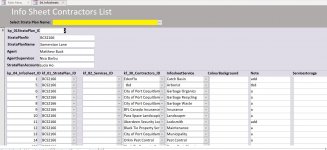
I have been struggling to produce the form 'Infosheet'. The business process: All stratas have a list of contractors that provide certain services. I have an Infosheet that conceptually should draw data from 01_StrataPlan_T (the StrataPlanNr), 30_Contractors_T (CompanyName), and 82_Services_T (Service). Ideally this would be an editable form, which could generate a report. More practically the Infosheet form helps me contact the right contractor given certain events.

First, yes I noticed the ambiguous relationship with 82_Service_T. One thought had been to provide access to the [82_Service_T].Service through [30_Contractors_T]. My query produced data up to the point where I created a relationship between the [82_Services_T].kp_82_Services_ID = [04_Infosheet_T].kf_82_Services_ID . I have deleted this relationship. But whichever way the Query did not produce a result. Moreover the Query did not produce selectable comboboxes. My comboboxes provide the StrataPlanNr, CompanyName and Service.

I hope my syntax is correct.

Thanks

PS: When you write the thrust of the DB, if you mean why I have a DB, it is to help me manage these buildings. I have a lot of different projects, about 1000 contractors, about 700 owners and other details I am constantly referencing. The DB is fast and rich.,
 
Last edited:
Editability does seem to be the issue as you want comboboxes to be changeable. Why do you want to include other tables in RecordSource?

I did not say Lookups are to be avoided, just including those tables in RecordSource is usually not necessary. What I do recommend is to not build Lookup fields in tables.

Trying to join 01_StrataPlan_T (as the lookup table, RIGHT or INNER join) to 04_Infosheet_T so that 04_Infosheet_T data is editable, fails with ambiguous outer join error. LEFT JOIN is accepted but dataset is not editable. So I think something is seriously wrong with that spiderweb of relationships. However, when I removed all Relationships, query still wants to do LEFT JOIN. I expect it is because of the Lookups built in table. Did you use the Lookup field wizard to build?

I changed all the lookup fields to just textboxes and made a copy of 04_Infosheet_T and built query with 01_StrataPlan_T. No problem with RIGHT JOIN and dataset is editable. That is just about the only way to remove relationships established by Lookup field wizard - delete the field and/or build new table.
 
Last edited:
I have been struggling to produce the form 'Infosheet'. The business process: All stratas have a list of contractors that provide certain services. I have an Infosheet that conceptually should draw data from 01_StrataPlan_T (the StrataPlanNr), 30_Contractors_T (CompanyName), and 82_Services_T (Service). Ideally this would be an editable form, which could generate a report. More practically the Infosheet form helps me contact the right contractor given certain events.

First, yes I noticed the ambiguous relationship with 82_Service_T. One thought had been to provide access to the [82_Service_T].Service through [30_Contractors_T]. My query produced data up to the point where I created a relationship between the [82_Services_T].kp_82_Services_ID = [04_Infosheet_T].kf_82_Services_ID . I have deleted this relationship. But whichever way the Query did not produce a result. Moreover the Query did not produce selectable comboboxes. My comboboxes provide the StrataPlanNr, CompanyName and Service.

I hope my syntax is correct.

Thanks

PS: When you write the thrust of the DB, if you mean why I have a DB, it is to help me manage these buildings. I have a lot of different projects, about 1000 contractors, about 700 owners and other details I am constantly referencing. The DB is fast and rich.,
Hi Mathew

The standard method of managing the process of Contractors and Services is via a Main Form / Subform layout as shown in
the attached screenshot.

I have left all of your Lookup Fields in Tables, but they should all be removed soonest.

The Main Form is based on your table "01_StrataPlan_T" and the Subform based on your table "04_Infosheet_T"
 

Attachments

  • MainSub.JPG
    MainSub.JPG
    193.7 KB · Views: 197
The numbers allow me to organize the tables as I want. Otherwise the tables are organized alphabetically. My numbering has a logic. The strataplan is the root document. The other tables are levels down from the root. 02 through 08 is the next level - the documents these tables produce are all directly related to a strata. 30_Contractor is removed from the strataplan, table 80 to 90 are lists. Why are the numbers a seriously bad idea?

In as much as I understand a query, it is necessary to produce documents (forms) that hold fields from related tables? When I used Filemaker this was not necessary. You just related fields and this provided access.
I bind ALL my forms to queries. Otherwise, I wouldn't be able to control the records that are returned.

Many of the queries use joins to other tables. There is nothing inherently wrong with this, nor will it automatically make your query not-updateable. You do however, need to be very careful when you do this because you don't want to allow the user to accidentally update any record in the join EXCEPT for the primary record. Typically, when we include ancillary tables, they are "lookups" so we can show additional data on a form, NOT so we can update it. For example, on the order header, we might want to join to the customer table so we can also show the contact information or sales rep.

I don't understand why these queries are nested nor do I understand why you would use all four of these tables/queries in a single query that you want to bind to a form, but I think I found the issue. the query below has a duplicate join. You can't see it in QBE view but you can see it in SQL view. Once I removed it, the query was updateable.

View attachment 101654

Now we get to the other stuff.

Numbering the tables is a seriously bad idea, especially when you are not leaving gaps. You have backed yourself into a corner. The numbers add nothing.l
 
Okay thanks. Yes I understood the Join issue you explained. I will try your proposal tonight. I have to say I do not quite understand yet the concepts like you explain. I thought Queries were how you joined tables in Access.
 
Hi Mathew

The standard method of managing the process of Contractors and Services is via a Main Form / Subform layout as shown in
the attached screenshot.

I have left all of your Lookup Fields in Tables, but they should all be removed soonest.

The Main Form is based on your table "01_StrataPlan_T" and the Subform based on your table "04_Infosheet_T"
Can you post the file so I can see what you did to the DB? Thanks
 
I told you how to fix the problem. But you keep ignoring my directions.
Not sure why you say that. I am trying to reorganize my database and at the same time understand your advice, and the advice of others. I actually did what you suggested and think I had success but that was on a backup of the db. Now I need to redo this on the database proper.

I go to work at 8 am and get home at 5:30. I have a 12 year old who I like to spend some time with and then like tonight, I turn on my computer at 10:30 pm and try work on my database and implement the advice I am provided. You don't mind that I spend time with my 12 year old do you?
 
And I'm helping you for free, taking my time that I could be spending doing something for fun or for profit. I gave you the answer Monday and it is now Thursday and you never even acknowledged seeing it. Good luck.
My apologies for that indeed. Do not doubt my appreciation for your generosity answering my question. But regardless, you are right I should acknowledge the reply no less.
 
Yes, thanks it work. It has taken a while to implement as how did someone put it, "there is a spiderweb of relationships. I am cleaning this up as well.

30 minutes later.

Interestingly, if I sort (order alphabetically) the subform using the filter feature it uses this sort result as the default sort thereafter. Even after the form is closed and then reopened. I wonder if it is possible to see the code access has applied to the form.
 
Last edited:
Hi Mathew

As I said previously, all of the Lookup Fields in the tables need to be changed to normal Field Types.
Thank you for providing this insight. I must read about parent and child properties as I see this is how you link the subform to the form. I cannot get the form to sort. I would like to sort the query based on StrataPlanNr Ascending, and then the Service from 82_Infosheet_T. I tried to sort the query but it does not sort. I checked the SQL for errors but noticed none. Do I need to sort the embedded subform?
Thanks
 
Thank you for providing this insight. I must read about parent and child properties as I see this is how you link the subform to the form. I cannot get the form to sort. I would like to sort the query based on StrataPlanNr Ascending, and then the Service from 82_Infosheet_T. I tried to sort the query but it does not sort. I checked the SQL for errors but noticed none. Do I need to sort the embedded subform?
Thanks
Not really understanding your comment:-
"I would like to sort the query based on StrataPlanNr Ascending, and then the Service from 82_Infosheet_T. I tried to sort the query but it does not sort."

StrataPlanNr is in the Main Form and this Form is based on the Table and not a query??

Service from 82_Infosheet_T. - this name does not appear anywhere on the Form ??
 
Okay, yes right. So no need to sort by the StrataPlanNr, because it is the main form. 04_Infosheet_T.Services is what I meant to write. In the Infosheet subform on the Form the service (Plumber, Catch Basin, Landscaper ect) in not in alphabetical order but the kp_04_Infosheet_ID order.

I have been otherwise trying to cleanup my DB which means some slight variations on some field names.
 
The purpose of Forms is to allow for Data Input and I see no reason to sort by Service.

If you want data to be displayed in a specific way then you can create Queries or Reports to do this.
 
Hi Mathew
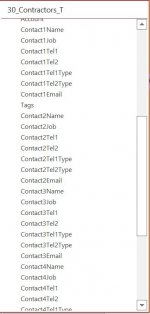
I also took a look at your Contractor Table.
The design of this table is wrong as you have fields which do not describe a Contractor.
You have Repeating Groups where you are entering Multiple Contact details.
ALL of the fields for Contacts should be Records in a related Table.
The Relationship would be something on the lines of this:-

tblContractor
-ContractorID - Autonumber - Long Integer - PK
-Contactorname
-(Other fields to describe the Contractor)

tblContractorContacts
-ContractorContactID - Autonumber - Long Integer
-ContractorID - Number - LongInteger - FK - (Linked to PK from tblContractor)
-ContactFirstname
-ContactSurname
-(Other fields to describe the Contact)
 

Attachments

  • Contractors.JPG
    Contractors.JPG
    45.1 KB · Views: 155

Users who are viewing this thread

Back
Top Bottom