
Medical indicator

niak32

Registered User.
Local time
Tomorrow, 10:43
Joined
Nov 1, 2008
Messages
28
I am looking to duplicate an Injury Form, most of it is pretty straight forward but one part that boggles me is the part where you circle which part of the body is injured, and it can be multiple parts.

On the form it has 2 pictures of a human outline, one front and back. I am racking my brain how to duplicate this in access without scrapping the pictures and moving to combo box's. transparent buttons or labels with click events and back ground color changes?

This is not the picture as the hands are different but it is not far off.
Human%20outline_307927258.ashx


Any help would be appreciated,
Thanks
 
could just put option buttons on top of the pics.
 
could just put option buttons on top of the pics.

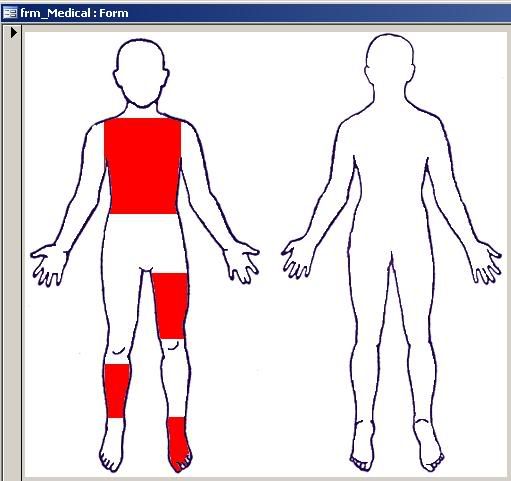
That's sort of what I'm doing at the moment, transparent labels above the picture (which the "in body" part is transparent) and hidden, red labels behind.

It works but it looks like terrible, hard red box's as indicators isn't really that good to look at. as below

medical.jpg


a better way of doing it would be great,

Next step i suppose, get a better picture and cut it up, change the colors of the cut up bits and work on how to get one on top of the other.

perhaps what i should be asking for is examples of people who have done this in access or similar which i can duplicate in access.
 
Here is a sample of a demo that does basically what you want to do.

Once you make the changes it saves the individual image to a folder using the pk as identifier.

David
 

Attachments

just a simple pic...
 

Attachments

  • anat_btns.png
    anat_btns.png
    56.8 KB · Views: 218
Here is a sample of a demo that does basically what you want to do.

Once you make the changes it saves the individual image to a folder using the pk as identifier.

David

cheers for that, It would do what i want, but i see problems down the track if it ever goes multi user. (while it would probably work, i would like to see if i can keep things in access with minimal external files).

As much of a pain as it is, I think that I will just go with the ugly red indicators as the little dots looked a little more whack when i drew up my model.

The fun part, I was going to just have one text box, use an on click event that changes the color to add text to the text box but i think i will go with check box's (hidden or just out of sight). Means I end up with a much bigger table but this way i can save myself further troubles when looking through older records I can still keep the colors in places.

Thanks for posting, If there are any other ideas I would still like to hear them as they are all valuable.
 
Can't see what your issue is with external programs, Paint is on everyone's machines as it is part of Windows suite. With regard to multi users the saved images are stored in a central shared drive so everyone has access to them.

If you take this one step further you can store a series of images relating to body parts, such as arms, legs, Torso's, etc and each patient has there own set of images. This is how I planned it. We have it in place in a Muscularskeletal practice and is used to indicate pain areas and locations of injections.

David
 
should have put closure to this thread a while ago when i fixed my problem. fixed my problem the looooong way around.

using a back ground picture of a human body, I cut out each part of the body ie. eyes, nose, ears, left pec, right pec, spine etc and assigned them to a non visible picture above a black and white picture of the whole picture. I placed labels above the area and when a user clicks on the part, the color image of that part becomes visible and checks a check box assigned to that area.

When the form loads there is a select case on each of the check box's (because on a new record it would stuff up with true or false for some reason in an if statement) and shows or keeps hidden that color body part.

Big pain in the bum to do but the end result is far better than expected, works for reports as well.

Later I edited all the color pictures with a black circle around the body part as it was not showing up in reports on a non color print out.

Thanks for the help all, you helped me decide the best course of action.
looks like i can not close this thread, oh well.
 

Users who are viewing this thread

Back
Top Bottom