
Hello,
I have some code which works perfectly for what I want. (This is it below)
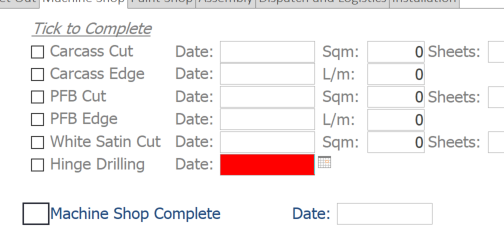
However on some items I need to implement further checks. The way I have written it isn't clean and not doing exactly what I want.
It sets the focus, changes the colors etc., however not giving me the message box, and when I make the check true, it doesnt then go on to check it off.
I will have a few checks to look at, not just this one. (Code I Have is)
I have some code which works perfectly for what I want. (This is it below)
Code:
Private Sub LblPShop_Complete_Click()
        If ChkPShop_Complete = True Then
            Dim iResponse As String
            'Ask if they are sure they want to change it and store their response in iResponse.
            iResponse = MsgBox("Do you wish to change the status of this job for Paint Shop Complete?  ", vbYesNo + vbExclamation + vbApplicationModal + vbDefaultButton1, "Change Manufacturing.")

            Select Case iResponse
                Case vbYes: 'They answered Yes
                    Dim strPassword As String
                    strPassword = InputBox("Please enter the admin password", "Change Status of Manufacturing") 'get password with input box
                    If strPassword = "Haus" Then
                        ChkPShop_Complete = False 'sets the check box to false.
                        Form_JobDetailF.TxtPShop_Complete = ""
                        LblPShop_Complete.Caption = ""
                    Else
                        Call MsgBox("The password you entered is incorrect.  ", vbOKOnly + vbCritical + vbApplicationModal + vbDefaultButton1, "Incorrect Password")
                    End If
                Case vbNo: 'If they select no to changing it it does nothing.

            End Select

        Else ' it is false
            ChkPShop_Complete = True
            Form_JobDetailF.TxtPShop_Complete = Date
            LblPShop_Complete.Caption = Chr(252)
        End If

End Sub
However on some items I need to implement further checks. The way I have written it isn't clean and not doing exactly what I want.
It sets the focus, changes the colors etc., however not giving me the message box, and when I make the check true, it doesnt then go on to check it off.
I will have a few checks to look at, not just this one. (Code I Have is)
Code:
Private Sub LblMShop_Complete_Click()
        If ChkMShop_Complete = True Then
            Dim iResponse As String
            'Ask if they are sure they want to change it and store their response in iResponse.
            iResponse = MsgBox("Do you wish to change the status of this job for Machine Shop Complete?  ", vbYesNo + vbExclamation + vbApplicationModal + vbDefaultButton1, "Change Manufacturing.")

            Select Case iResponse
                Case vbYes: 'They answered Yes
                    Dim strPassword As String
                    strPassword = InputBox("Please enter the admin password", "Change Status of Machine Shop") 'get password with input box
                    If strPassword = "Haus" Then
                        ChkMShop_Complete = False 'sets the check box to false.
                        Form_JobDetailF.TxtMShop_Complete = ""
                        LblMShop_Complete.Caption = ""
                    Else
                        Call MsgBox("The password you entered is incorrect.  ", vbOKOnly + vbCritical + vbApplicationModal + vbDefaultButton1, "Incorrect Password")
                    End If
                Case vbNo: 'If they select no to changing it it does nothing.

            End Select

        Else ' it is false
            'check bid
            Dim txtmessage As String
            txtmessage = ""
                If ChkBIDs = True Then
                    If Len(Nz(Me.TxtHingeDrill)) = 0 Then
                        txtmessage = "Hinge Drill is not complete for bought in doors." & vbCrLf & txtmessage
                        Me.TxtHingeDrill.BackColor = vbRed
                        Me.TxtHingeDrill.ForeColor = vbWhite
                        Me.TxtHingeDrill.SetFocus
                    Else
                        Me.TxtHingeDrill.BackColor = vbWhite
                        Me.TxtHingeDrill.ForeColor = vbBlack
                End If
        Else
            ChkMShop_Complete = True
            Form_JobDetailF.TxtMShop_Complete = Date
            LblMShop_Complete.Caption = Chr(252)
        End If
    End If
End Sub


