Multivalue Filed Update

termsig

Registered User.
Local time
Today, 15:16
Joined
Jan 21, 2010
Messages
16
Hi,

I have some difficulties to update table with the multi value record.

I look online but i can't find anything which will answer all question and point me in right direction.

Dim db As DAO.Database
Dim rs As DAO.Recordset
Set db = CurrentDb
Set rs = db.OpenRecordset("Tbl_main")
rs.AddNew

rs![PO Number / Option] = Me.Option__PO_
rs!Style = Me.Style
rs![MKTGP Name] = Me.Marketing_Group
rs![Department Code] = Me.Department_Code
rs!Units = Me.Units
rs![Cartons / Sets] = Me.Cartons
rs![Date Rec in Processing] = Me.Date_Rec_in_Processing
rs![Processing Task] = Me.Porcessing_Task
rs![New PO] = Me.New_Option
rs![New Style] = Me.New_Style
rs!Processor = Me.Processor
rs![Processing Lane] = Me.Processing_Lane ' this is the field with multiple values.
rs![Processing Type] = Me.Porcessing_Type
rs!Consumable = Me.Consumable
rs![Consumables Rec Date] = Me.Consumables_Rec_Date
rs![Processing Status] = Me.Processing_Status
rs![Planned Completion Date] = Me.Planned_Completion_Date
rs!Comments = Me.Comments
rs![Intake Date / Request Date] = Me.Booking_Date

rs.Update
rs.Close
Set rs = Nothing
Set db = Nothing
DoCmd.GoToRecord , , acNewRec

When "rs![Processing Lane] = Me.Processing_Lane " is used to update the field in table no new record is added.

Is there any chance that someone can help with above?

Thanks,
 
i avoid using MVF's for reasons just like this. I'm not sure how you would handle it within a recordset.

from MS...

You might wonder why Office Access 2007 allows you to store more than one value in a field, when most relational database management systems forbid this. The answer is that the database engine in Office Access 2007 doesn't actually store the values in a single field. Even though what you see and work with appears to be a single field, the values are actually stored independently and managed in hidden, system tables. The Access database engine handles this for you, automatically separating the data and bringing it back together again to surface the values in one field.
 
Indeed a lot people don't like using MVF however it's only option which i might have... i look on the link and it doesn't make any sense for me..

Is there any chance that someone can advise on the changed to the current code?

Do i need loop MVF?
 
sample database attached:

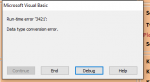
when adding single field to CboSensor2 is returning "Data type conversion error".

Is there any option to add the data into table?
 

Attachments

i am a little confused as to what your trying to do. In your sample, at the bottom of the AddClientInfo form you have a bound mvf combobox. it appears to work fine for me. Why are you trying to use a recordset?
 
i am a little confused as to what your trying to do. In your sample, at the bottom of the AddClientInfo form you have a bound mvf combobox. it appears to work fine for me. Why are you trying to use a recordset?

indeed it's showing MVF correct on form but it's showing error when adding record to table.
 
I think the point was... You don't need code to update a table from a bound form. It's automatic.
 
indeed it's showing MVF correct on form but it's showing error when adding record to table.

In that case what's the reason behind below two errors when trying add new client?

Run time error 3421 - multi value selected.

Run time error 64224 - with no value selected.

I can't imagine that nobody did anything similar in past even everyone telling that using MVF isn't good idea.

I'm brand new to VBA and not sure where i should go.

Look everywhere and couldn't find any working solution.
 

Attachments

  • SingleValueMVF.PNG
    SingleValueMVF.PNG
    5.5 KB · Views: 139
  • MultipleValueMVF.PNG
    MultipleValueMVF.PNG
    6.7 KB · Views: 117
Fill in your controls and press F9.
Do not press the ''Add Client' button.
Open the table.

Can you see your new record?
Did you get an error?
 
I thought you wanted to use Multi value Fields? Or was that the way it read, the only way you could see to do it... Most professionals don't use them (as far as I know) so if you are coming around to thinking that maybe you shouldn't be using them either, then we can probably make some headway.

If that's the case you need to explain your problem in simple terms, with some data would be good. We will probably have a whole thread on your problem, making suggestions. Then we should start to make some headway. I know this doesn't read right but it's late...

Indeed i want use MVF on the form to update the table or at least this is the most easy way for user to choose multiple values.

I did include sample database were after choosing required values and adding record it's ending up with run time error.

if there is any other way how this can be done where user can choose multiple values and it can be populated into table it will be really amazing as I did already started pulling my hair to make it work.

I did attached sample database 2 post back and will be really appreciated if someone can advise the way to make it working; hopefully in couple months i will pass this knowledge to folks like me who started journey with vba.

@static

it's not working and returning run time error.

https://youtu.be/TeHmOeY7cTU
 
there is no need for vba to save the mvf to the table. It is a bound form. moving to a new record or closing the form will automatically save it.
 

Users who are viewing this thread

Back
Top Bottom