Solved Need expert advice regarding the table structure of Subtypes and supertypes

wikihow

Member
Local time
Today, 16:25
Joined
Apr 14, 2020
Messages
38
Hello,

This is my second post here and I need help in regard of arranging my table structures. I have basic knowledge to Access and learning more at the moment.
I have a basic table (Super-types) of products in which we have common attributes and various additional attributes need to be divided into (Sub types).

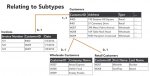
I saw one video where this same problem was illustrated with a different data. in this video, two types of customer types were divided in supertypes for additional attributes.( attaching image)

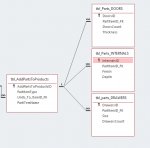
I have created one table strucutre and relationship. (Attaching screenshot of my table structure)
I want to know how to auto enter the PartITemID in subtype tables, when i am entering a record for any specific type of category in supertype table.
For example, if I enter a record for doors category in supertype table, I need to enter related details in subtype table (Doors) with manually typing partitemID_FK to relate it with main table. How can i make it automatic so that I can enter a record in subtypes depending on whatever product category i choose and typing the partitemID_FK automatically somehow. (I have around 10-11 subtype Items, so there may be 10+ sub type tables needed). Any tip to get it working better or in a different way would be appreciated

Also if you have some examples of such situations, i would request the demo files. So i can view and learn from them.

Thank you in Advance.
 

Attachments

  • vlcsnap-2020-06-23-23h06m36s874.jpg
    vlcsnap-2020-06-23-23h06m36s874.jpg
    98 KB · Views: 240
  • 001686.jpg
    001686.jpg
    106 KB · Views: 249
Hello Pat and Mike,
Thanks for the reply. The detail is quite complex as there are more details to be added to each category later on. I am not very good in Access and learning at the moment and trying to achieve some results from my work.

The customer screenshot is just an example from a video i watched. I am attaching the copy of sample database, what i am working on. It is basically a system to prepare multiple quotations for client and save them in system. After approval, there may be more documentation to be worked out.

I am trying to imitate a working online database, which is quite advanced. The item Doors & Internals etc you are seeing, they are the category and further each type have many type of sub items and the attributes or specs/ or details for these products will be different. its hard to make one big table for all items as in this case all unrelated fields of any item will have to be ignored and left blank.

Each category of items will have their own set of properties, stats. Like doors will have length, width, door count in a unit, price will be calculated length wise, their unique freight structure.

On the other hand a glass item will have length width and thickness, price in sqmt unlike doors. if i keep these two in same table, many fields will not relate to both and those uncommon fields I am trying to setup in different tables with linked to main product ID.

I am yet trying to figure out, what is best for my database.
 

Attachments

Hi

Your database currently has quite a few issues.

You should not use Lookup Lists in table fields.

You should definitely not use Lookup's to obtain the related Foreign Key.

You should remove all spaces from Field Names

Can you explain in simple English a typical Clients Project so that we can understand the Data Input Requirements.

For example a Customer on a specific date will Order a number of Items.
 
Thank you Pat and Mike for your suggestions. I will look into it again as you have advised and will try to get back.
 
I have removed the few extra tables. Removed spaces from the table fields and removed lookup queries from tables. Can I keep typed list of look up items instead? will that be fine?
 
Hi

If you need to refer to a list of items then this list would always be placed in a separate table.

Then on your Form for Data Input you would create a Combobox to lookup the list which then allows you to select an item from the List.

Access would then store the PrimaryKey for the Item selected rather than the actual name of the Item.
 
Hello Part/Mike
Hope you are doing good.
I need some advice in adding a pricing structure for the items in database.

Scenario is we have say approx 10 basic product category. For example Product 1, Product 2, .... up to Product 10. Then we have 7 variant of each Product and that makes it. Product 1A, Product 1B, Product 1C and so on. and this goes same with other 9 products. Lets say total is 10 x 7 = 70 total variants.

Now we need to price each Variant. Each variant will have its own pricing slab. For example Product 1A ( if it is <500mm then $100, if <1000mm then $150, if <1500mm then $200 .. can go up to 5000mm.

Each Variant have its own pricing slab. As above example had <500mm, <1000mm, <1500mm, <2000mm, Other may have <700mm, <1200mm, <1700mm.

Please note that these are pricing slabs, product may not have round off size. it can be 586mm, 2156mm and like so. if a product is 586mm then it will be charged as <1000mm slab, if a product is 2156 mm then it will be charged as the next slab ahead of 2156mm depending on the sizes on price slab or price milestone.

So it is like its own pricing chart for one variant and we have 70.

I have attached an excel screenshot. We used a big chart and each cell have a big formula with conditions. That works, but still Excel is slow since there is much to calculate.

But now to make this work in Access, I wanted to know what can be the best strategy. Would it be good if we do it with VBA? Can VBA be used to write big codes. if yes, can you provide me a small code, so that i can use it to replicate for all my items.

OR I think, i can do it with macros with If code but I was told that VBA is faster than Macros. In macros, i would thinking to do it by if condition, where i would target a field to get its Part/variant ID and size field and then based on to those value and conditions I can give results in final field.
Or I create non embedded macro first and use access to convert them in VBA?

Or may be you can suggest a better method for this scenario. We have the item selection and can manually enter size (height x width) and then depending on the width price needs to be auto filled or calculated.

Please suggest as this may need professional experience rather than me doing excel like stuff.

Thanks in Advance

1594789217374.png
 
Hi

I would recommend a Products table that lists All of the actual Products together with sizes and the current Price.

I would imagine that the majority of Products would fall into the standard size bracket.

If the required Product does not fit the standard Size then you can enter the Price for that specific Product as needed.
 
Put your slab bandings sizes into a table. You can then include that in your pricing lookups.

You need to stop thinking of your data horizontally and think vertically.
 
Hi

I would recommend a Products table that lists All of the actual Products together with sizes and the current Price.

I would imagine that the majority of Products would fall into the standard size bracket.

If the required Product does not fit the standard Size then you can enter the Price for that specific Product as needed.
Oh there is no Standard size or so. Size of an item can be from 500mm to 5000mm. I need the price to appear or calculate automatically depending upon whatever size we fill in manually. I already have a product table all i need is how i setup pricing according to the slab.
I am actually unable to make up mind on how to setup the structure of pricing table which is based on conditions depending upon size.

IF you see a product Mirror Door in list. there are approx 9-10 pricing slab for this one item. price differs with each 500mm gap i.e. 500mm, 1000mm, 1500mm, 2000mm ... the real product size is not specifically rounded off as per the slab. Real size can be any random size from 500 to 5000mm.

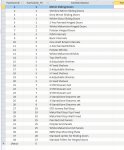
Are you suggesting something like below? Slabwise price table. Still need to understand how to setup conditions how it will fetch price from particular field for given size.

Any example would be appreciated.

Thank you.
 

Attachments

  • 001728.jpg
    001728.jpg
    203.7 KB · Views: 224
  • 001729.jpg
    001729.jpg
    440.8 KB · Views: 225
  • 001730.jpg
    001730.jpg
    201.8 KB · Views: 220
That is sort of what I was suggesting.
But go vertical. You are still thinking spreadsheet.

If you need to add another slab or another measurement value you have to add a new field to your table.
By using a properly designed table even if it needs a lot of rows you have a simple solution.

Price_ID, PartItemID_FK, FromSize_mm, UptoSize_mm , Cost

Then you simply look up the price where the slab size is >= FromSize_mm and < UptoSize_mm

You can always produce a spreadsheet-like output using a crosstab query of you want to publish a grid-style price list.
 
@Minty, I agree with mike60smart

I see Product as an entity with as many properties as required to be attributed to it including type, size, shape and price.

A hardware store sells amongst others products, screws. One screw product will be say countersunk, a certain length, gauge, type of metal, price and will have an SKU code. The only reason I see for a separate price table is for keeping a record of historical prices for a particular product.
 
Hello Guys,
I need some help in one form.

1596412082400.png

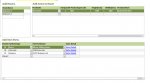
This Add item parts form is linked to above subform. I need to enter data in Add item parts by selecting items. There are 3 cbo for Itemmain, Itemsub and item. This is basically to categorize the items.

If I individually choose record source as a select query for each cbo, Everything works fine. 2nd and 3rd Cbo gives me a long list even if they are not related to first Cbo.

If i filter the second cbo with the select query criteria with Main Cbo then it does not work properly. It does filter the list in second cbo but it applies same filter for all 3 rows, while i need different list as each item in main cbo is different and sub combo should result in related filter list.

Can anyone suggest any solution here? I am attaching the copy of DB. It is frm03 > 2nd tab (add item parts).
 

Attachments

Hi

I would recommend that you use Cascading Combobox's for this process
 
@mike60smart I believe the OP is trying to use cascading combo's, the problem is they don't work well on continuous forms unless you set them up really craftily.
 
Hi Minty

Yes but I don't believe he has set up his tables to deal with the correct cascading
 
Do you guys have any sample of craftily setup cascade combo boxes in continuous form?
 
Not directly available - the two techniques I have seen are :
1. Change the row source of the combo on getting the focus to only have the records you want to see, then after losing focus change it back to all records to maintain the rest of forms data or
2. Have a text box placed on top of the combo that displays the correct data but hides the combo. on getting focus, you set focus to the hidden combo which is filtered correctly and after update / losing focus you hide the combo again and the text box displays the value selected.

Neither is 2 minutes work and can be a bit of a fiddle to make it look right, but will work.
 
Here is a sample using technique 2. I find this more reliable than technique one. In technique one there are still times when the records will go blank in a continuous form. Works well in datasheet.
 

Attachments

Users who are viewing this thread

Back
Top Bottom