
You are using an out of date browser. It may not display this or other websites correctly.
You should upgrade or use an alternative browser.
You should upgrade or use an alternative browser.
Need to print a crosstab report without complete data
- Thread starter Lkwdmntr
- Start date
I am so frustrated. I thought it was my computer, so I went out and bought a new one. Nice one, too. Alienware with an i9 processor. I went to run the query, and it did the same thing. Blue circle for a few seconds, and then the application closes. It is only with that query. I went and compared all the settings in Access on my work computer, and they are all the same.
I am at a complete loss. I need to be able to run this on any computer.
I am at a complete loss. I need to be able to run this on any computer.
I am still trying to clean up the report on my work computer. I was able to get the X's in, sort it by the index, and change the source of the text boxes in the header, with the exception of the Name. I am still stumped on why it is pulling double of a few of the actions.

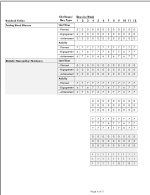
I do have one more report that I need to fix. This one is set up strangely. Probably to know surprise! LOL. As with this last report I am having difficulty with the crosstab function. I can only include a certain amount of fields when I create the query. Using the same program you already have. Still using John D. Accelerated as the client, navigate to the reports menu and pull up the Weekly Progress by Standard Action report. You will notice I have subreports designed for all the weeks, with week one containing all the labels. It works ok, but if an action gets added past week one, the labels won't show.
I know this is not a good design, and I have had to do a few reports like this. I would love to learn how to pull this data into one complete report.
If this could be fixed, perhaps some of the other reports using this design can also be fixed.
Take a look and see what you think. Thank you so much for all your help. You have been great!
I know this is not a good design, and I have had to do a few reports like this. I would love to learn how to pull this data into one complete report.
If this could be fixed, perhaps some of the other reports using this design can also be fixed.
Take a look and see what you think. Thank you so much for all your help. You have been great!
Attachments

DHookom
Active member
- Local time
- Yesterday, 21:33
- Joined
- Aug 7, 2024
- Messages
- 649
Congrats on getting the first question to work. I’m not sure why the bold but it would be interesting to know if this was bold in a printed or to PDF report. A possible cause is code or conditional formatting.
I’m away from home/PC for a couple days so I can’t look at your new question.
I’m away from home/PC for a couple days so I can’t look at your new question.
Thanks, DHookom; I did find the conditional formatting and fixed the bolding issue.Congrats on getting the first question to work. I’m not sure why the bold but it would be interesting to know if this was bold in a printed or to PDF report. A possible cause is code or conditional formatting.
I’m away from home/PC for a couple days so I can’t look at your new question.
Enjoy your time off, and if you can look at the subsequent report at your leisure, that would be great.!
DHookom
Active member
- Local time
- Yesterday, 21:33
- Joined
- Aug 7, 2024
- Messages
- 649
Can you create a query with all of the information other than the days by week which would be a simple date field? Looking at your relationship diagram, I'm not sure where all the data comes from. Does the data have a value stored that identifies the order of the actions and challenges?

DHookom
Active member
- Local time
- Yesterday, 21:33
- Joined
- Aug 7, 2024
- Messages
- 649
wrong thread?Aleinware was acquired by Dell, so watch out under the hood.
Hello, I haven't had much time to work on this, but before I start the report I was talking about. I have the rptNSAByPlanWeek and am using John Accelerator in the example. This report is very similar to the Standard Actions by Plan Week report that you helped me with. The main difference is that we are summing the NSApoints in the Challenges table and then I need to total the weeks at the end of each row, which I'm stumped at how to make that happen. I am getting an error saying "You can't assign a value to this object." when I load the form, but when I push past it all the data is coming up right, except the Totals field that is not bound to anything right now. I attached an updated version of the program, let me know your thoughts. Thanks.
Attachments
DHookom
Active member
- Local time
- Yesterday, 21:33
- Joined
- Aug 7, 2024
- Messages
- 649
Which "when I load the form"?
Do you actually mean the report "rptNonStandardActionsByPlanWeek"
The report errors but if you open the report in design view and display the record source in datasheet, you get

Is that what you expected? I found the last report I looked at worked if some the controls in the header were removed.
As the NFL referees say "After further review", you have code in the report that attempts to set the value of controls that have a value in the Control Source. You can't do this. You can set values of unbound controls.
Do you actually mean the report "rptNonStandardActionsByPlanWeek"
The report errors but if you open the report in design view and display the record source in datasheet, you get
Is that what you expected? I found the last report I looked at worked if some the controls in the header were removed.
As the NFL referees say "After further review", you have code in the report that attempts to set the value of controls that have a value in the Control Source. You can't do this. You can set values of unbound controls.
Last edited:
Yes, when I hit "Output" on the SelectLoopReport form. I took out the code, that wasn't needed. This one guy who was helping me a while back suggested using "con" as a variable type because the crosstabs didn't like the temp variables. Looks like I'm not using that anymore.
Ok, so that is working well and all the data is correct. I am stumped on how to make a totals column. I did try to add all the fields together but for some reason it worked on some, but not others. Any ideas?


Ok, so that is working well and all the data is correct. I am stumped on how to make a totals column. I did try to add all the fields together but for some reason it worked on some, but not others. Any ideas?
Last edited:
As far as the other report. You asked me to show you the query that pulls all the data. The report is Weekly Progress by Standard Action, and I am using twelve sub-reports to get all the data for all twelve weeks. The query is shown below. The issue is that I don't get all the labels if I add an action any time after week one. I also need a crosstab for this report, but Access has issues with too many rows for the data. HELP!

If you add a Null value to any other value, it will Null the result. For instance Null + 8 = Null. I expect you could just add another row heading like:
View attachment 118380
If you add a Null value to any other value, it will Null the result. For instance Null + 8 = Null. I expect you could just add another row heading like:
View attachment 118380
Wow! I didn't think it would be that easy. Nice fix. Now I have this other report that will probably not be so easy. I sent the query and some info in the last post. Thanks again for all your help, I don't know what I would do without you and this site.If you add a Null value to any other value, it will Null the result. For instance Null + 8 = Null. I expect you could just add another row heading like:
View attachment 118380
DHookom
Active member
- Local time
- Yesterday, 21:33
- Joined
- Aug 7, 2024
- Messages
- 649
Access should never have “issues with too many rows”. There is a limit to the number of columns in a query which matches the limit of fields in a table.
Twelve queries for twelve weeks sounds like a poor design but I can’t tell since I’m replying from my iPad.
Twelve queries for twelve weeks sounds like a poor design but I can’t tell since I’m replying from my iPad.
It is a poor design, but making a crosstab for all those fields is beyond me, and that was the only way I could get it to work. But it doesn't work. If you have more time to take a look at it, I would greatly appreciate it.Access should never have “issues with too many rows”. There is a limit to the number of columns in a query which matches the limit of fields in a table.
Twelve queries for twelve weeks sounds like a poor design but I can’t tell since I’m replying from my iPad.
DHookom
Active member
- Local time
- Yesterday, 21:33
- Joined
- Aug 7, 2024
- Messages
- 649
Having 12 queries with basically the same SQL and only a slight difference in criteria raises questions. I can't figure out what you are attempting to do. I rarely if ever use tempvars and global variables and when I do, they are documented. They all make any troubleshooting very troublesome. Also, modal forms don't allow for moving between objects.
I have no idea what you want in your report.
I have no idea what you want in your report.
Hi, I am sorry this isn't easier to understand. Let me try again.
With this report, I am pulling the points earned throughout the weeks of the program. The points are put in with the "Enter User's Progress" button on the Main Menu and filling out those forms. The report lists planned points, engagement points, and achievement points. You can see the logic in the "qlkpPoints" query.
I find the potential points (Planned in the report) for each Start Time action by looking at the Start Time. If it is not null, there is a point. Same thing with the Activity Action, but if IsActivity is selected, then there is a point. Then, if checks are in the "Yes" or "No" field, they earn an Engagement point. If they check "Yes" it counts as an Achievement point. The potential (Planned) points reflect the maximum number of points that can be earned for both Engagement and Achievement actions.
I can gather this information each week with the query "qlkpStandardActionPoinstbyLoop_Wk_XX." I don't know how to do it for the whole loop and present it as a crosstab report.
I wish this weren't so challenging. I feel bad that I keep asking you for help. I'm not opposed to offering some payment to help with this either. Let me know if that is appropriate in this case.
I am also willing to meet via Teams or Zoom to help better explain.
I attached a couple of screenshots. One shows where the data is being entered, and the other is the actual report where the action was added after the first week.
With this report, I am pulling the points earned throughout the weeks of the program. The points are put in with the "Enter User's Progress" button on the Main Menu and filling out those forms. The report lists planned points, engagement points, and achievement points. You can see the logic in the "qlkpPoints" query.
I find the potential points (Planned in the report) for each Start Time action by looking at the Start Time. If it is not null, there is a point. Same thing with the Activity Action, but if IsActivity is selected, then there is a point. Then, if checks are in the "Yes" or "No" field, they earn an Engagement point. If they check "Yes" it counts as an Achievement point. The potential (Planned) points reflect the maximum number of points that can be earned for both Engagement and Achievement actions.
I can gather this information each week with the query "qlkpStandardActionPoinstbyLoop_Wk_XX." I don't know how to do it for the whole loop and present it as a crosstab report.
I wish this weren't so challenging. I feel bad that I keep asking you for help. I'm not opposed to offering some payment to help with this either. Let me know if that is appropriate in this case.
I am also willing to meet via Teams or Zoom to help better explain.
I attached a couple of screenshots. One shows where the data is being entered, and the other is the actual report where the action was added after the first week.
Attachments

Last edited:
Similar threads
- Replies
- 5
- Views
- 1,017

- Replies
- 18
- Views
- 1,377


Users who are viewing this thread
Total: 1 (members: 0, guests: 1)