New to Navigation Forms

ReginaF

Registered User.
Local time
Today, 20:03
Joined
Sep 23, 2019
Messages
26
Hello!

I would like to ask for your kind help in the use of Navigation Form.

I have already created a bunch of forms that are 'linked together' with buttons. They work really well, but now I decided to create one Navigation form for some of my already existing forms.
When is inserted the forms to the Navigation Form my command buttons stopped working (many of those buttons are for closing the form and opening a new one).
I have already inserted one form to the Navigation Form and when I click the Open button on the form it does not close the navigation form, however opens the desired 'other form' (that is not in the navigation form). And when I click the Back button on this other form it closes it, however it can not open the form inserted into the navigation form :(

I would like to ask for your help in resolving this problem. I have never used navigation forms before, and I do not know how to refer to it and its subforms.

Thanks in advance.
Regina
 
Regina,

Your mention of using so many forms doesn't really sound like that great of practice. Please post either the code that is not working or a sample file that we can take a look at.
 
Hi Regina. When using a Navigation Form, instead of using the OpenForm method, try using the BrowseTo method.
 
Hi Regina, did you use the wizard to help build your Nav form? I have done a few of these, as long a the donor form(s) are operational prior to adding them to the nav form it should work.
 
Last edited:
Why use buttons on forms to open some other form rather than the navigation buttons themselves? As stated, seeing the code might be required because nav forms behave somewhat like a form/subform design. The nav form adds an extra layer in the hierarchy.
@ReginaF - hope you have decided to go this route after researching the use of nav forms. They do have their issues - perhaps mostly that you can only have one form open at a time. Open a second form and the first closes.
 
I think the Nav Form is Microsoft's way of updating their switchboard without using that pesky table and button limit. As stated it adds confusing layers.

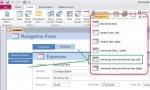
For people who haven't seen this:
 

Attachments

  • NavForm.jpg
    NavForm.jpg
    68.3 KB · Views: 176
I would roll my own switchboard or instead of a nav form, use a form with a tab control. You could get the same look and allow several forms to stay open; could even swap form recordsources, load on demand, swap forms on demand, etc.
 
Hi Regina, did you use the wizard to help build your Nav form? I have done a few of these, as long a the donor form(s) are operational prior to adding them to the nav form it should work.

Hello,
I think my forms are working. However after I added one of them (Only the the one that is like a Main form, where the other forms are linked to it) to the Nav Form, I can no longer 'return' to that form on the Nav Form(with buttons on my other forms), only to "version" of the form that was not added to the Nav Form. But I would like to create the Nav Form to make my work more user friendly, so it would be really cool if I could fix this, so that my Nav Form would be functional.
 
Hello,
I think my forms are working. However after I added one of them (Only the the one that is like a Main form, where the other forms are linked to it) to the Nav Form, I can no longer 'return' to that form on the Nav Form(with buttons on my other forms), only to "version" of the form that was not added to the Nav Form. But I would like to create the Nav Form to make my work more user friendly, so it would be really cool if I could fix this, so that my Nav Form would be functional.
Hi Regina. To "fix" your buttons, you could try changing the code from using OpenForm to BrowseTo. Either that or just hide those buttons because the Nav Form already has the buttons either at the top or at the side, depending on your chosen setup.
 
Why use buttons on forms to open some other form rather than the navigation buttons themselves? As stated, seeing the code might be required because nav forms behave somewhat like a form/subform design. The nav form adds an extra layer in the hierarchy.
@ReginaF - hope you have decided to go this route after researching the use of nav forms. They do have their issues - perhaps mostly that you can only have one form open at a time. Open a second form and the first closes.

Hello, thanks for your reply :)
To be totally honest, I did not do a lot of prior research on Nav Forms before I decided I want to add it to my database :/
I thought it would be a good idea to make my program more "user friendly", as I have a bunch of forms, and I do not wnat them to search through all to find the ones that they need.
 
I believe it does appear more user friendly. What it also does is add complexity to the designer and perhaps even introduce obstacles. If you research, you will probably find plenty of posts that for example, ask why they can't pass a value from one form to another. It is possible, but they don't realize that the form is no longer open so their usual methods don't work. Or they want to reference a value on a loaded form but can't figure out the syntax (as I said, the nav form adds a layer).

Anyway, not saying that you should abandon your current design, just that you should know the limitations of nav forms. I'd recommend doing some research to help decide if the issues will be a barrier to your process or simply require some learning to deal with them.
 
I agree the roll your own approach is superior, I take inspiration from the designs you and others have shared.
 
Pat; if a user has no rights for using a particular button (e.g. View Log), do you just hide it and leave the gap?
 
I suspect a routine checks your credentials then either enables or disables the button leaving no gaps, just a dead button.

I have never seen a path displayed on a switchboard before, interesting approach.
 
You could do that but you are correct in that it would leave a gap.
I asked because I was curious as to what your approach is. If I understood, you have a version (of the form or db, not sure which) that fits the user's profile or permissions. To help in an old post I developed a form that has all the controls in a pile. Depending on user, each allowed control is shifted down by an amount equal to its height + a space value, thus no gaps. Worked out well.
 

Users who are viewing this thread

Back
Top Bottom