Question Normalization Of Questionnaire

Has the spreadsheet format changed at all? Does it still match the example in your original post?
 
Last edited:
Please Read: The Ten Commandments of Access
See commandment #2.

I still can't figure out how youir table design wil handle this data. I think you still need to work on the table design before attempting to import any data. Once you have the table design down and it makes sense to you, I think importing the data will be easier.

Based on your object names, I would think the Questions from spreadsheet would go into the table tblQuestions. It looks like they all went into the table tblSMRForm. :confused::eek: Not what I was expecting.

Would you please give a brief explaination of what data goes into each table and?
 
Commandments are now on my wall :)

I dont know how to make my tables better, I thought they had been setup ok...Thats why I need help :(

First off, that was a mixup sorry it must have happend when I was trying to import the data by hand. You are right Questions need to go into tblQuestion.

Here is my thoughts,

tblSMRForm
This is the stating point for all records imported, each one haveing its own set of questions, answers, Dropdown options, approval information, site, staff and version.

This currently only holds the filename, my thought was that I can set the records apart by the filename.

tblQuestion
I wanted to use this to store all the questions from the imported records I did this in case a set of questions changed from one imported record to another.

It only has one field to store and thats Questions, this will be the full question asked on the form.

tblDropdownOption
This just like the questions table stores only one part of the imported records, the dropdown option a user picks from the excel sheet (Yes, No, N/A) It was planned to be stored in the Option field but looking at it now I changed it to the fk_OptionID field for some reason :confused:

tblOption is a lookup table for tblDropdownOption

tblAnswer
This is going to hold all the awnsers from the corilating questions, for my form the Comments = Answers.

tblStaff
This table holds staff information, right now its only rirst and last name but it will grow. This data is individual to each record

tblSite
This will hold the Site Name, City and State This data is individual to each record

tblStateProvince
Its the lookup table for the states

tblversion
For holding the versions assigned to each form, this should only change one time a week or two, v1 v2 v3 etc.This data is individual to each record

tblApproval
Holds other information that will be user for a mailmerge later. This data is individual to each record
 
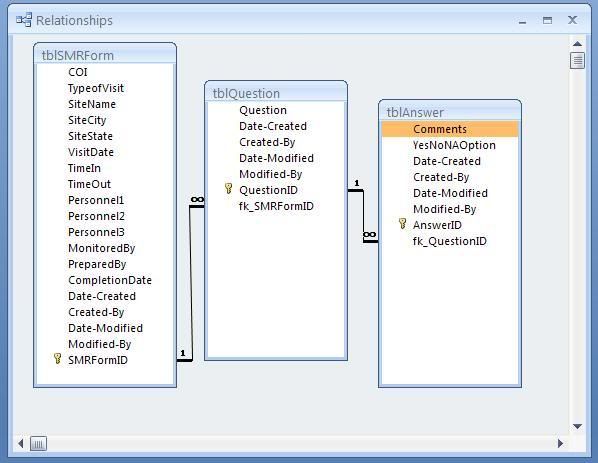
Ok, so I thought about this over the weekend and I think this setup below should work. Feedback?

I will post a DB file with the test data soon. I will include a Report, Qry and entry form. (If it all works lol)

NO LOOKUPS! lol
SMRDBRELATE2.jpg
 
You need to get rid of Personnel1, Personnel2, Personnel3. You need a junction table for that information. You would store the SMRFormID as Foreign Key and then the PersonnelID as Foreign Key in that table. Then it would be stored properly as well as not being limited to 3 entries.
 
You need to get rid of Personnel1, Personnel2, Personnel3. You need a junction table for that information. You would store the SMRFormID as Foreign Key and then the PersonnelID as Foreign Key in that table. Then it would be stored properly as well as not being limited to 3 entries.

Good point! I will make the change!
 
OK!

I have attached the final DB layout, I am still haveing issues reporting on the data as it duplicates records :confused: But I am sure I can work on that.

If anyone is willing to take a quick look over the relationships real fast and if you want to look at the report for me thats cool but not the point of this post.

I want to make sure the design is on the up and up so I can run over to another forum and get some guys to make me a new import script for excel.

THANK YOU!!!
 

Attachments

Users who are viewing this thread

Back
Top Bottom