
not to leave a field of main form blannk

hfsitumo2001

Member
Local time
Today, 14:49
Joined
Jan 17, 2021
Messages
394
Hello, How can we make it not to leave a field blank such as customerID from the Main form, before it goes to the sub form as I marked in red in the attached form. Because when we got in the sub form, I can not get back to the previous field ( CustomerID}. and get stuck, so I delete the transaction.

On other thing, could be a silly question, but since English is not my native language, I need to ask this. What is the best name of the form for supplies taken out and supplies received in the ware house.
Is it Supplies Check out Form for going out, and Supplies check in form for supplies coming in

Thank you for any helps.

Frank\
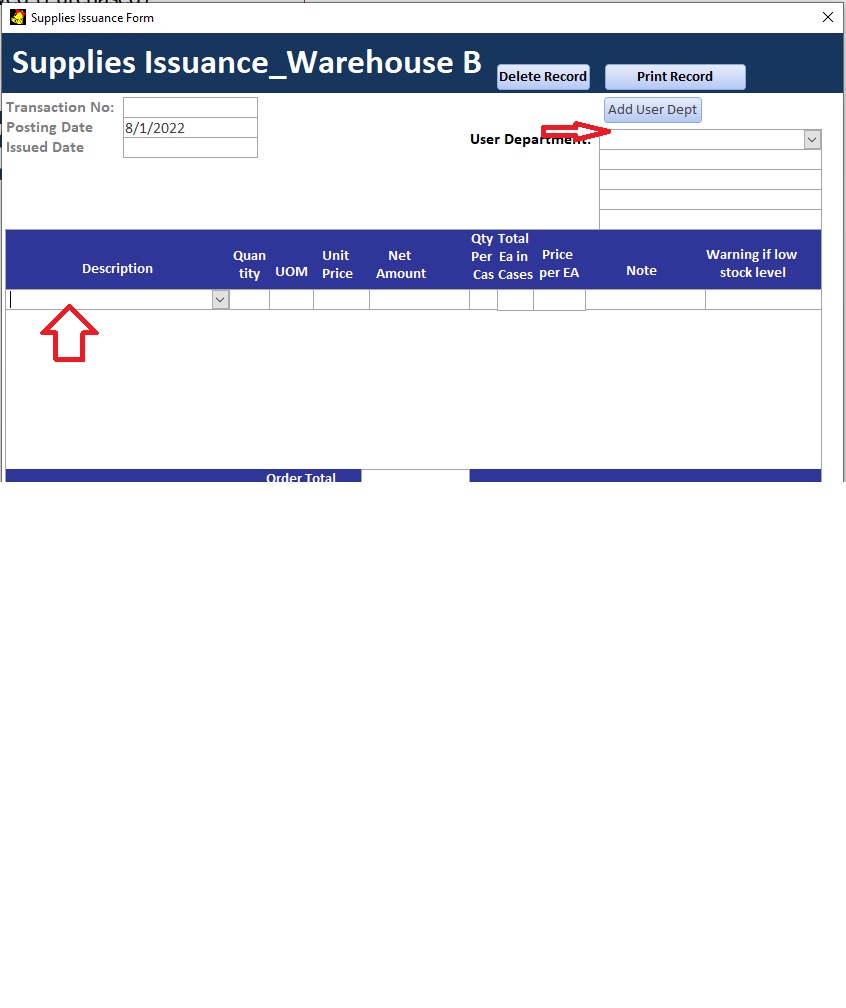
Not to leave it blank.jpg
 
Last edited:
Why can you not go back to that combo?
 
Frank, your best bet is to tag the field's properties as REQUIRED. Access won't let you save the record if it is empty, and if that other thing is a sub-form, you can't leave the main form - because going to a sub-form saves the main form.
 
Frank,

You can also use the BeforeUpdate event of the form to validate the values of each control to ensure the values meet your requirements. eg, must not be empty, must be less than 10 etc.
 
I use this code which hilights all the required missing fields.
Here is a demo using the linked code. Go to a new record and enter part of a record.
 

Attachments

Hi MajP, I want it not to let us move to the next field in the subform, because when when we moved, there is an error message from the access itself to say we should fill the customer ID, but even I stuck I can not go back, unless when my cursor in the description field i press escape than i delete the transaction in the main form and start again for the new transaction ID and fill every thing as usual.

So actually I need to not letting me go description field unless I filled the customer ID. What is the code in the property of customer ID

Thank you for any help.

Frank
 
I do not have this code on the before update event Pat, what do you mean. Is it pertaining to my case?.

Thank you
 
If you really want to stop the person from even leaving the control, you put a test in the control's .LostFocus event and if it is deficient, you do a .SetFocus to itself.
 
because when when we moved, there is an error message from the access itself to say we should fill the customer ID
If you put the code in the before update event you cannot go to the next record and you can avoid the error.
 
If you put the code in the before update event you cannot go to the next record and you can avoid the error.

If you really want to stop the person from even leaving the control, you put a test in the control's .LostFocus event and if it is deficient, you do a .SetFocus to itself.
what is the code of a SetFocust Sir

Thank you.

Frank
 
If you really want to stop the person from even leaving the control, you put a test in the control's .LostFocus event and if it is deficient, you do a .SetFocus to itself.
The doc man, can you give me the code on LostFocus event? to let not people leave it blank?
 
I guess you don't believe me:(
Pat, I believe you, the reason is because if it is still in the middle of the road, as you can see in the sub-form, if user key in the quantity, it will automatically update the Quantity on hand even though the record was not saved. And my quantity on hand is not formula, but replaced with the new quantity on hand minus or plus transactions amount. So that is why I prefer, the cursor will go to the control first after filling out the date, then when it is already in the said control, it wont' let you leave it blank or you can not move to the next field/ item description in the subform.

Thank you for your help

Frank
 
If the quantity on hand is being updated at the wrong time, you need to fix that first! Learning how to use form events is critical to doing this correctly and it is bad enough to store the quantity on hand but even worse to update it incorrectly. You are never going to be sure the amount is correct unless you get control of the updates. Stopping the cursor from leaving the control is NOT going to solve the problem.

I told you how to do this using the form's BeforeUpdate event. Did you try that solution. It doesn't matter whether the focus can leave the control. What matters is that the form's BeforeUpdate event, will STOP the record from being saved if the quantity is missing. You can't do this kind of validation by using the Control's BeforeUpdate event because unless you have locked all controls on the form and you are forcing the cursor to move field by field, there is no way to ensure that focus ever ended up in the quantity control and if focus never entered the quantity control, then the lost focus event for that control is NOT GOING TO RUN so your code won't even run!!

Personally, I don't care what you do. I'm not the one whose job will be on the line. But, I'm telling you that your current solution is wrong and preventing focus from leaving the control doesn't solve it because closing the form or the database WILL save the record because your validation is not being done in an event that will prevent the bad data from being saved.

Beyond that, updating the quantity on hand and storing the calculated value is fraught with danger. The correct/safe way to manage inventory is to create transaction records. Then you sum the transaction records to get the quantity on hand when you need it. This gives you an audit trail and minimizes the potential for multiple users updating the balance at the same time leaving the balance incorrect.

You are right Sir, could you give me the simple database that will not keep the Quantity balance, but to make a calculated field for the balance on hand. I think the same way as bank account balance.

Thank you

Frank
 
Frank,

You posted, "Since English is not my native language....". Let me suggest that you create a post/question/comment in your native language, then using Google translate, get the English translation of your text and post that. Google translate may not be 100%, but many of us have found it more than adequate for communication. Similarly, if/when you get a response that you may have difficulty understanding the English version, google translate to you native language.

Curious--- what is your native language?

As for Quantity on Hand,
this is a very popular reference by Allen Browne
 
Curious--- what is your native language?

My native language is Indonesian Jdraw, but we immigrated to CA 7 years ago, and since we came here was not young, so is not easy to be fluent in English.
 
Frank,

How is this translation?

Bahasa ibu saya Jdraw bahasa Indonesia, tapi kami berimigrasi ke CA 7 tahun yang lalu, dan karena kami datang ke sini tidak muda, jadi tidak mudah untuk fasih berbahasa Inggris.
 
Frank,

How is this translation?

Bahasa ibu saya Jdraw bahasa Indonesia, tapi kami berimigrasi ke CA 7 tahun yang lalu, dan karena kami datang ke sini tidak muda, jadi tidak mudah untuk fasih berbahasa Inggris.
Jdraw, it is correct because you use google translation. I know google translator is good but we still have to recheck, because we can not translate word by word because Indonesian has a very simple grammar.

Thank you Jdraw, any way what is your actual name.

Thanks
Frak
 
Frank,
My name is Jack. My point with Google Translate is that if you/anybody write a post in your native language, then use GT to get the English version for posting. The result is more than adequate for communication ~99% of the time.

Nama saya Jack. Maksud saya dengan Google Terjemahan adalah jika Anda/siapa pun menulis posting dalam bahasa asli Anda, gunakan GT untuk mendapatkan versi bahasa Inggris untuk posting. Hasilnya lebih dari cukup untuk komunikasi ~99% dari waktu.
 

Users who are viewing this thread

Back
Top Bottom